
We’re excited to introduce two new Publitio features designed to give you more flexibility, control, and seamless integration when managing and uploading media. These updates focus on improving the upload experience for end users and giving creators deeper control over their original media files.
Let’s take a closer look at what’s new.
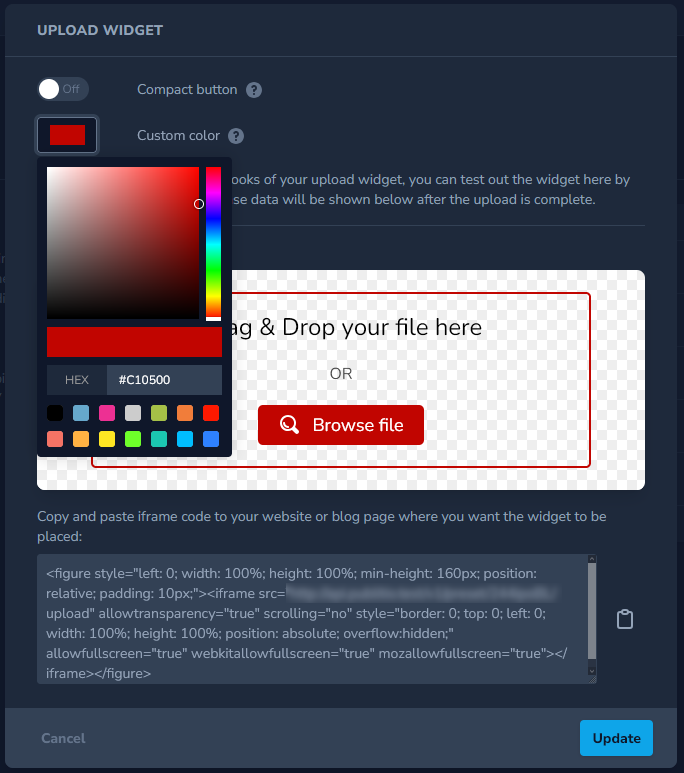
Customizable Upload Widget: Standard & Compact Modes
Publitio’s upload widget has been expanded to better fit different use cases and UI requirements. You can now choose between two widget layouts, both designed for performance and ease of use.
Standard Upload Widget
The standard widget provides a full upload interface, ideal for dashboards and media-heavy workflows. It includes:
- Drag & drop file uploads
- File selection via button click
- Real-time upload progress
- File actions and status indicators
- A clean, user-friendly layout
- A success event that returns uploaded file data for further handling

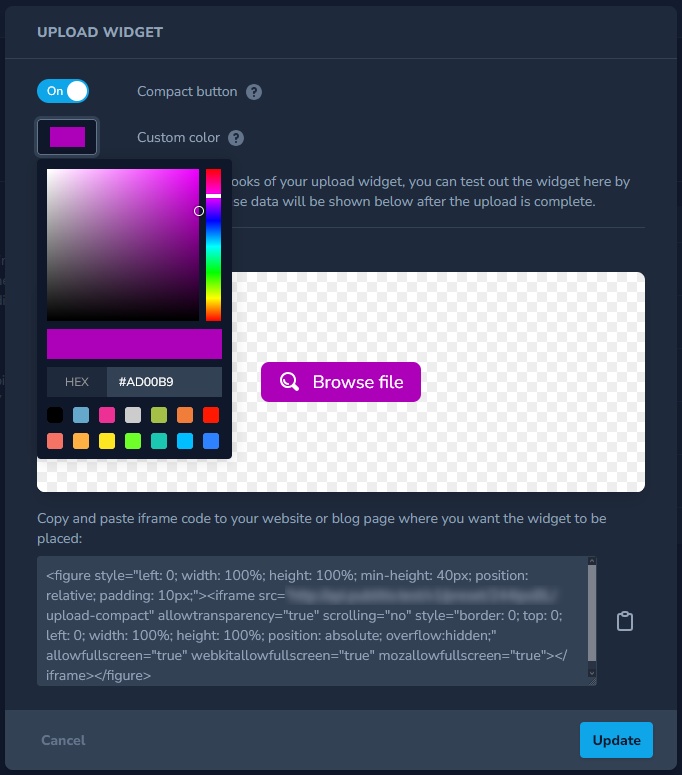
Compact Upload Widget
For projects where space and simplicity matter, the new compact upload widget offers a minimal UI that consists of a single button—without sacrificing functionality. Despite its small footprint, the compact widget supports the same functionalities.
This makes it perfect for embedding uploads into forms, modals, comments, or any space-constrained layout.

Custom Colors for Seamless Design Integration
Both the standard and compact widgets now support custom color configuration, allowing you to match your website or application branding effortlessly. Whether you’re building a public upload form or an internal tool, the widget can blend naturally into your existing design system.
If you haven't tried using presets before feel free to create and tinker with them inside your Dashboard under Settings section.
Keep an eye on the Presets as many updates in this field are coming, we plan to bring Presets back into the first plan and we see a great potential with this feature.
Update Original Media Metadata (Dashboard & API)
Managing media metadata just became more flexible. Publitio now allows you to update original file metadata for supported media types (Video and Audio).
Why File Metadata Matters
File metadata is the information stored inside your media files that helps platforms and tools understand what your content is about. Think of it as the file’s built-in label and description that travels with it wherever it’s uploaded or shared.
- Metadata is what shows correct titles, names, and details instead of random filenames.
- Embedded rights and copyright metadata reduce misuse and ambiguity when files are shared.
- This information doesn’t change your content—it just adds context to it.
- When files are moved between tools or platforms, metadata helps keep important details intact.
- Metadata helps your content stay identifiable, organized, and meaningful, no matter where it goes.
It’s invisible most of the time—but incredibly important behind the scenes.
Dashboard Metadata Editing
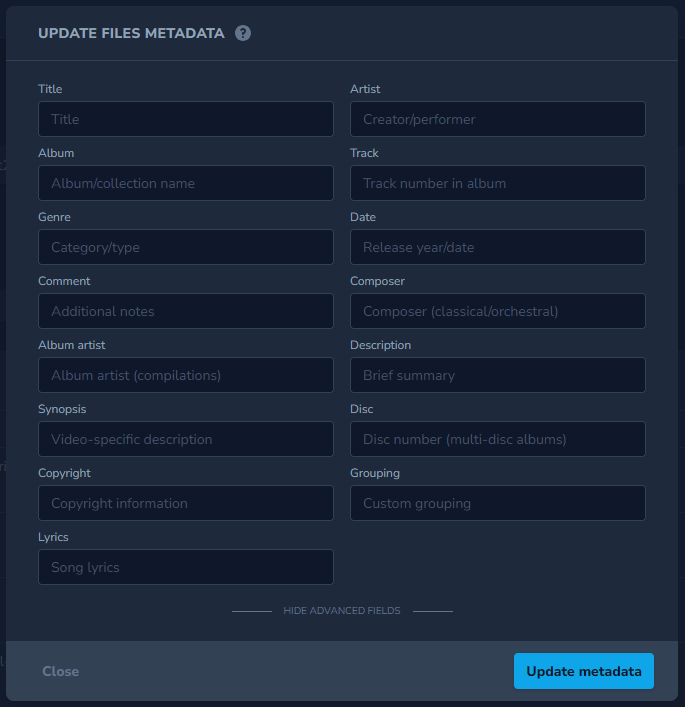
Metadata can be updated directly from the dashboard by:
- Selecting one or more files inside your Dashboard
- Opening the actions dropdown
- Choosing “Update Files Meta”
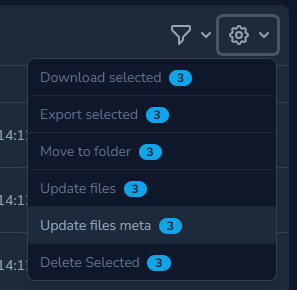
This enables quick edits across multiple assets without re-uploading files.
Metadata Update via API
For automated workflows and integrations, a new API endpoint is now available to update original file metadata programmatically. This is especially useful for media pipelines, CMS integrations, and large-scale asset management.
PUT: https://api.publit.io/v1/files/update_meta/<file_code>We made a list of most popular and most format accepted meta tags:
title, artist, album_artist, album, genre, comment, description, synopsis, composer, trac, disc, date, copyright, grouping, lyricsSimply fill any of these meta tags and add them as a field in JSON format in your request:
curl --location --request PUT 'https://api.publit.io/v1/files/update_meta/<file_code>' \
--header 'Content-Type: application/json' \
--header 'Authorization: ••••••' \
--data '{
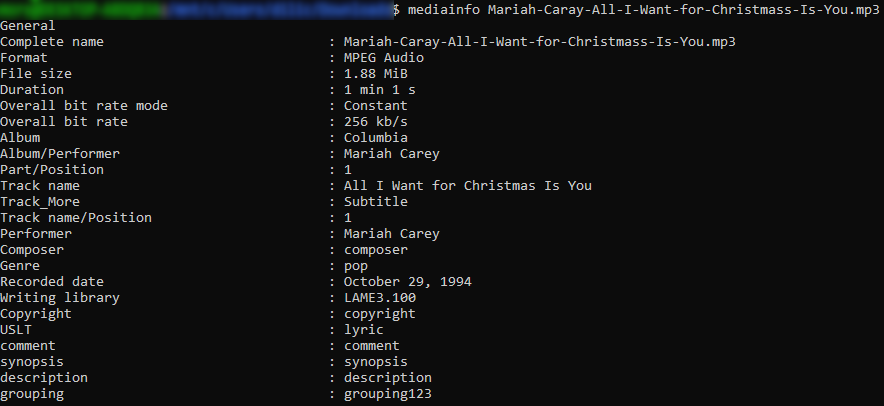
    "title": "All I Want for Christmas Is You",
    "artist": "Mariah Carey",
    "album_artist": "Mariah Carey",
    "album": "Columbia",
    "genre": "pop",
    "track": "1",
    "disc": "1",
    "date": "October 29, 1994"
}'
Important Disclosure
Metadata support depends on the underlying file format. Any fields not supported by the file format will be silently ignored during the update process.
The following formats have very limited metadata support:
avi, wav, aac, amr, ac3, au, flv, mpeg, mpg, ra and vocFor best results, we recommend using modern audio and video formats with robust metadata capabilities.
Designed for Flexibility and Control
Together, these updates make it easier to embed uploads anywhere, match your brand visually, and manage media metadata efficiently—whether through the dashboard or API.
As always, we’ll continue refining these features and expanding their capabilities based on real-world use cases and customer feedback.
Stay tuned for more updates 🚀