

Best Media Asset Management Software in 2026: Features, Use Cases & How to Choose
As organizations accumulate thousands — sometimes millions — of images, videos, documents, and audio files, the need for reliable media asset management software has never been more urgent. Whether you are a marketing team drowning in product photography, a media company streaming video to global audiences, or a developer building a content-heavy application, the right platform can transform how you store, organize, deliver, and protect your digital assets. This guide walks you through everything you need to know to make the best choice in 2025.
What Is Media Asset Management Software?
Media asset management (MAM) software is a specialized category of technology designed to centralize the storage, organization, retrieval, and distribution of rich media files — primarily video, audio, and images. It overlaps significantly with digital asset management (DAM) but tends to place a heavier emphasis on large video workflows, encoding pipelines, and broadcast-quality streaming.
Modern platforms blur the line between DAM and MAM, offering unified solutions that handle everything from a small JPEG thumbnail to a multi-gigabyte 4K video file. The best tools combine intuitive organization features with powerful delivery infrastructure, including CDN distribution, adaptive bitrate streaming, and API-first integrations that plug directly into your existing stack.
Why Your Business Needs Dedicated Media Asset Management Software in 2026
The volume of digital media created every year continues to grow exponentially. A single product launch can generate hundreds of variations of images and dozens of video cuts. Without a centralized system, teams waste hours hunting for the right file version, risk publishing outdated assets, and lose control over brand consistency. Here is why investing in dedicated software pays off:
- Centralized storage: One single source of truth for every asset your organization owns.
- Faster time to market: Teams can find, approve, and publish assets in minutes rather than days.
- Bandwidth and cost savings: CDN delivery and optimized encoding reduce infrastructure costs compared to self-hosting.
- Security and access control: Role-based permissions, DRM protection, and encryption keep sensitive content safe.
- Scalability: Cloud-based platforms scale with your needs without requiring hardware investment.
Core Features to Look for in Media Asset Management Software
Not every platform is built the same way. When evaluating your options, focus on the feature sets that align with your primary use cases. Below are the capabilities that matter most in 2025.
Storage and Organization
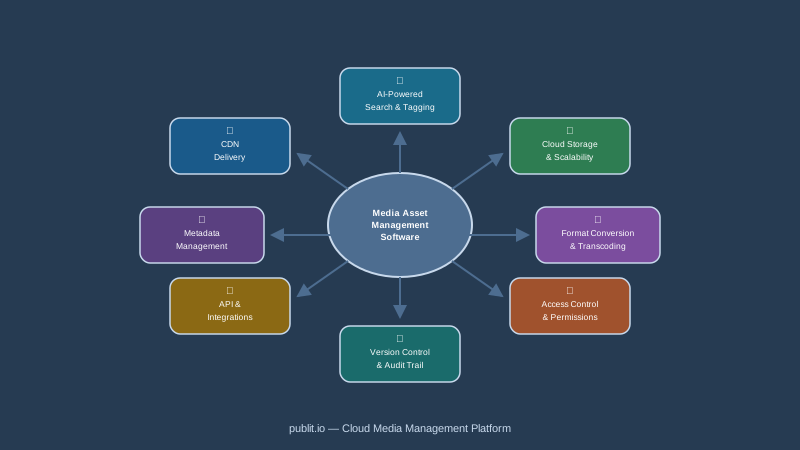
At its foundation, any MAM platform must offer robust file storage with folder hierarchies, tagging, custom metadata fields, and powerful search. Look for support for a wide range of file formats — including RAW images, ProRes video, and audio stems — along with automatic metadata extraction on upload.
Video Hosting and On-Demand Streaming
Video is the dominant media format across almost every industry. Quality video hosting capabilities should include automatic transcoding to multiple resolutions, adaptive bitrate HLS streaming, and a customizable embedded player. Platforms that also support live-to-VOD workflows are especially valuable for media companies and content creators.
DRM and Content Protection
If you distribute premium or proprietary video content, encryption and DRM (Digital Rights Management) are non-negotiable. Widevine, PlayReady, and FairPlay DRM support ensures your content is protected across every device and browser. Signed URLs and token-based access control add an additional layer of security for sensitive assets.
CDN Delivery
Delivery speed directly impacts user experience and, by extension, conversion rates. A built-in global CDN ensures that assets load quickly for users in any geographic location, reducing latency and buffering. Some platforms let you connect your own CDN configuration, while others provide managed delivery out of the box.
API and Developer Tooling
An API-first architecture makes a MAM platform far more versatile. A comprehensive REST API with well-documented endpoints allows developers to automate uploads, trigger transformations, manage folders, and retrieve assets programmatically. SDKs, webhooks, and CLI tools further streamline integration into custom pipelines.
Image and File Transformation
Real-time image transformation — resizing, cropping, format conversion, watermarking — via URL parameters is a huge productivity multiplier. It eliminates the need to manually prepare multiple asset variants for different contexts, from social media thumbnails to high-resolution print files.
CMS and WordPress Integration
For teams that manage content through a CMS, native integrations save enormous amounts of time. A dedicated WordPress media offload plugin, for example, automatically offloads media library files to cloud storage and replaces local URLs with CDN-delivered links, improving site performance without changing your editorial workflow.
Key Use Cases for Media Asset Management Software
Different industries and teams use MAM platforms in distinct ways. Understanding common use cases helps clarify which features deserve the most weight during your evaluation.
Marketing and Creative Teams
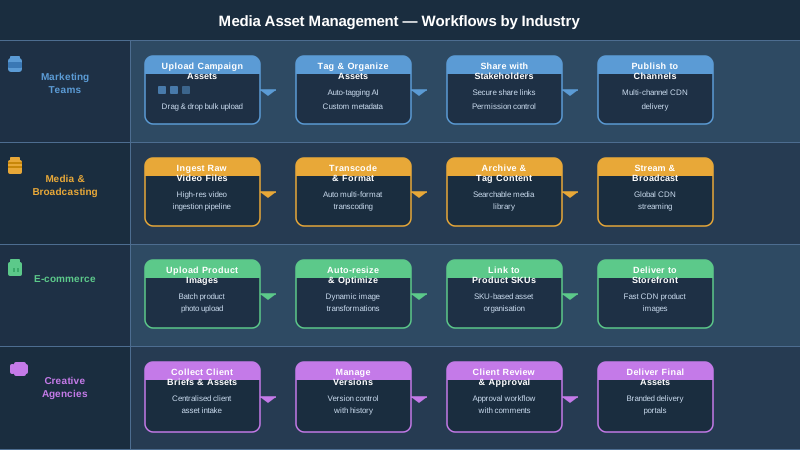
Marketing departments are arguably the heaviest users of DAM and MAM tools. They need a central library where designers, copywriters, and campaign managers can access approved brand assets, collaborate on new creatives, and quickly distribute finalized files to agencies, partners, and publishing channels. Version control and approval workflows are especially critical here.
Media and Entertainment Companies
For broadcasters, streaming services, and production studios, MAM software handles the full lifecycle of video content — from raw ingest and editing proxies to final delivery. Features like multi-bitrate encoding, chapter markers, subtitle management, and DRM protection are essential at this scale.
E-commerce and Retail
Product-heavy retailers generate enormous volumes of imagery and video. A MAM platform helps manage thousands of SKU-level assets, enables real-time image resizing for different storefront layouts, and integrates with product information management (PIM) systems. Fast CDN delivery also directly supports page load speed, which is critical for SEO and conversion.
Education and eLearning
Educational institutions and online learning platforms need reliable video-on-demand infrastructure to host course content, lectures, and tutorials. Access control by user role, bandwidth optimization, and a secure embeddable player are the key requirements in this vertical.
Software and SaaS Companies
Developer-led companies often build media functionality directly into their products. An API-first platform with predictable pricing, robust documentation, and flexible storage options lets engineering teams integrate media hosting and delivery without building and maintaining that infrastructure themselves.
How to Evaluate and Choose the Right Platform
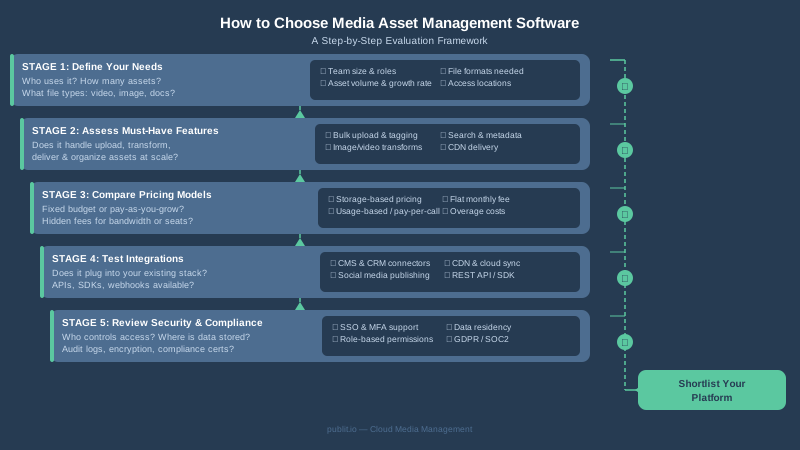
With dozens of options on the market, narrowing down your shortlist requires a structured approach. Here is a practical framework for making the right decision.
Step 1 — Define Your Primary Use Case
Are you primarily managing images, video, or mixed media? Do you need live streaming or only VOD? Is content protection a priority? Answering these questions first narrows the field significantly and prevents you from paying for capabilities you will never use.
Step 2 — Audit Your Current Pain Points
Talk to the teams who will use the platform daily. Common pain points include slow asset retrieval, duplicated files, lack of version history, slow video load times, or difficulty managing access permissions. Mapping your pain points to specific features ensures your shortlist actually solves real problems.
Step 3 — Evaluate Storage, Bandwidth, and Pricing Models
MAM platform pricing can vary dramatically. Some charge per gigabyte of storage, others by bandwidth consumed, and others by the number of assets or API calls. Review the pricing plans carefully and model your expected usage to avoid bill shock as you scale. Look for transparent overage policies and no hidden encoding fees.
Step 4 — Test the API and Developer Experience
If your team includes developers who will integrate the platform into existing systems, request API credentials during a trial and test real workflows. Quality developer documentation, active support channels, and a responsive API are indicators of a mature platform that will not slow your engineering team down.
Step 5 — Check Security and Compliance Features
Depending on your industry, you may have specific compliance requirements — GDPR for European data, HIPAA for healthcare content, or internal security standards. Verify that the platform offers encryption at rest and in transit, access logs, signed URL support, and any relevant compliance certifications.
Step 6 — Consider Scalability and Support
A platform that works well for 10,000 assets should also work for 10 million. Ask vendors about their infrastructure architecture, uptime SLAs, and geographic distribution of storage and CDN nodes. Equally important is the quality of customer support — live chat, dedicated account managers, and thorough onboarding resources all reduce time to value.
Why Publitio Stands Out as a Media Asset Management Software Solution
Publitio is purpose-built for teams and developers who need a powerful, flexible, and affordable cloud media platform. It brings together the core pillars of digital asset management, video hosting, and CDN delivery in a single API-first solution — without the complexity or cost of enterprise legacy systems.
Here is what makes Publitio a strong contender in 2026:
- Unified media management: Store and organize images, videos, audio, and documents in one centralized platform with custom folders, tags, and metadata.
- HLS video streaming: Automatic transcoding and adaptive bitrate HLS delivery ensures smooth playback on every device and connection speed.
- DRM and encryption: Protect premium video content with token-based signed URLs and encryption options that keep unauthorized users out.
- Global CDN delivery: Assets are served from the edge, reducing load times for audiences worldwide.
- Powerful REST API: Every platform function is accessible via a clean, well-documented API, making it straightforward to integrate into any tech stack.
- WordPress plugin: Automatically offload your WordPress media library to Publitio and serve files via CDN without changing your editorial workflow.
- Transparent pricing: Flexible plans that scale with storage and bandwidth needs, with no surprise fees.
Explore the full range of platform features or dive into the video hosting solution to see how Publitio handles demanding video workflows at scale.
Common Mistakes to Avoid When Choosing Media Asset Management Software
Even experienced buyers make avoidable errors during platform selection. Keep these pitfalls in mind:
- Choosing on price alone: The cheapest plan often lacks critical features like DRM, advanced APIs, or sufficient storage. Total cost of ownership matters more than the monthly line item.
- Ignoring the developer experience: If your team needs API access, poor documentation will cost far more in engineering time than a cheaper price point saves.
- Underestimating bandwidth usage: Video-heavy use cases consume bandwidth quickly. Model realistic usage before committing to a plan.
- Skipping the migration plan: Moving thousands of existing assets to a new platform takes planning. Ask vendors about bulk import tools, API migration support, and URL redirect strategies.
- Overlooking user adoption: The most feature-rich platform is worthless if your team does not use it. Prioritize intuitive UI and solid onboarding resources.
The Future of Media Asset Management Software
Looking ahead, several trends are shaping the next generation of MAM platforms. AI-powered metadata tagging and content recognition are already reducing the manual work of organizing large libraries. Edge computing is pushing delivery even closer to end users, further reducing latency. And the growing adoption of headless CMS architectures is increasing demand for API-first media platforms that can serve assets across websites, mobile apps, connected TV, and digital signage simultaneously.
Platforms that invest in these capabilities today — while maintaining developer friendliness and transparent pricing — will be the clear leaders tomorrow. When evaluating your options, prioritize vendors who demonstrate a strong product roadmap alongside their current feature set.
Ready to Modernize Your Media Workflow?
Finding the right media asset management software does not have to be overwhelming. With a clear understanding of your use case, a structured evaluation process, and a platform built for both creative teams and developers, you can dramatically improve how your organization stores, delivers, and protects its media assets. Publitio is designed to be that platform — combining powerful DAM and MAM capabilities with HLS streaming, DRM protection, global CDN delivery, and a clean API, all at a price point that scales with your business. Sign up for a free account at publit.io today and see how easy it is to take full control of your media infrastructure.


