


Widevine DRM Explained: How It Works and How to Add It to Your Video Streams
If you distribute premium video content online, protecting it from unauthorized copying and redistribution is not optional — it is essential. Widevine DRM is Google's industry-leading digital rights management technology, and it powers content protection on the vast majority of the world's connected devices, from Chrome browsers and Android phones to smart TVs and Chromecast. In this guide, we will break down exactly how Widevine DRM works under the hood, explain its security levels, walk through the encryption and licensing flow step by step, and show you how to add it to your video streams without building everything from scratch.
What Is Widevine DRM?
Widevine is a DRM system developed by Widevine Technologies and acquired by Google in 2010. It is one of three major DRM systems widely used in the browser ecosystem today, alongside Apple's FairPlay and Microsoft's PlayReady. Widevine is the dominant DRM solution for Chrome, Firefox (via a content decryption module), Android, Android TV, Chromecast, and many Smart TV platforms.
At its core, DRM technology solves a fundamental problem: how do you deliver video to a legitimate paying subscriber while preventing them — or anyone who intercepts the stream — from saving, copying, or redistributing that content? Widevine answers this by encrypting the video data and requiring any playback device to prove it is authorized before receiving a short-lived decryption key. Without that key, the encrypted media file is useless.
Widevine is built on top of the Encrypted Media Extensions (EME) browser API and integrates with the MPEG-CENC (Common Encryption) standard, meaning a single encrypted stream can be compatible with multiple DRM systems simultaneously — an approach commonly called multi-DRM.
Widevine Security Levels: L1, L2, and L3
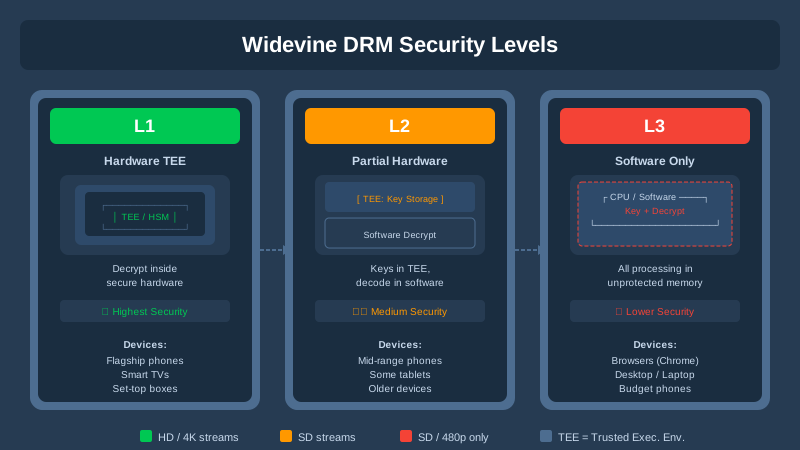
One of the most important concepts to understand about Widevine DRM is that not all devices enforce protection equally. Widevine defines three security levels that determine both the quality of content a device can play and how tightly the decryption is protected.
Level 1 (L1) — Highest Security
At L1, all cryptographic operations and media processing happen inside a hardware-based Trusted Execution Environment (TEE). The decrypted video content never leaves the secure enclave and is never accessible to the operating system or applications. Most modern Android phones, high-end tablets, and certified streaming sticks support L1. Streaming platforms like Netflix require L1 certification to unlock HD and 4K streams.
Level 2 (L2) — Intermediate
Cryptographic operations still occur inside the TEE, but video processing happens outside it. L2 is relatively uncommon in practice and has largely been superseded by L1 and L3 in real-world deployments.
Level 3 (L3) — Software Only
At L3, all decryption is handled in software without hardware-level protection. This is typical for desktop Chrome browsers and devices without a hardware TEE. L3 is significantly less secure — determined attackers with memory dump tools can potentially extract decryption keys — which is why many premium platforms cap L3 playback at 540p or 720p.
How the Widevine DRM Licensing Flow Works
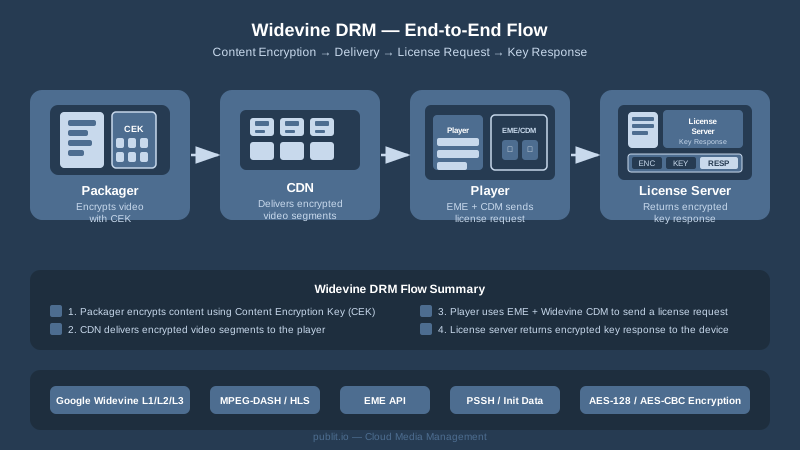
Understanding the end-to-end licensing flow is critical if you are integrating Widevine into your own platform. The process involves four main actors: the content packager, the license server, the CDN, and the player on the end-user's device. Here is how they interact.
Step 1: Content Encryption and Packaging
Before any video reaches your CDN, it must be encrypted. The video is packaged using MPEG-CENC encryption, typically with AES-128 in CTR mode. During this process, a Content Encryption Key (CEK) and a corresponding Key ID (KID) are generated. These are the secrets that will eventually be handed to authorized players. The encrypted video segments, along with metadata describing the DRM system and key IDs, are bundled into an adaptive bitrate format — most commonly MPEG-DASH with a Media Presentation Description (MPD) manifest, though HLS with CMAF packaging can also carry Widevine encryption. You can learn more about how HLS streaming integrates with encrypted delivery on Publitio's platform.
Step 2: Content Delivery via CDN
The encrypted video segments are distributed through a CDN. Because the content is encrypted, the CDN nodes themselves cannot read the video — they simply cache and deliver opaque binary data. This means even if someone intercepts the CDN traffic, they receive nothing but ciphertext. No key material ever passes through the CDN.
Step 3: Player Initialization and License Request
When a user presses play in their browser or app, the HTML5 video player — using a library like Shaka Player or dash.js — reads the manifest file and detects the DRM initialization data (called PSSH boxes, or Protection System Specific Header boxes, embedded in the stream). The player calls the browser's EME API, which instantiates the Widevine Content Decryption Module (CDM). The CDM generates a license request message, typically a binary protobuf blob, which is signed with device credentials burned into the TEE or derived from software attestation.
Step 4: License Server Authentication and Key Delivery
The player sends the license request to your Widevine license server. The license server — either Google's hosted service or a third-party provider — validates the request, checks the user's entitlements (is this user subscribed? is the content window valid?), and if approved, wraps the Content Encryption Key in a license response encrypted specifically for that device. The decryption key is never transmitted in plaintext. The CDM on the device unwraps the key inside the TEE, and playback begins. The key is bound to the session and expires according to the policy defined in the license, typically after a few hours or at the end of the session.
Widevine DRM and DASH vs. HLS
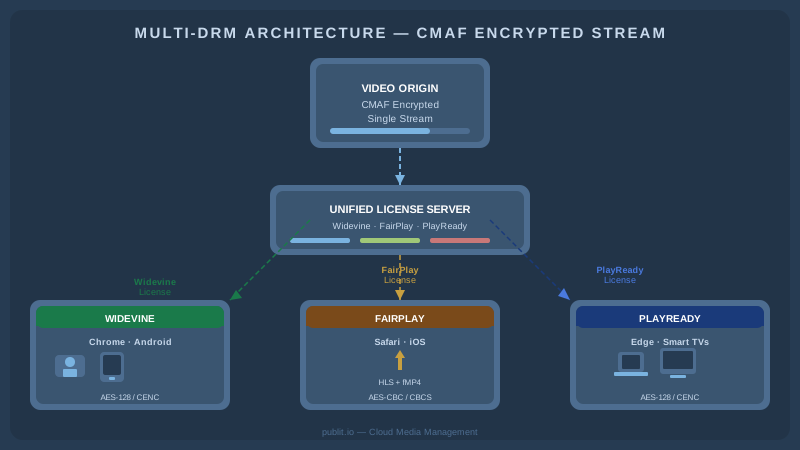
Historically, Widevine was tightly coupled to MPEG-DASH delivery. DASH manifests natively support multiple DRM system descriptors, making multi-DRM deployments straightforward. However, with the adoption of Common Media Application Format (CMAF), it is now possible to deliver a single encrypted CMAF stream that works with Widevine (via DASH or CMAF-HLS), FairPlay (via HLS), and PlayReady simultaneously — using the same encrypted segments for all DRM systems, only swapping the license acquisition URL.
This convergence dramatically reduces storage and CDN costs compared to maintaining separate encrypted streams per DRM system. For platforms targeting both iOS/Safari (FairPlay) and Android/Chrome (Widevine) audiences, a CMAF-based multi-DRM workflow is now the industry best practice.
Implementing Widevine DRM: What You Need
Rolling your own Widevine DRM stack is a significant engineering investment. At a minimum, you need the following components in place.
1. A Widevine License Certificate from Google
To deploy Widevine commercially, you must obtain a Widevine license certificate from Google. This involves signing a commercial agreement, as Widevine is not freely available for any arbitrary use. Google runs a certification program, and the credentials you receive are used to sign the license server's responses in a way that Widevine CDMs will trust.
2. An Encrypted Content Packaging Pipeline
You need a tool or service that ingests raw video, transcodes it to multiple bitrate renditions, encrypts each rendition with AES-128-CTR using MPEG-CENC, embeds the correct PSSH boxes for each DRM system, and outputs DASH or CMAF manifests. Open-source tools like Shaka Packager and Bento4 can do this. Platforms like Publitio handle video processing and packaging as a managed service, removing this infrastructure burden from your team. GPU-accelerated transcoding further speeds up the pipeline — see how GPU video conversion works on Publitio.
3. A Widevine License Server
This is the most complex piece. The license server must receive license request blobs from players, validate user entitlements against your subscription database, construct license response messages according to Widevine's protobuf schema, sign them with your Widevine credentials, and return them to the player. You also need to think about license policy: offline playback windows, concurrent stream limits, output control flags (HDCP requirements, analog output restrictions), and license renewal. Building this yourself requires deep familiarity with the Widevine Modular DRM specification. Most teams opt for a managed DRM provider — or a platform like Publitio that offers integrated digital rights management as part of its video hosting stack.
4. A Compatible Video Player
On the client side, you need a player that supports EME. Shaka Player (Google's open-source player) and dash.js both have excellent Widevine support. Video.js with appropriate plugins also works. The player handles DRM initialization, generates the license request, communicates with your license server endpoint, and manages the CDM session lifecycle. You will configure the player with your license server URL and any custom request headers (such as authorization tokens) needed to authenticate license requests.
5. Token-Based License Authentication
Never expose a license server that issues keys to anyone who asks. License requests must be authenticated. A common pattern is to issue a short-lived JWT or opaque token from your authentication service when the user begins a playback session. The player includes this token in the license request header. Your license server validates the token before issuing any keys. This ensures that only authenticated, subscribed users can decrypt your content.
Beyond Widevine: A Multi-DRM Strategy
While Widevine DRM dominates on Android and Chrome, a complete content protection strategy for the open web also requires Apple FairPlay for Safari and iOS, and often Microsoft PlayReady for Edge and certain Smart TV ecosystems. A true multi-DRM platform manages all three simultaneously, serving the appropriate license based on the client's detected DRM capabilities.
This is another reason why building DRM infrastructure from scratch is rarely the right call for most product teams. A managed platform handles the DRM system routing, certificate management, license policy enforcement, and key storage — letting your engineering team focus on the product experience rather than the cryptographic plumbing. Publitio's video management solution integrates multi-DRM protection alongside adaptive bitrate streaming and global CDN delivery in a single API-first platform.
For teams exploring broader digital asset management needs — managing not just video but images, audio, and documents under a unified rights framework — an integrated DAM with built-in DRM capabilities provides significant operational advantages over piecing together separate tools.
Common Widevine DRM Implementation Mistakes
Even experienced teams run into pitfalls when deploying Widevine. Here are the most frequent ones to watch for.
Not Enforcing HDCP at the License Level
Widevine licenses include output control flags that require HDCP (High-bandwidth Digital Content Protection) on HDMI outputs for HD and 4K playback. If you do not configure these flags, a user could theoretically capture the decrypted video signal through an unprotected output. Always set the appropriate hdcp_version requirement in your license policy for premium content.
Using Static, Long-Lived License Tokens
Long-lived authentication tokens dramatically increase the window of exposure if a token is compromised. Use short-lived, single-use tokens tied to a specific piece of content and user session. Rotate keys regularly and implement license renewal for long-form content.
Ignoring L3 Limitations for Premium Tiers
If you are offering a 4K or premium HD subscription tier, you need to verify device security level during license issuance and enforce resolution caps for L3 devices. Do not rely on the player to self-report its security level — check the attestation data in the license request.
Failing to Combine DRM with Watermarking
DRM prevents casual copying but is not a silver bullet against sophisticated piracy. Combining Widevine DRM with forensic video watermarking — which embeds an invisible, user-specific identifier into each stream — allows you to trace the source of any leaked copy even when DRM has been circumvented. Publitio supports watermarks as an additional layer of content protection alongside encryption.
Getting Started with Widevine DRM on Publitio
For development teams and content businesses that want the power of Widevine DRM without the complexity of managing certificates, license servers, encryption pipelines, and CDN infrastructure, Publitio offers an integrated solution. Through the video-on-demand platform, you can upload video content via the video API, apply DRM-protected HLS or DASH output, and deliver securely over a global CDN — all from a single dashboard or API call. The platform handles transcoding, packaging, encryption, license issuance, and delivery so you can protect your content and reach audiences on any device with minimal engineering overhead. Detailed integration instructions are available in the developer documentation.
Conclusion
Widevine DRM is the backbone of content protection for the majority of the world's internet-connected video playback devices. Understanding how its security levels work, how the license acquisition flow operates, and what infrastructure you need to deploy it correctly is essential for any team serious about protecting premium video content. Whether you are building a subscription VOD platform, an enterprise training portal, or a live sports streaming service, getting DRM right from day one saves significant pain later.
Ready to add Widevine DRM and enterprise-grade video protection to your streams without building the infrastructure yourself? Sign up at publit.io and start delivering encrypted, DRM-protected video to any device in minutes. Explore the pricing plans to find the right fit for your content business, and let Publitio handle the complexity so you can focus on your audience.


