


FairPlay DRM Explained: How Apple's Streaming Protection Works and How to Implement It
If you're delivering premium video content to iOS, macOS, or tvOS users, understanding FairPlay DRM is not optional — it's essential. Apple's FairPlay Streaming (FPS) is the proprietary digital rights management system that encrypts and protects your video content across every Apple device and platform. Whether you're running a subscription video-on-demand service, distributing licensed media, or building a secure enterprise video portal, FairPlay DRM is the mechanism that ensures only authorized viewers can access your streams. In this guide, we'll break down how FairPlay works under the hood, walk through the key components of its architecture, and show you how to implement it effectively — including how cloud platforms like Publitio can handle much of the complexity for you.
What Is FairPlay DRM?
FairPlay DRM, formally known as Apple FairPlay Streaming (FPS), is Apple's content protection technology introduced alongside HTTP Live Streaming (HLS). It was designed specifically to encrypt video and audio content delivered over HLS streams, preventing unauthorized copying, redistribution, or playback of protected media.
Unlike other DRM systems such as Google's Widevine or Microsoft's PlayReady, FairPlay is Apple-exclusive. It runs natively on Apple's ecosystem — Safari on macOS, all iOS and iPadOS browsers, tvOS, and any AVFoundation-based media player on Apple hardware. This means that if a significant portion of your audience uses Apple devices (and statistically, they do), you cannot ignore FairPlay.
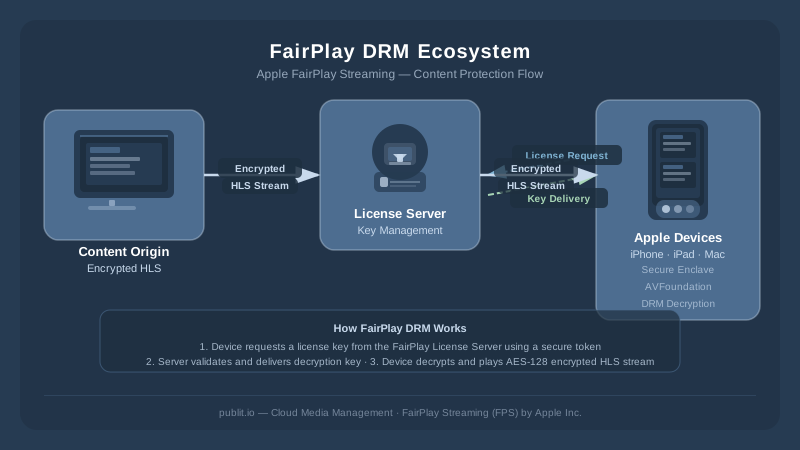
FairPlay DRM works in tandem with AES-128 encryption and operates through a key exchange system that involves your content server, a Key Security Module (KSM), and Apple's own FairPlay license delivery infrastructure. The result is end-to-end protection: content is encrypted at the source, delivered securely over HLS, and decrypted only within the secure playback environment of an authorized Apple device.
How FairPlay DRM Works: The Technical Architecture
To implement FairPlay correctly, you need to understand its three-part architecture: content packaging, license acquisition, and secure playback. Each layer plays a critical role in the overall protection chain.
1. Content Encryption and HLS Packaging
FairPlay DRM is built on top of HLS streaming, Apple's adaptive bitrate streaming protocol. When content is prepared for FairPlay protection, the video file is segmented into small chunks (typically 2–6 seconds each) and encrypted using AES-128 encryption. Each segment references a Content Key — a unique cryptographic key that the player must obtain from the license server before playback can begin.
The HLS manifest (.m3u8 file) includes a special #EXT-X-SESSION-KEY or #EXT-X-KEY tag that signals to the player that the content is FairPlay-protected and specifies the URI of the key server. This is where the license acquisition process kicks in.
2. License Acquisition: The Key Exchange Process
When an Apple device encounters a FairPlay-encrypted HLS stream, the AVFoundation framework automatically initiates a license request. Here's the step-by-step process:
- SPC Generation: The player generates a Server Playback Context (SPC) message. This is a cryptographically signed blob that contains device-specific information and a request for the Content Key.
- License Request: The SPC is sent to your Key Security Module (KSM) — a server-side component that communicates with Apple's FairPlay infrastructure.
- CKC Response: The KSM validates the request, retrieves the appropriate Content Key, and returns a Content Key Context (CKC) — an encrypted bundle containing the key.
- Decryption: The Apple device decrypts the CKC using its hardware-backed Secure Enclave, extracts the Content Key, and uses it to decrypt and play the HLS segments.
This entire handshake happens in milliseconds and is invisible to the end user. The Secure Enclave ensures the Content Key never exists in plaintext in device memory, making it extremely resistant to extraction attacks.
3. The Key Security Module (KSM)
The KSM is the server-side heart of your FairPlay implementation. It must be built using Apple's FPS Server SDK, which is available to registered Apple developers who have agreed to the FPS program terms. The KSM is responsible for:
- Authenticating incoming SPC messages from devices
- Communicating with Apple's FPS key validation infrastructure
- Generating and returning valid CKC responses
- Managing Content Keys for your media library
Building a KSM from scratch is non-trivial. It requires handling Apple's proprietary cryptographic protocols, managing certificates, and building a robust key storage system. This is one of the primary reasons many content publishers choose a managed DRM solution rather than rolling their own.
FairPlay DRM vs. Other DRM Systems
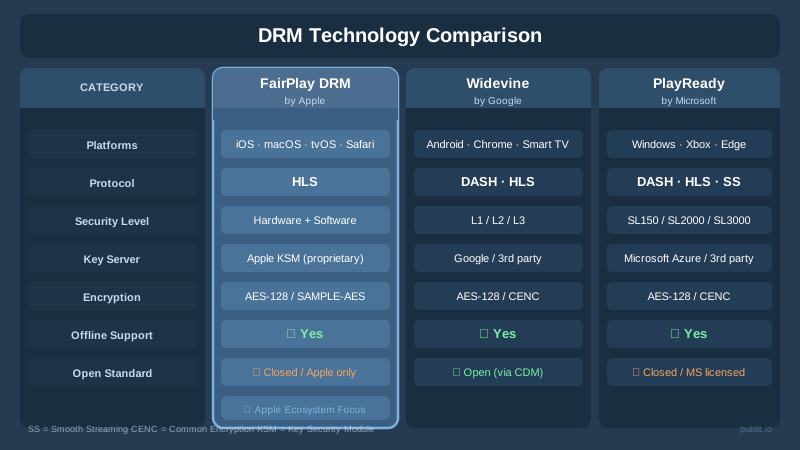
FairPlay doesn't exist in isolation. Most enterprise video platforms need to support multiple DRM systems simultaneously to cover all devices and browsers. Here's how FairPlay compares to the other major players:
FairPlay vs. Widevine
Google's Widevine is the dominant DRM for Android devices and Chrome/Firefox browsers. Widevine uses MPEG-DASH instead of HLS and has a three-tiered security level system (L1, L2, L3) based on hardware capabilities. FairPlay, by contrast, is always hardware-backed on Apple devices thanks to the Secure Enclave — making it inherently more secure than Widevine L3 (software-only) implementations.
FairPlay vs. PlayReady
Microsoft's PlayReady is primarily used on Windows, Xbox, and some smart TVs. PlayReady supports both DASH and HLS and has a similarly tiered hardware/software security model. Like Widevine, PlayReady cannot be used on Apple devices — FairPlay is the only option there.
In practice, professional video platforms implement all three: FairPlay for Apple, Widevine for Android/Chrome, and PlayReady for Windows/Xbox. This is known as multi-DRM delivery, and it's the standard approach for any serious digital rights management strategy.
Requirements for Implementing FairPlay DRM
Before you write a single line of code, there are a few prerequisites you need to have in place. Skipping any of these will result in a non-functional implementation.
Apple FPS Program Enrollment
You must apply for Apple's FairPlay Streaming program through the Apple Developer portal. Apple will provide you with:
- A FPS Deployment Package (containing your Application Secret Key and Application Certificate)
- Access to the FPS Server SDK
- Documentation for building your KSM
Apple reviews FPS applications manually, and the approval process can take several days to weeks. Plan accordingly.
A Valid SSL Certificate and HTTPS Infrastructure
All FairPlay license requests must be made over HTTPS. Your key server, CDN endpoints, and HLS origin must all be served over secure connections. This is both a technical requirement and a security best practice.
HLS-Packaged Content with FairPlay Encryption
Your content must be packaged as HLS with FairPlay encryption applied. Tools like Apple's media stream segmenter, Shaka Packager, or cloud video processing pipelines can handle this. The output is a set of .ts or fMP4 segments plus an .m3u8 manifest with the appropriate key tags.
A Content Delivery Network
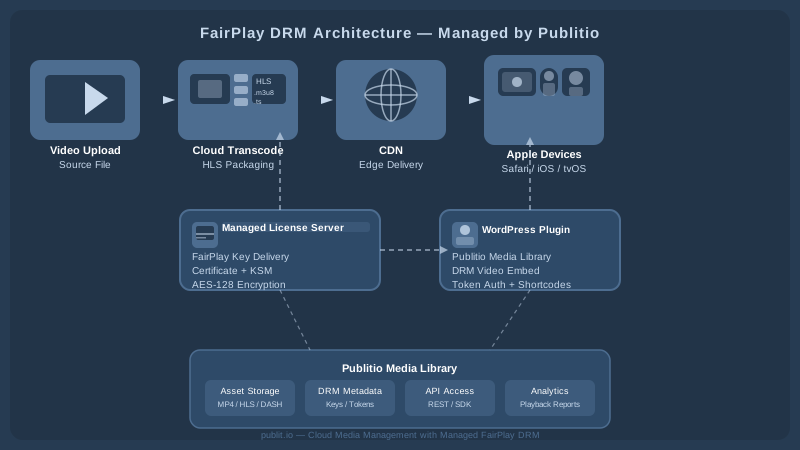
High-quality streaming at scale requires a CDN. The CDN caches your HLS segments at edge nodes close to your viewers, reducing latency and origin load. Crucially, the CDN does not serve your encryption keys — those always come from your secure license server. With a platform like Publitio, CDN delivery is built in and automatically configured for your media assets.
Step-by-Step FairPlay DRM Implementation Guide
Step 1: Obtain Your FPS Credentials from Apple
Log in to your Apple Developer account, navigate to the FairPlay Streaming section, and submit your FPS deployment request. Once approved, download your Application Secret Key (ASK) and your Application Certificate. Store the ASK in a hardware security module (HSM) or a secure secrets manager — this key should never be exposed in plaintext or committed to version control.
Step 2: Build or Configure Your Key Security Module
Using Apple's FPS Server SDK, implement your KSM endpoint. At minimum, this endpoint must:
- Accept HTTP POST requests containing a Base64-encoded SPC
- Parse the SPC using the SDK's decryption utilities
- Retrieve the appropriate Content Key for the requested asset (from your key store)
- Generate a valid CKC response using the SDK
- Return the Base64-encoded CKC in the HTTP response
Your key store should map Content Key IDs (referenced in the HLS manifest) to the actual AES-128 keys used to encrypt each piece of content. This mapping must be persistent and reliably backed up.
Step 3: Encrypt and Package Your Video Content
Run your video files through a packaging workflow that applies FairPlay encryption. Each content segment is encrypted with your AES-128 Content Key, and the manifest is updated with the correct #EXT-X-KEY URI pointing to your KSM. If you're using Publitio's video processing pipeline, encryption and HLS packaging can be handled automatically as part of your upload and transcode workflow — eliminating this step from your infrastructure burden.
Step 4: Configure Your HLS Player for FairPlay
On the client side, you need to configure your media player to handle FairPlay license requests. If you're using AVFoundation directly (native iOS/macOS app), you'll implement the AVContentKeySessionDelegate protocol:
- Implement
contentKeySession(_:didProvide:)to intercept key requests - Generate the SPC using
makeStreamingContentKeyRequestData(forApp:contentIdentifier:options:completionHandler:) - POST the SPC to your KSM endpoint
- Pass the returned CKC back to the
AVContentKeyRequestviaprocessContentKeyResponse(_:)
For web-based playback in Safari, you'll use the Encrypted Media Extensions (EME) API with the "com.apple.fps.1_0" key system identifier. Popular web players like Video.js, Shaka Player, and hls.js (in Safari) have built-in FairPlay integration hooks that simplify this considerably.
Step 5: Test Across the Apple Device Matrix
Before going live, test your FairPlay implementation across the full range of Apple devices and OS versions you plan to support: iPhone, iPad, Mac (both Safari and native apps), and Apple TV. Pay particular attention to edge cases like offline playback (if you're using persistent licenses), AirPlay behavior, and Picture-in-Picture mode.
FairPlay DRM for WordPress and API-Based Platforms
Not every team has the resources to build a full DRM stack from scratch. For publishers using WordPress, or developers building on API-first architectures, managed DRM solutions dramatically reduce time-to-market and ongoing maintenance overhead.
Publitio's platform offers a fully managed approach to digital rights management that integrates natively with its video hosting and video-on-demand infrastructure. Instead of maintaining your own KSM, certificate infrastructure, and key storage, you can leverage Publitio's secure DRM delivery — all accessible via a clean video API. For WordPress users, the WordPress media offloading plugin connects your media library directly to Publitio's cloud, enabling DRM-protected video delivery without complex server-side configuration.
Beyond DRM, a complete video delivery stack also benefits from complementary features like video watermarking for forensic tracing, and playback analytics to monitor engagement and detect suspicious access patterns.
Common FairPlay DRM Implementation Pitfalls
Incorrect Content Identifier Format
The content identifier embedded in the HLS manifest's key URI must exactly match what your KSM expects. A mismatch here causes the license request to fail silently, leaving users with a playback error and no obvious diagnostic information. Always validate this mapping end-to-end in your test environment before deployment.
Certificate Expiration
Your Application Certificate has an expiration date. If it lapses, all FairPlay playback across your platform will fail simultaneously. Build certificate expiration monitoring into your operations workflow and renew well in advance of the deadline.
Ignoring Offline Playback Requirements
If your use case involves offline downloads (as on Netflix or Apple TV+), you need to implement persistent FairPlay licenses. This requires a different license type and additional server-side logic. Make sure you scope this requirement early — retrofitting offline support is significantly more complex than building it in from the start.
Not Combining FairPlay with Widevine and PlayReady
Implementing only FairPlay DRM means Android and Windows users are either unprotected or locked out. A complete multi-DRM strategy using FairPlay, Widevine, and PlayReady — delivered through a single unified platform — is the professional standard for any commercial video service.
Conclusion: Secure Your Apple Audience with FairPlay DRM
FairPlay DRM is a sophisticated, hardware-backed content protection system that Apple has built directly into its entire device ecosystem. When implemented correctly — with proper HLS packaging, a robust Key Security Module, secure key delivery, and thorough cross-device testing — it provides a strong layer of protection for your premium video content on every Apple platform. The implementation complexity is real, but the protection it offers is equally substantial: AES-128 encryption, Secure Enclave-backed key protection, and native integration with AVFoundation make FairPlay one of the most secure DRM systems available to content publishers today.
For teams looking to move fast without sacrificing security or quality, Publitio offers a cloud-native platform that wraps all of this complexity into a clean, API-first workflow. From HLS streaming and DRM encryption to CDN delivery and video management, every layer of your secure video stack is covered. Ready to protect your content and deliver it beautifully to every Apple device your audience uses? Sign up at publit.io today and get your first media assets streaming securely within minutes — no KSM setup required, no certificate juggling, just professional-grade DRM delivery out of the box.


