

We’re rolling out a powerful new update focused on security, flexibility, and smoother integrations. This release introduces Digital Rights Management (DRM) solution, seamless file transfers between accounts, and important improvements across our WordPress plugins: Publitio and Publitio Offloading.
Let’s dive into what’s new.
Digital Rights Management (DRM) Video Security
Security has always been a priority, and with this update, we’re taking it to the very top level. After long time and excess development, we have Publitio DRM, our #1 feature request finally ready. Publitio DRM is soft DRM solution (eDRM) and it naturally relies on and extends HLS videos security functionality. While Publitio Enhanced HLS solution prevents all known video download extensions, our DRM solution goes step further by trying to prevent screen capturing and screen recording tools.
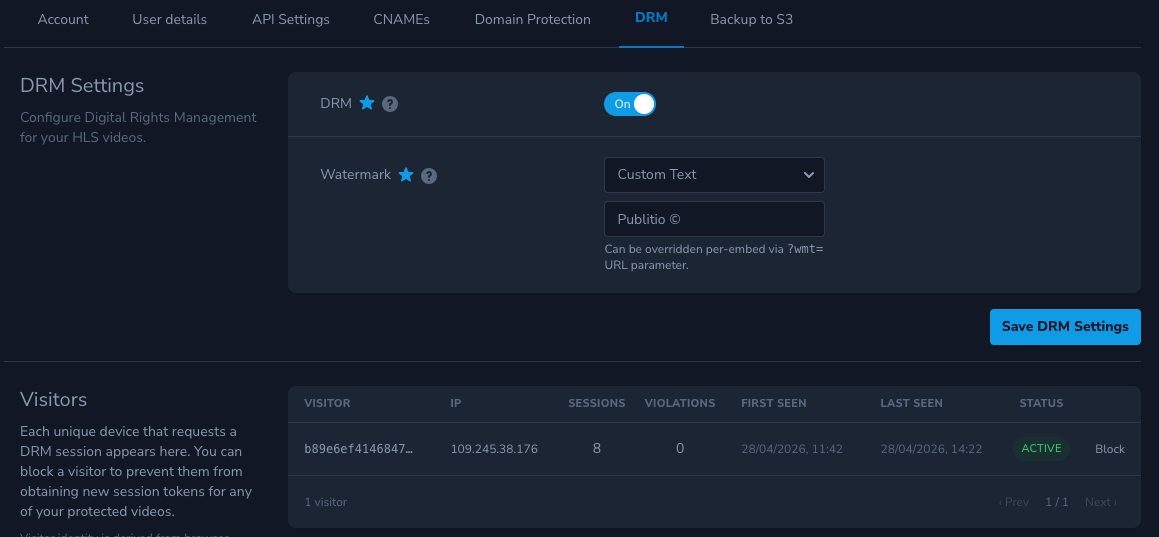
Users can now enable DRM (Digital Rights Management) directly from their dashboard settings. Once enabled, Publitio adds an additional layer of protection to your HLS videos by actively monitoring viewer sessions.
 DRM settings
What DRM Includes:
- Session Tracking: Each viewer session is monitored, including IP address, browser agent, and other identifying data.
- Violation Detection: If suspicious behavior is detected, the system logs violations. Once a session reaches two or more violations, access to the content is automatically blocked for that session.
- Session Management: You can view all active and past sessions, giving you full visibility and control. Suspicious IPs can be manually blocked or unblocked at any time.
DRM & Dynamic Watermark Protection
To further protect your content from screen recording or unauthorized sharing, we’ve introduced a dynamic watermark system:
- Watermarks can display the viewer’s IP address, a unique visitor hash, or custom text.
- The watermark moves randomly across the screen, making it extremely difficult to remove or edit out.
- This ensures that any leaked content can always be traced back to its source.
DRM protected video example
Here you can see Publitio DRM protected video in action. Protected video example uses HLS encryption and it has DRM security enabled together with DRM dynamic watermark (shows IP address of visitor) :
Please note: while soft DRM solution by Publitio further prevents screen capturing & recordings, it is not 100% bullet proof solution (and there is no such solution on the market!). eDRM solution is good enough to further deter or at least to make it very hard for malicious visitors trying to steal your valuable video content, with leaving digital fingerprint (like dynamic watermark) on top of the content. However, there are no protection against phone or camera recording of the screen (nor against some OS level screen recording), not even with hardware DRM solutions. Anybody advertising differently on the market is lying.
Transferring Files Between Accounts
Managing media across multiple workspaces just got easier.
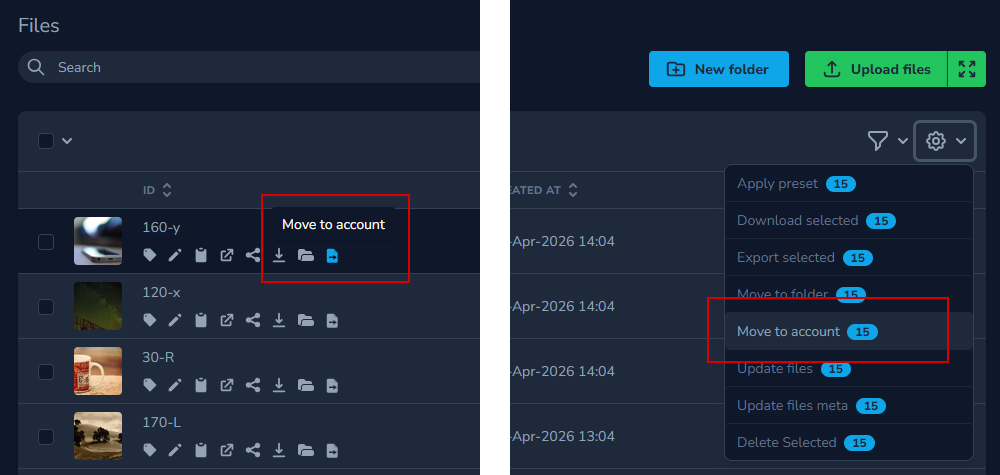
You can now transfer files between accounts within your ownership, allowing for better organization and flexibility when working across projects, teams, or environments. Simply click on the Move to account icon below the file name for a single move or select multiple files and move them all. Choose an account in the modal and desired folder where you want your files to be placed.
Why this matters:
- Easily separate development, staging, and production assets
- Organize content by client or project
- Cleanly restructure your media without re-uploading files
This feature saves time and gives you full control over how your media is structured.
Wordpress Plugin Updates
We’ve updated both Publitio plugins with a focus on security, compatibility, and usability.
What’s new:
- Enhanced Security: All plugin actions are now protected with an additional layer of security
- Compatibility: Fully tested and optimized for WordPress 6.9
- Quality of Life Improvements: Various refinements to improve stability and user experience
Publitio Offloading Plugin
A major addition to the Offloading plugin:
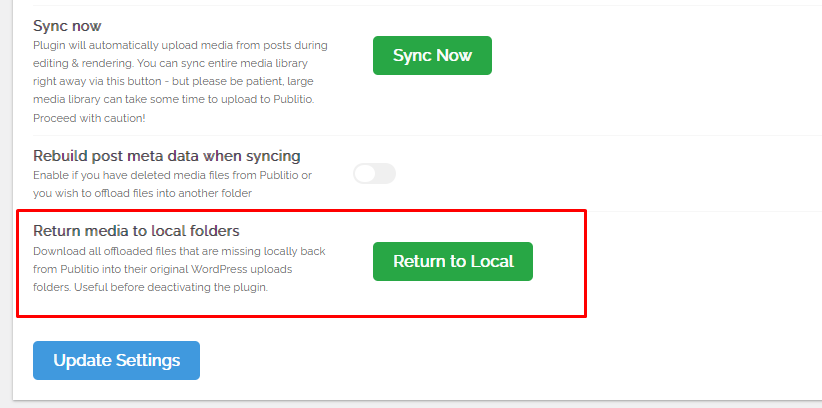
- You can now restore offloaded media back to your local WordPress uploads folder
- This is especially useful if you plan to deactivate the plugin or migrate your setup
- Ensures you always retain full control over your files
Final Thoughts
This update brings stronger protection, better organization tools, and more reliable integrations. Whether you're safeguarding premium content, managing multiple environments, or working with WordPress, these improvements are designed to make your workflow smoother and more secure.
As always, we’re continuing to build based on your feedback—more updates are on the way.
Stay tuned.


