
Introducing PDF DRM: Session-Based Protection for Your Documents
Video piracy gets all the headlines, but documents leak just as easily — a PDF is a screenshot, a forward, or a "temporary" download away from being everywhere. Today we're rolling out PDF DRM for Business plan accounts: the same session-based protection model that already secures Publitio's video streams, now applied to PDF viewing.
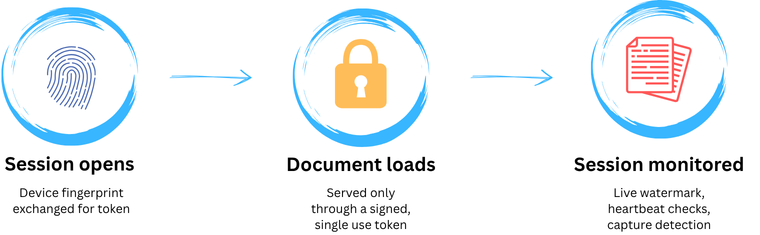
This isn't another watermark-on-export tool. It's a live, monitored viewing session — every document open is authenticated, fingerprinted, watermarked, and continuously re-checked for as long as it stays on screen.
How It Works
When DRM is enabled on your account, every protected PDF opens inside a secured viewer instead of a plain embed:
- The file itself is never exposed as a fetchable link. There's no direct URL a viewer can copy out of the page, save, or paste into another tab. The document is served only through a gated endpoint, unlocked by a short-lived, single-use, cryptographically signed session token.
- Every session is fingerprinted. On open, the viewer builds a lightweight device signature (canvas/WebGL rendering characteristics, screen and timezone data) and exchanges it for a session token. That signature is re-verified on a recurring heartbeat for the life of the session — if the fingerprint drifts or the token is replayed somewhere else, the session is revoked and the document is pulled from view.
- Pages carry a live watermark. A diagonal, semi-transparent overlay is drawn directly onto each rendered page — your choice of the viewer's IP address, a unique per-session hash, or custom text (e.g. a recipient's name or email). It's redrawn automatically as pages render and refreshed periodically, so it survives scrolling and can't be cropped out with a single screenshot.
- Capture attempts are detected, not just discouraged. The viewer watches for the Print Screen key, briefly blacks out the page, clears the clipboard, and reports the attempt back to the session — which can end the session outright.
- Right-click, text selection, and printing are locked down by default. If you want to allow printing for a specific document, a dedicated print-only mode does that while keeping every other protection — watermarking, fingerprinting, capture detection — fully active.
Read-Only, Print-Only, or Full DRM
PDF protection on Publitio now has three tiers, so you can match the level of friction to the sensitivity of the document:
| Mode | Download | Printing | Watermark | Session monitoring |
|---|---|---|---|---|
| Read-only viewer | Blocked | Blocked | — | — |
| Print-only viewer | Blocked | Allowed | — | — |
| PDF DRM (Business) | Blocked | Configurable | IP / hash / custom text | Live fingerprinting + heartbeat |
The first two tiers are available to every plan and simply restrict how the embedded viewer behaves. Full DRM adds the identity layer on top: it doesn't just stop casual downloading, it ties every open session to a specific, continuously-verified viewer.
DRM Protected PDF Document
Built on the Same Engine as Our Video DRM
Rather than bolting on a separate document-protection product, PDF DRM reuses the session, fingerprinting, and abuse-tracking infrastructure we already run for protected video playback. That means:
- One consistent security model across video and document delivery, instead of two products with different guarantees
- Repeat offenders can be flagged and blocked at the visitor level — not just per document, but across everything they try to access
- The same operational maturity (session expiry, revocation, heartbeat validation) that's already been hardened in production for video carries directly over to documents
We Also Modernized the Viewer
PDF DRM shipped alongside an upgrade to the viewer engine itself. Every protected document — read-only, print-only, or full DRM — now renders through a newer, actively-maintained PDF viewer core instead of the legacy viewer we'd been running. In practice that means crisper text and image rendering, steadier performance on long or image-heavy documents, and a foundation that made it possible to build the fingerprinting, live watermarking, and capture-detection layers described above directly into the viewer rather than bolting them on from outside. Existing embeds don't need any changes to pick this up — the newer viewer is served automatically.
Who This Is For
PDF DRM is built for the documents where a leak actually costs you something: paid courses and training materials, licensed research and reports, contracts and proposals shared pre-signature, internal documentation shared with external partners. For everything else, the plain read-only or print-only viewer is still there — no plan upgrade, no session overhead, just a sensible default that stops casual copying.
Enabling, Disabling, and Managing Sessions
Everything lives in one place — the DRM tab under Settings in your Publitio dashboard. No code changes, no per-file setup.
To turn PDF DRM on:
- Go to Settings → DRM.
- Switch the DRM toggle to On.
- Pick a Watermark mode — Off, IP Address, Visitor Hash, or Custom Text (with your own message, e.g. "Company Confidential" or a recipient's name).
- Click Save DRM Settings.
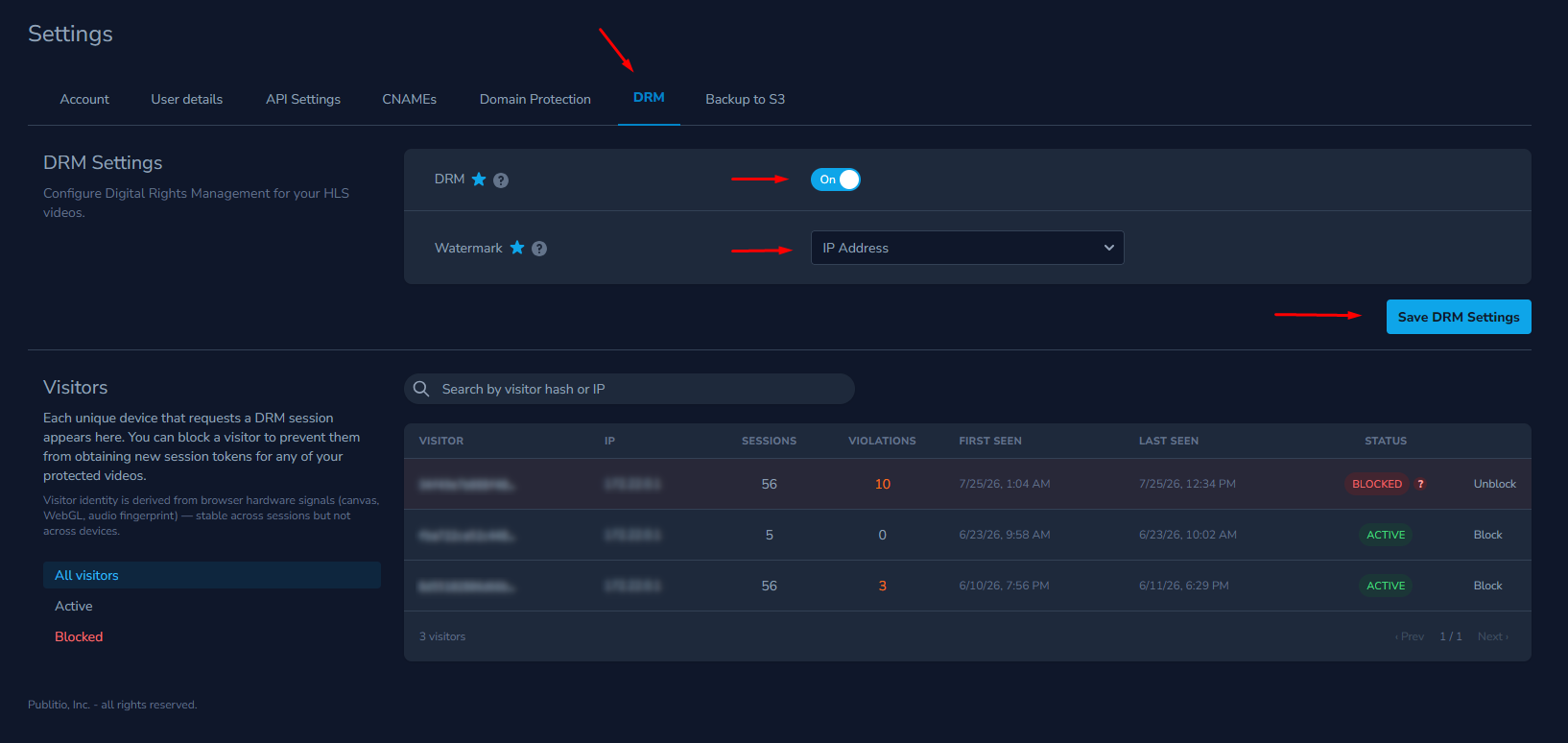
From that point on, every protected PDF you deliver opens in the secured, session-monitored viewer automatically — the same toggle also governs DRM for your protected HLS videos, so both are managed from a single switch.
To turn it off: flip the same toggle to Off and save. Your documents fall back to the standard read-only or print-only viewer — still restricted from download and copy/paste, just without session fingerprinting, live watermarking, or capture detection.
To manage sessions and visitors: the same DRM tab lists every unique device (“visitor”) that has opened a protected document, with session counts, violation counts, first/last seen timestamps, and status. You can:
- Filter the list to All, Active, or Blocked visitors
- Search through by visitor hashes or IP addresses
- Block a visitor to stop that device from starting any new protected session, across every document you own
- Unblock a visitor at any time to restore their access
Visitors are also blocked automatically once they cross a violation threshold — repeated capture attempts, fingerprint mismatches, or session abuse — so you're not relying purely on manual review to catch abuse.
No System Is Unbreakable — But We're Not Standing Still
We want to be upfront about this: no DRM system, ours included, can make a document 100% impossible to leak. Anyone determined enough can point a phone camera at a screen. What PDF DRM is designed to do is raise the cost and risk of doing that — verifying who's viewing, watermarking what they see, catching the obvious capture attempts, and giving you the visibility and controls to shut down abuse when it happens. That's a meaningfully different posture than a plain embed with no protection at all, and it's one we intend to keep investing in as new evasion techniques show up.