


GPU Video Converter: How Hardware Acceleration Speeds Up Video Processing
If you have ever sat through a painfully slow video encoding job, watching a progress bar crawl toward 100% while your CPU fan screams at full throttle, you already understand why the GPU video converter has become one of the most important technologies in modern media workflows. By offloading the heavy lifting of encoding, decoding, and transcoding from the CPU to a dedicated graphics processing unit, organizations can dramatically cut processing times, reduce infrastructure costs, and deliver better video experiences to their audiences. In this guide, we will break down exactly how GPU-accelerated video conversion works, why it outperforms traditional CPU-based encoding, and how you can put it to work in your own pipeline.
What Is a GPU Video Converter?
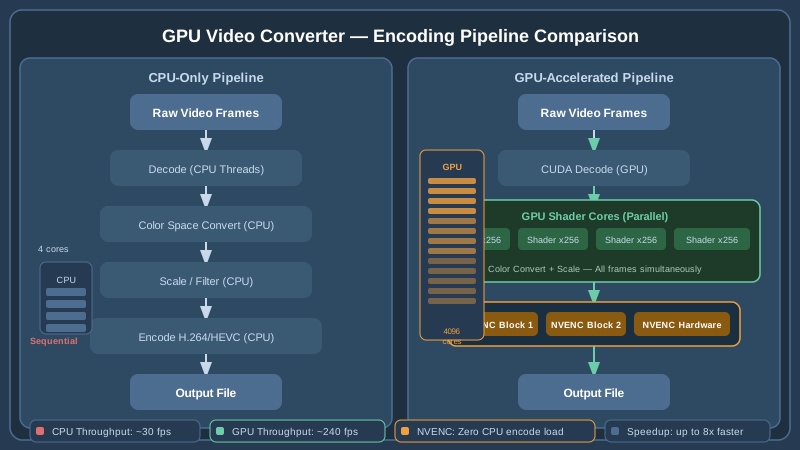
A GPU video converter is a software tool or service that uses the parallel processing cores inside a graphics processing unit to perform video transcoding, encoding, or decoding tasks. Unlike a central processing unit, which typically has between 4 and 64 high-performance cores optimized for sequential tasks, a modern GPU contains thousands of smaller cores designed to handle many operations simultaneously. This massive parallelism makes the GPU an ideal engine for video processing, where the same mathematical transformations must be applied to millions of pixels across thousands of frames.
Common hardware acceleration frameworks include:
- NVIDIA NVENC / NVDEC — dedicated encoder and decoder chips on NVIDIA GPUs, separate from the CUDA cores so encoding does not compete with other GPU workloads.
- AMD AMF (Advanced Media Framework) — AMD's equivalent hardware encoder/decoder built into Radeon and EPYC graphics hardware.
- Intel Quick Sync Video — a fixed-function media engine embedded in Intel processor graphics, available even on CPUs without a discrete GPU.
- Apple VideoToolbox — Apple's framework for hardware-accelerated encode and decode on M-series and Intel-based Macs.
When video software sends a job to one of these engines rather than the CPU, conversion times can drop by a factor of five to twenty, depending on the codec, resolution, and hardware generation.
CPU vs. GPU Video Encoding: A Practical Comparison
To appreciate why GPU acceleration matters, it helps to understand what video encoding actually does. Encoding compresses raw video by identifying redundancy within frames (spatial compression) and between consecutive frames (temporal compression). Algorithms such as H.264, H.265/HEVC, AV1, and VP9 perform this compression through a series of computationally expensive steps: block partitioning, motion estimation, discrete cosine transforms, entropy coding, and more.
Processing Speed
A high-end 16-core CPU might encode a 4K H.264 file at around 30–60 frames per second using software encoders such as x264. An NVIDIA RTX 4090 using NVENC can sustain over 300 frames per second on the same task, a roughly 5–10× improvement. For HEVC encoding, where software speeds are roughly half those of H.264, the GPU advantage widens further. When you are processing hundreds of video assets simultaneously — as is common on media platforms, e-learning sites, and broadcast operations — these gains translate directly into hours saved and infrastructure bills reduced.
Quality Trade-offs
Early GPU encoders had a reputation for producing slightly lower quality output than their software counterparts at the same bitrate. Recent hardware generations have closed this gap significantly. NVIDIA's seventh-generation NVENC, for example, produces quality scores competitive with x264 at the medium preset, while running far faster. For most professional use cases, the quality delivered by modern GPU encoders is entirely acceptable, especially when paired with intelligent bitrate ladders and adaptive streaming configurations.
CPU Headroom
Because the GPU handles encoding, the server's CPU remains free to manage other tasks — running application logic, serving API requests, or handling metadata operations. In a cloud environment, this means you can pack more concurrent encoding jobs onto each server instance, reducing cost per transcode significantly.
Key Use Cases for a GPU Video Converter
Video-on-Demand Platforms
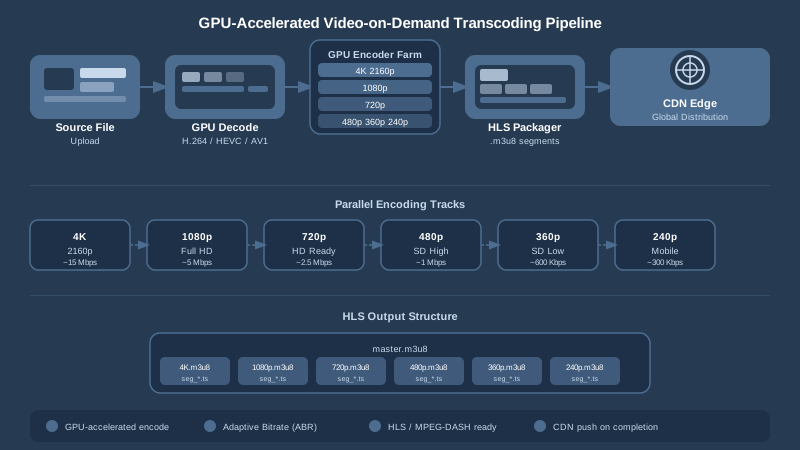
When a user uploads a video to a VoD platform, that video typically needs to be transcoded into multiple resolutions and bitrates to support adaptive streaming. A single 60-minute upload might require generating eight or more renditions: 240p, 360p, 480p, 720p, 1080p, and 4K variants, each in both H.264 and HEVC. GPU acceleration makes it feasible to complete all of these renditions in minutes rather than hours, so the content is available to viewers quickly after upload. Platforms that rely on video-on-demand delivery need this kind of throughput to keep pace with growing content libraries.
Live Stream Ingest and Re-encoding
Live streaming introduces strict real-time requirements. The encoder must keep pace with the incoming frame rate with no backlog allowed, because any delay means dropped frames or buffer underruns. GPU encoders, with their sustained high frame-rate performance, are the standard choice for live ingest servers. They can simultaneously decode an incoming stream, apply watermarks or overlays, re-encode into multiple output profiles, and push to a CDN origin — all in real time.
Batch Processing for Media Archives
Organizations migrating large media archives to modern codecs — converting legacy MPEG-2 libraries to HEVC, for example, or upgrading an H.264 catalog to AV1 — face enormous batch workloads. GPU-accelerated batch conversion can shrink a project that would take weeks on CPU-only hardware down to days or even hours, depending on scale.
AI-Enhanced Video Processing
Beyond traditional encoding, GPUs power a growing range of AI-based video tasks: super-resolution upscaling, noise reduction, scene detection, automatic caption generation, and content-aware compression. These workflows run on the same GPU cores used for encoding, making GPU infrastructure doubly valuable in modern AI-assisted media pipelines.
Codecs Supported by Modern GPU Video Converters
Not every GPU supports every codec for hardware acceleration. Understanding the codec-hardware matrix is important when designing a video processing pipeline.
H.264 (AVC)
H.264 remains the most universally supported codec across hardware encoders. Every major GPU platform — NVIDIA, AMD, Intel, and Apple — supports H.264 hardware acceleration for both encode and decode. It is the safest choice for maximum device compatibility and is the baseline codec for HLS streaming delivery.
H.265 (HEVC)
HEVC delivers roughly 40–50% better compression than H.264 at equivalent quality, making it ideal for 4K content and bandwidth-constrained delivery. GPU hardware support is widespread among newer devices, and HEVC hardware encoding is available on all current-generation NVIDIA, AMD, and Intel platforms.
AV1
AV1 is the royalty-free successor to VP9, offering compression efficiency comparable to or better than HEVC. Software AV1 encoding (libaom, SVT-AV1) is extremely slow; even a fast preset can be 20–50× slower than H.264. Hardware AV1 encoding changes this equation dramatically. NVIDIA RTX 30 series and newer, Intel Arc, and AMD RDNA 3 GPUs all include AV1 hardware encoders. For streaming platforms wanting to serve AV1 to compatible browsers and devices while keeping encoding costs manageable, GPU acceleration is effectively mandatory.
VP9
VP9 hardware decode is broadly available, but hardware encoding support is more limited. Intel Quick Sync supports VP9 encode; NVIDIA and AMD have traditionally not. Platforms targeting VP9 often rely on software encoding or accept slower encode speeds.
How GPU Acceleration Works: The Technical Details
Fixed-Function Hardware vs. Shader-Based Encoding
There are two broad approaches to GPU video encoding. The first uses fixed-function silicon — dedicated circuits on the GPU die that implement specific encoding algorithms in hardware. NVIDIA NVENC and Intel Quick Sync fall into this category. Because the circuits are purpose-built, they are extremely fast and power-efficient, but they offer less flexibility. The second approach uses programmable shader cores to implement encoding algorithms in software running on the GPU. This is slower than fixed-function but can be more flexible and is sometimes used for codecs not yet supported in silicon.
The Encoding Pipeline on a GPU
In a fixed-function GPU encoder, the pipeline typically looks like this:
- Frame input — the raw or decoded video frame is transferred to GPU memory (VRAM) via the PCIe bus or, in cloud environments, from system memory.
- Pre-processing — color space conversion, scaling, deinterlacing, and noise filtering, often handled by shader cores or dedicated video processing units.
- Motion estimation — the encoder searches for similar regions between frames to predict motion vectors, eliminating temporal redundancy.
- DCT / Transform — the residual differences between predicted and actual frames are transformed into frequency coefficients.
- Quantization and entropy coding — coefficients are quantized and entropy-coded into a compressed bitstream.
- Bitstream output — the compressed data is transferred back to system memory or directly to a network buffer.
All of these steps are executed by dedicated hardware circuits at speeds that CPU implementations cannot match.
Multi-GPU Scaling
Cloud video platforms handling high-volume workloads often run multiple GPUs per server and distribute encode jobs across them. Modern orchestration systems can assign each GPU a separate chunk of a large video file — or separate files entirely — and then reassemble the output. This horizontal scaling approach means that as a platform grows, throughput scales nearly linearly by adding more GPU capacity, making it straightforward to budget for future growth.
Integrating GPU Video Conversion into a Cloud Media Platform
For developers and media engineers building video pipelines, the practical question is not just whether to use GPU encoding, but how to integrate it into a complete media management workflow that includes storage, metadata, access control, analytics, and delivery.
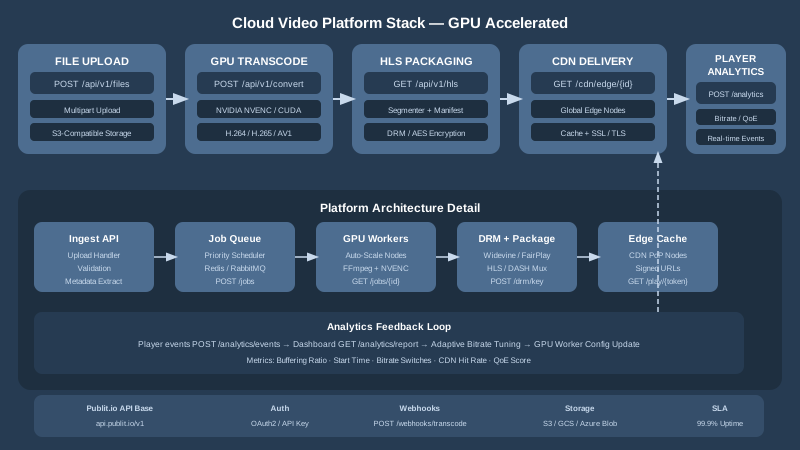
A fully capable platform needs GPU-accelerated transcoding as one layer within a broader stack that includes:
- Asset ingestion and storage — receiving uploads, validating files, and storing originals in a reliable object store.
- Transcoding and format conversion — generating adaptive bitrate ladders using a GPU video conversion engine for maximum throughput.
- Video processing features — applying transformations, overlays, and watermarks during the encode pass rather than as a separate step.
- Packaging and DRM — wrapping encoded segments in HLS or DASH manifests and applying encryption for digital rights management.
- CDN delivery — pushing content to edge nodes for low-latency global distribution via a high-performance content delivery network.
- Analytics — tracking playback quality, viewer engagement, and error rates through integrated video analytics.
Building all of this from scratch requires significant infrastructure investment. Platforms that expose this full stack through a clean API allow development teams to focus on their core product rather than encoding infrastructure.
Developers integrating programmatic video management can explore the full video processing features available via API, and get started quickly using the free video API tier.
Choosing the Right GPU Video Converter for Your Workflow
On-Premises vs. Cloud GPU Processing
Organizations with predictable, high-volume workloads may find it cost-effective to purchase dedicated GPU servers. Broadcast studios, post-production houses, and large e-learning platforms often fall into this category. However, for teams with variable or unpredictable upload volumes, cloud-based GPU encoding is typically more economical. You pay for capacity as you use it rather than maintaining hardware that sits idle between peaks.
Evaluating a GPU Video Converter Service
When assessing a GPU-accelerated video processing service, consider:
- Codec support — does it cover H.264, HEVC, and AV1 on the encode side, and a broad range of input codecs on the decode side?
- Concurrent job capacity — how many simultaneous encode jobs can it handle per account, and how does it scale?
- API design — is the API RESTful, well-documented, and developer-friendly? Check the technical documentation before committing.
- Integration with DAM/MAM — does the service connect to your broader media asset management workflow so transcoded files are automatically organized, tagged, and accessible?
- Pricing transparency — is the pricing model based on minutes encoded, storage consumed, bandwidth delivered, or a flat monthly fee? Understanding the cost model prevents billing surprises as your library grows.
WordPress and CMS Users
Not every team building on GPU-accelerated video is a software development shop. Content teams running WordPress sites can benefit from GPU-accelerated video hosting and delivery through a dedicated WordPress media offloading integration, which automatically routes video uploads to a cloud processing and delivery pipeline without requiring any custom code.
The Future of GPU Video Conversion
Hardware encoder generations continue to advance rapidly. Each successive GPU architecture brings improvements in quality, efficiency, and codec support. AV1 hardware encoding has moved from a niche capability to a broadly available feature in the span of two years. The next wave of development is likely to bring deeper integration between AI inference engines and video encoding — using neural networks running on GPU tensor cores to make encoding decisions in real time, achieving better quality at lower bitrates than any purely algorithmic encoder can manage today.
At the same time, the rise of software-defined media processing means that encoding pipelines are increasingly abstracted away from specific hardware vendors. Developers can write to a high-level API and let the underlying platform choose the optimal GPU hardware for each job, whether that is NVIDIA on one cloud provider or AMD on another.
For organizations managing large video libraries, the combination of GPU-accelerated encoding, adaptive streaming, DRM, and CDN delivery is rapidly becoming the table-stakes baseline rather than a premium differentiator. Teams that build on platforms offering all of these capabilities through a unified API will be better positioned to ship fast and scale confidently.
Start Encoding Faster with Publitio
Publitio is a cloud media management platform built for exactly this kind of modern video workflow. With GPU-accelerated transcoding, HLS streaming, DRM encryption, a global CDN, and a powerful developer API, Publitio gives you everything you need to ingest, process, protect, and deliver video at scale — without managing a single encoder server yourself. Whether you are building a VoD platform, migrating a media archive, or simply looking to speed up your existing video pipeline, Publitio has a plan that fits. Sign up at publit.io today and start your free trial — your first encoding jobs are on us.


