


How Does a CDN Work? A Plain-English Guide to Content Delivery Networks
If you've ever wondered how does a CDN work and why your favorite streaming service loads instantly no matter where you are in the world, you're in the right place. Content Delivery Networks — CDNs — are the invisible infrastructure powering almost every fast-loading website, video stream, and downloadable file on the internet today. Whether you're a developer building a media-rich application, a content creator hosting videos, or a business managing thousands of digital assets, understanding CDNs can help you make smarter decisions about how you deliver content to your audience. This guide breaks it all down in plain English — no jargon, no fluff.
What Is a CDN? The Big Picture
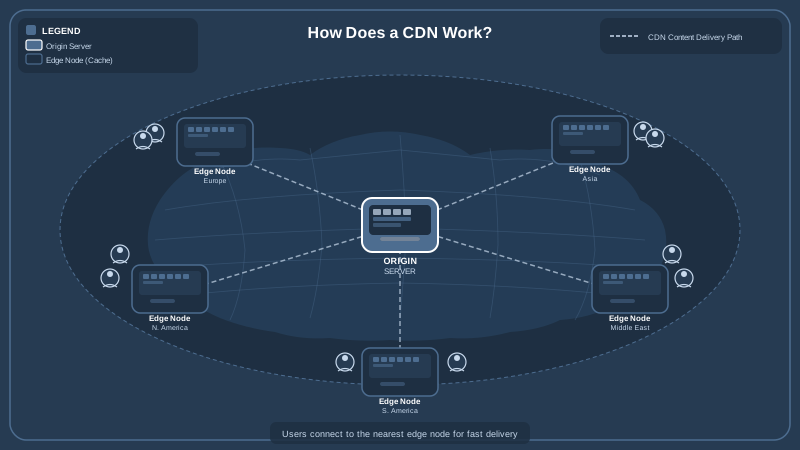
A Content Delivery Network is a geographically distributed group of servers that work together to deliver digital content — web pages, images, videos, scripts, fonts — to users as quickly and reliably as possible. Instead of every request going back to one central server (often called the "origin server"), a CDN stores cached copies of your content on servers spread across the globe. When a user requests a file, the CDN routes that request to the nearest server, dramatically cutting down the distance data has to travel.
Think of it like a chain of regional warehouses for a retail company. Instead of shipping every order from a single factory on the other side of the country, you stock inventory in warehouses close to your customers. Orders arrive faster, shipping costs drop, and the central warehouse isn't overwhelmed by every individual request. CDNs operate on exactly this principle — but for bytes of data instead of physical goods.
The individual servers in a CDN are called Points of Presence, or PoPs. Each PoP contains one or more edge servers that store cached content and handle incoming requests from nearby users. The larger the CDN provider's network, the more PoPs they have, and the closer users are to one at any given time.
How Does a CDN Work, Step by Step?
Let's walk through exactly what happens when a user requests a piece of content — say, a product image on an e-commerce site or a video on a streaming platform.
Step 1: The User Makes a Request
A visitor in Tokyo opens their browser and navigates to your website. Their browser needs to load a hero image. It sends an HTTP request for that image file.
Step 2: DNS Routes the Request to the Nearest Edge Server
The CDN uses a technique called Anycast routing (or DNS-based routing) to intercept the request and determine which edge server is closest to the user in Tokyo — geographically, or more precisely, in terms of network latency. The request is redirected to a PoP in, say, Tokyo or Osaka rather than your origin server in New York.
Step 3: The Edge Server Checks Its Cache
The edge server checks whether it already has a cached copy of the requested file. This is called a cache hit. If the file is in cache and hasn't expired (based on its Time To Live, or TTL settings), the edge server serves it directly to the user — lightning fast, no trip to the origin needed.
Step 4: Cache Miss — Fetching From Origin
If the edge server doesn't have the file cached yet — a cache miss — it fetches the file from your origin server, stores a copy in its own cache, and then delivers it to the user. Future requests for the same file from users near that PoP will be served from cache.
Step 5: The User Gets Their Content, Fast
Whether it was a cache hit or miss, the user in Tokyo receives their content far more quickly than if their request had traveled all the way to a server in New York and back. The round-trip time (RTT) over that distance alone could add hundreds of milliseconds of latency — enough to noticeably degrade the experience.
Why Latency Matters More Than You Think
Latency is the delay between a user making a request and receiving the first byte of a response. It's measured in milliseconds, but even small differences have measurable effects on user behavior. Research consistently shows that a one-second delay in page load time can reduce conversions by up to 7%. For video streaming, high latency means buffering — and buffering means users click away.
Bandwidth is related but different: it's how much data can be transferred per second. CDNs help with both. By serving content from nearby edge servers, they reduce latency. By distributing load across many servers, they prevent any single server from becoming a bottleneck that would throttle bandwidth for everyone.
For video content specifically, these gains are massive. Streaming a high-definition video requires sustained, high-bandwidth delivery with minimal interruption. Without a CDN, a popular video could overwhelm an origin server entirely — causing buffering, failed loads, or outright downtime. With a CDN, millions of concurrent viewers can stream the same video smoothly because each viewer is being served by an edge server close to them, not all hammering the same origin.
What Types of Content Does a CDN Deliver?
CDNs are commonly associated with static content — files that don't change between requests. This includes:
- Images: JPEG, PNG, WebP, SVG, and other image formats. Efficient image management combined with CDN delivery is a cornerstone of fast-loading websites.
- Videos: MP4s, HLS streams, and adaptive bitrate video files. Delivering video through a CDN is essential for smooth playback — learn more about how Publitio handles video-on-demand delivery.
- Audio files: Podcasts, music, and sound effects served quickly to listeners worldwide.
- JavaScript and CSS: The scripts and stylesheets that make web applications interactive and styled.
- Fonts and icons: Web fonts requested on every page load.
- Documents and downloads: PDFs, ZIPs, software installers.
Modern CDNs also handle dynamic content with more sophisticated techniques — route optimization, TCP connection reuse, and edge computing — though caching dynamic content requires careful configuration.
HLS Streaming and CDNs: A Powerful Combination
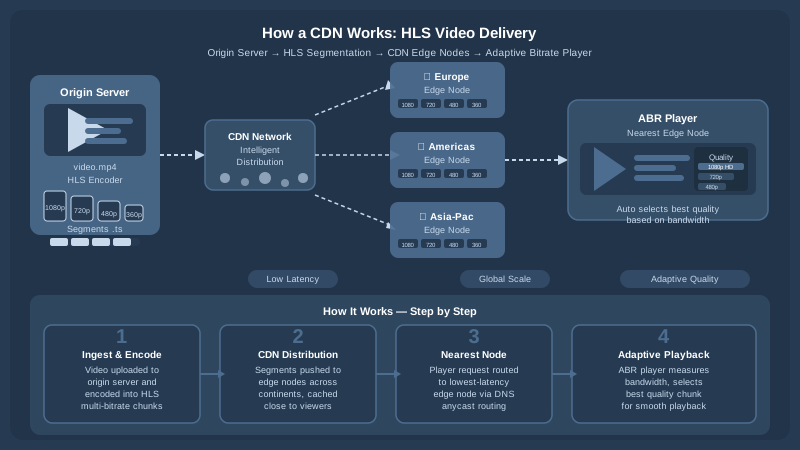
One of the most important applications of CDN technology is video streaming — specifically HTTP Live Streaming (HLS). HLS breaks a video into small chunks (typically 2–10 seconds each) and delivers them sequentially to the player. This approach is perfectly suited for CDN delivery because each chunk is essentially a small static file that can be cached and served from an edge server.
HLS also supports adaptive bitrate streaming: the player monitors the viewer's available bandwidth and switches between different quality levels (e.g., 1080p, 720p, 480p) in real time. The CDN serves whichever chunk the player requests, from the appropriate quality level, from the nearest edge server. The result is smooth, buffer-free playback that adapts to network conditions automatically.
Publitio's HLS streaming feature is built on top of CDN infrastructure, ensuring your video content reaches viewers with minimal latency and maximum reliability. Combined with built-in digital rights management, you can protect premium video content while still delivering it at scale.
How Does a CDN Improve Security?
CDNs don't just speed things up — they also add meaningful layers of security to your content delivery infrastructure.
DDoS Mitigation
A Distributed Denial of Service (DDoS) attack floods a server with so much traffic that it becomes unavailable to legitimate users. Because a CDN distributes traffic across hundreds or thousands of edge servers, it can absorb enormous amounts of malicious traffic without taking down your origin. The attack is spread thin across the network rather than concentrated on a single point of failure.
TLS/SSL Termination at the Edge
CDNs typically handle HTTPS encryption at the edge server level, meaning the computationally intensive TLS handshake happens close to the user. This improves both security and performance, since the encrypted connection is established faster over a shorter network path.
Token Authentication and Signed URLs
For premium or private content, CDNs support token-based authentication. A signed URL includes a cryptographic token that expires after a set time or is tied to a specific user or IP address. This prevents unauthorized sharing of direct links to your content. Publitio's platform supports these mechanisms as part of its broader approach to digital rights management and content protection.
Web Application Firewall (WAF)
Many enterprise CDNs include a WAF at the edge that inspects HTTP requests and blocks common attack patterns — SQL injection, cross-site scripting (XSS), and other threats — before they ever reach your origin server.
CDN Caching: How It's Controlled
Understanding how caching works is critical to getting the most out of a CDN. Several mechanisms control what gets cached, for how long, and when it's refreshed.
Cache-Control Headers
HTTP headers set by your origin server tell the CDN how to handle each file. The Cache-Control: max-age=86400 header, for example, tells edge servers to cache a file for 24 hours. After that, the edge server will revalidate — check whether the file has changed — before serving it again.
Cache Invalidation and Purging
What if you update a file before its TTL expires? Most CDNs allow you to manually purge cached files, either individually or in bulk. Some support instant global purges; others propagate changes within a few minutes. Planning your cache strategy around your content update frequency is an important part of CDN configuration.
Cache Keys and Variations
CDNs typically cache files based on their URL (the cache key). If the same URL returns different content based on factors like user location, device type, or query parameters, you need to configure the CDN to vary the cache accordingly — otherwise one user might get content intended for another.
CDN Analytics: Understanding Your Content Delivery Performance
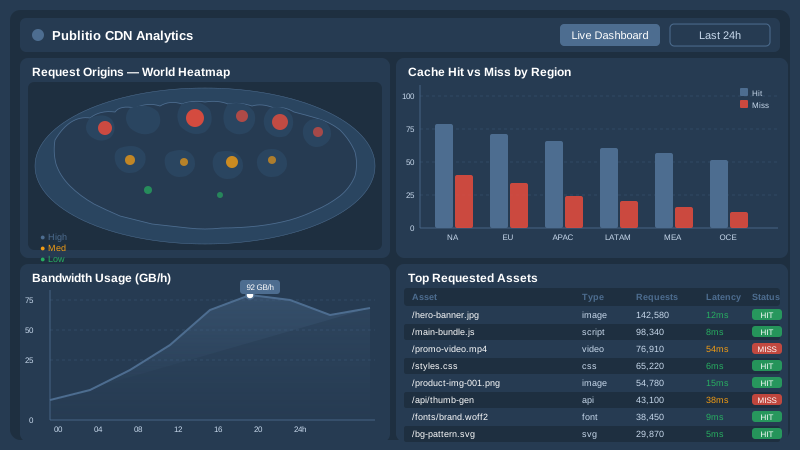
A well-configured CDN doesn't just deliver content — it gives you rich data about how that delivery is performing. Cache hit ratios, bandwidth consumption by region, request volumes, error rates, and latency distributions are all metrics that help you optimize both your CDN configuration and your content strategy.
Publitio's built-in analytics give you visibility into how your media assets are being delivered and consumed, so you can make data-driven decisions about encoding settings, caching policies, and geographic distribution priorities. Combined with Publitio's CDN delivery infrastructure, you get end-to-end insight from upload to playback.
Do You Really Need a CDN? Signs the Answer Is Yes
Not every project requires a CDN from day one, but there are clear signals that it's time to add one to your stack:
- You have a global or geographically diverse audience. If users are spread across continents, a CDN is essential to give everyone a consistent experience.
- You serve a lot of media. Images, videos, and audio files are large and bandwidth-intensive. A CDN makes delivering them affordable and fast. Platforms built around video management or media asset management almost always rely on CDN delivery.
- Your origin server is struggling under load. High traffic volumes causing slow response times or downtime are a classic sign you need to offload requests to a CDN edge network.
- You're running a WordPress site with heavy media. Offloading media to a CDN-backed platform — like Publitio's WordPress media offloading solution — can dramatically improve site performance without changing your workflow.
- You need to protect premium content. Signed URLs, DRM, and edge-level security are all reasons to route content through a CDN.
How CDNs Fit Into a Modern Media Management Platform
For teams managing large libraries of digital assets — images, videos, audio files, documents — a CDN isn't a standalone tool. It's one layer in a broader media infrastructure stack. A complete solution typically includes:
- Upload and storage: Ingesting files and storing them securely in the cloud.
- Processing and transcoding: Converting videos to multiple formats and resolutions, optimizing images. Publitio's video processing pipeline handles this automatically.
- Organization and metadata: Tagging, searching, and managing assets at scale — the core of digital asset management.
- CDN delivery: Serving processed assets to end users globally with low latency.
- Analytics: Measuring usage and optimizing over time.
Publitio is built as an API-first platform that integrates all of these layers. Developers can interact with every feature programmatically via the video and media API, and the full documentation is available at Publitio Docs. Whether you need adaptive HLS streaming, GPU-accelerated transcoding, watermarking, or global CDN delivery, everything is available through a single, unified platform — so you're not stitching together five different services with five different billing cycles and support teams.
Key Takeaways: How Does a CDN Work?
Let's recap the essentials:
- A CDN is a network of geographically distributed edge servers that cache and deliver content close to users.
- CDNs reduce latency by minimizing the physical and network distance between a server and a user.
- They improve reliability by distributing load and providing redundancy — if one edge server fails, another takes over.
- For video streaming, CDNs are essential: HLS chunks, adaptive bitrate streams, and large video files all benefit enormously from edge delivery.
- CDNs add security through DDoS mitigation, TLS termination, token authentication, and WAF capabilities.
- Caching behavior is controlled through HTTP headers, TTL settings, and cache purging tools.
- Modern media platforms combine CDN delivery with storage, processing, and analytics into a unified workflow.
Ready to put a CDN-powered media platform to work for your project? Sign up for free at publit.io and start delivering images, videos, and files to your audience at global scale — with HLS streaming, DRM protection, built-in analytics, and a developer-friendly API included from day one. No credit card required to get started, and our transparent pricing plans scale with you as your audience grows.


