


Media Asset Management: The Complete Guide to Organizing and Delivering Your Digital Content
Whether you run a media company, a growing e-commerce brand, or a development team building video-heavy applications, media asset management is the backbone that keeps your digital content organized, accessible, and ready to deliver at scale. Without a structured system in place, teams waste hours hunting for files, duplicate assets pile up, and delivery pipelines break down at the worst possible moments. This guide walks you through everything you need to know about media asset management — what it is, why it matters, and how to choose the right platform to future-proof your content operations.
What Is Media Asset Management?
Media asset management (MAM) refers to the systems, workflows, and technologies used to store, organize, retrieve, and distribute media files — including videos, images, audio files, documents, and other rich content. Think of it as a smart, searchable library for all your digital assets, built specifically to handle the demands of modern media production and delivery.
While traditional file storage solutions like shared drives or cloud folders can technically hold your files, they offer none of the metadata tagging, version control, access management, or delivery optimization that a dedicated MAM system provides. As teams grow and content libraries expand into the thousands — or hundreds of thousands — of assets, the gap between basic storage and true media asset management becomes critical.
MAM vs. DAM: Understanding the Difference
You'll often see "media asset management" and "digital asset management" (DAM) used interchangeably, but there are meaningful distinctions. DAM typically refers to broader asset management covering all types of digital files — PDFs, brand assets, marketing collateral, and more. MAM is a specialized subset that focuses primarily on rich media: video, audio, and images. In practice, modern platforms increasingly merge both capabilities into unified solutions.
Publitio's DAM/MAM solution is built to handle both — giving teams a single platform for managing every type of digital asset while providing the deep media-specific capabilities that video and image-heavy workflows demand.
Why Media Asset Management Matters More Than Ever
The volume of digital content created and consumed globally continues to break records every year. Video traffic alone accounts for the majority of internet bandwidth, and brands are producing more content — across more channels — than ever before. Here's why investing in proper media asset management has shifted from "nice to have" to business-critical:
The Cost of Poor Asset Organization
Studies consistently show that knowledge workers spend a significant portion of their day simply searching for information and files. For creative and media teams, that problem is amplified. Without proper tagging, folder structures, and search capabilities, your team ends up:
- Re-creating assets that already exist somewhere in the system
- Delivering outdated file versions to clients or publishing channels
- Losing brand consistency across campaigns and markets
- Onboarding new team members slowly because institutional knowledge lives in disorganized drives
- Wasting bandwidth and storage costs on duplicate files
A robust MAM system eliminates these pain points by making every asset findable, versionable, and shareable in seconds.
The Demand for Faster Content Delivery
Modern audiences expect fast, high-quality media experiences on every device. A video that buffers or an image that loads slowly doesn't just frustrate users — it directly impacts conversion rates and search rankings. Media asset management isn't just about storage; it's about making sure your content reaches end users quickly and reliably. That's why the best MAM platforms integrate tightly with CDN delivery and adaptive streaming technologies.
Core Features of a Modern Media Asset Management Platform
Not all MAM systems are created equal. When evaluating platforms, look for these essential capabilities that separate professional-grade solutions from basic file repositories.
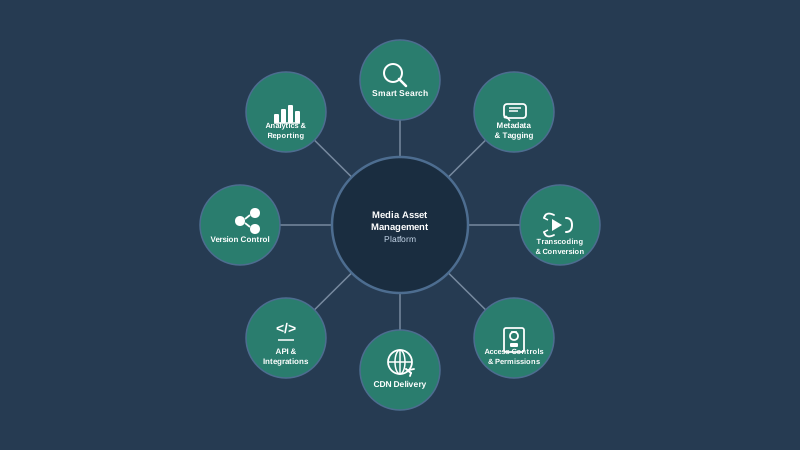
Centralized Storage with Intelligent Organization
At its foundation, a MAM platform provides centralized cloud storage where all your media files live in one place. But what makes it intelligent is the organizational layer on top: folder hierarchies, custom metadata schemas, tagging, and powerful search functionality. You should be able to find any asset in seconds using keywords, file type, date ranges, tags, or custom fields relevant to your workflow.
File and Image Management API
For development teams, an API-first architecture is non-negotiable. A well-designed file and image management API lets you automate uploads, trigger transformations, generate delivery URLs, and integrate asset management directly into your applications and CMS. Publitio's API is built with developers in mind, offering comprehensive endpoints for every operation so you can build custom workflows without limitations.
Video Hosting and On-Demand Streaming
If your content library includes video — and increasingly, everyone's does — your MAM platform needs native video hosting capabilities. This means more than just storing MP4 files. Look for platforms that offer:
- Automatic transcoding to multiple formats and resolutions
- HLS adaptive bitrate streaming for smooth playback across network conditions
- Customizable video players
- Thumbnail generation and preview capabilities
- Analytics and performance tracking
Publitio's video hosting solution handles all of this out of the box, giving you a complete video-on-demand infrastructure without needing to stitch together multiple third-party services.
Content Delivery Network (CDN) Integration
Speed matters. A MAM platform backed by a global CDN ensures your assets are served from edge locations closest to your end users — dramatically reducing latency and load times. This is especially important for video streaming and image delivery at scale. When your content library serves users across multiple countries or continents, CDN integration isn't optional; it's the difference between a smooth experience and a frustrating one.
Access Control and Permissions
Enterprise teams need granular control over who can view, edit, download, or share specific assets. A proper media asset management system supports role-based access control, so you can give external collaborators access to relevant files without exposing your entire library, and ensure that sensitive content stays protected.
DRM and Content Protection
For premium video content, digital rights management (DRM) is essential. Whether you're running a subscription video platform, delivering training content, or distributing licensed media, you need to ensure your videos can't be downloaded or redistributed without authorization. Publitio's DRM and encryption solution provides HLS encryption and token-based access controls, giving content owners the protection they need without sacrificing the viewing experience.
Media Asset Management Workflows: From Ingest to Delivery
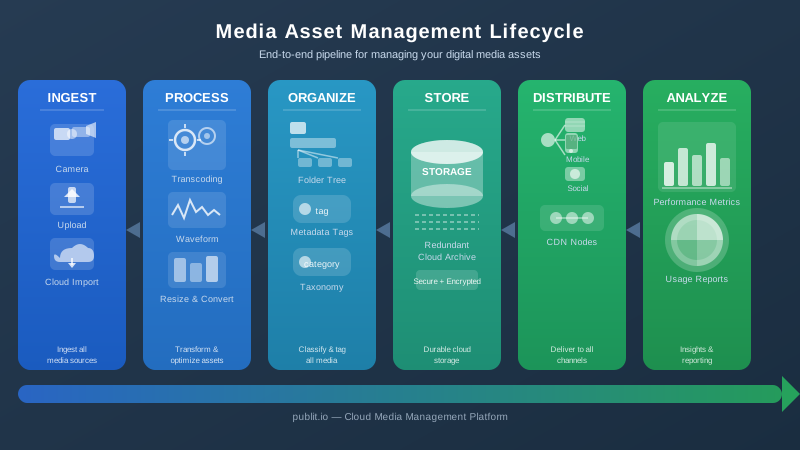
Understanding the lifecycle of a media asset helps you design better workflows and choose the right tools for each stage. Here's how a typical MAM workflow looks in practice.
1. Ingest and Upload
Assets enter the system through various channels — direct uploads from team members, automated ingestion from production pipelines, or API-driven imports from connected tools. A good MAM platform supports bulk uploads, drag-and-drop interfaces, and programmatic ingestion via API so that no matter how assets are created, they end up in the right place.
2. Processing and Transformation
Once uploaded, assets often need processing. For video, this means transcoding to multiple formats and resolutions. For images, it might mean resizing, format conversion, or compression for web delivery. Modern MAM platforms handle this automatically, applying transformation rules based on asset type and intended use case — so your team doesn't need to manually process files before they're usable.
3. Metadata Tagging and Organization
This is where the real value of media asset management is created. Assets are tagged with relevant metadata — titles, descriptions, keywords, categories, rights information, expiration dates, and custom fields specific to your business. Good metadata makes assets findable. Great metadata makes them useful across teams, campaigns, and time.
4. Review and Approval
For teams with content governance requirements, built-in review and approval workflows ensure that only approved assets are published or shared externally. This prevents outdated or off-brand content from slipping through and maintains quality control at scale.
5. Distribution and Delivery
Finally, assets need to reach their destination — whether that's a website, a mobile app, a streaming platform, a social channel, or an email campaign. A MAM platform with integrated CDN delivery and API access makes it easy to generate optimized delivery URLs, embed players, and push content to any channel programmatically.
Who Needs a Media Asset Management Solution?
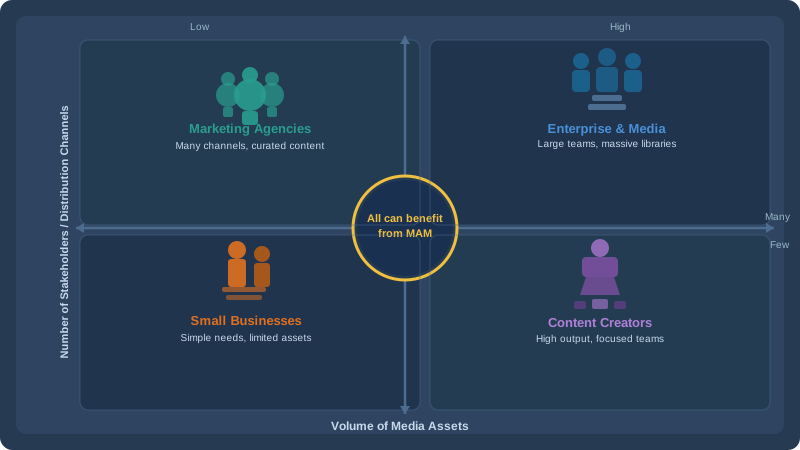
Media asset management isn't just for Hollywood studios or broadcast networks. Modern MAM platforms serve a wide range of use cases across industries:
Media and Entertainment
Production companies, broadcasters, and streaming platforms manage enormous libraries of video content that need to be stored securely, transcoded efficiently, and delivered reliably to global audiences. MAM is the operational core of their entire content supply chain.
E-Commerce and Retail
Online retailers manage product photography, promotional videos, and marketing assets across dozens of channels. A MAM system ensures that the right image, at the right resolution, in the right format, reaches every channel — from product pages to social ads to email campaigns.
Education and eLearning
Educational institutions and online learning platforms host extensive video libraries, course materials, and interactive media. They need secure delivery, access controls tied to enrollment, and the ability to stream content reliably to students around the world.
Marketing and Creative Agencies
Agencies managing assets for multiple clients need a system that keeps everything organized, versioned, and accessible for both internal teams and client stakeholders — without the chaos of shared Dropbox folders and email attachments.
Developers and SaaS Platforms
Development teams building applications with user-generated content, video features, or image management capabilities need an API-first MAM backend that handles storage, processing, and delivery so they can focus on building features rather than infrastructure.
Choosing the Right Media Asset Management Platform
The market offers a wide range of MAM solutions, from enterprise behemoths with six-figure implementation costs to lightweight tools that lack the features growing teams need. Here's what to evaluate when selecting a platform.
Scalability
Your content library will grow. The platform you choose needs to scale with you — in terms of storage capacity, API throughput, and feature depth — without requiring a costly migration down the road.
API and Integration Capabilities
Unless every member of your team will interact with assets exclusively through a web dashboard, you need strong API support. Check the developer documentation to understand how comprehensive the API is and how well it fits your existing tech stack.
Video-Specific Features
If video is a significant part of your content strategy — and for most organizations today, it is — make sure the platform provides native video hosting, transcoding, adaptive streaming, and player customization rather than treating video as just another file type.
Security and Compliance
Look for platforms that offer signed URLs, token-based access, DRM encryption, and role-based permissions. Depending on your industry, you may also need compliance with specific data residency or security standards.
Pricing Transparency
Enterprise MAM pricing is notoriously opaque. Look for platforms that offer clear, usage-based pricing plans that make sense for your actual consumption rather than forcing you into oversized contracts.
WordPress and CMS Integration
For teams managing content through WordPress or other CMS platforms, native plugin support can dramatically simplify asset management workflows. Publitio's WordPress media offload plugin automatically handles media storage and delivery through the Publitio platform, freeing up server resources and improving site performance without changing how your editorial team works.
The Business Case for Investing in Media Asset Management
Implementing a proper MAM solution delivers measurable ROI across multiple dimensions. Teams that adopt structured media asset management consistently report:
- Faster time-to-market for campaigns and content launches
- Reduced storage costs through deduplication and optimized delivery
- Improved brand consistency by ensuring approved assets are always used
- Better collaboration between creative, marketing, and technical teams
- Lower infrastructure costs by consolidating storage, transcoding, and delivery into one platform
- Stronger content protection through access controls and DRM
When you factor in the time your team currently spends searching for assets, re-creating lost files, and managing a patchwork of storage and delivery tools, the cost of not investing in proper media asset management often exceeds the cost of the solution itself.
Get Started with Publitio's Media Asset Management Platform
Publitio brings together everything you need to manage, deliver, and monetize your digital content in a single, developer-friendly platform. From centralized cloud storage and automatic video transcoding to HLS streaming, DRM protection, and global CDN delivery, Publitio is designed for teams that take their media seriously. Whether you're a startup building your first video application or an enterprise managing tens of thousands of assets, our flexible infrastructure scales with your needs — and our transparent pricing means you only pay for what you use.
Ready to transform the way your team manages media? Sign up for a free Publitio account today and experience the difference that professional media asset management makes — from your first upload to your millionth delivery.


