
Video Processing API: How to Encode, Transform, and Stream Video at Scale
Whether you're building a video-on-demand platform, integrating live playback into a SaaS product, or managing thousands of media assets for enterprise clients, a reliable video processing API is the engine that keeps everything running. Without programmatic control over encoding, transformation, and delivery, video workflows become bottlenecks — slow, expensive, and difficult to scale. In this guide, we'll walk through what a modern video processing API does, the core capabilities you should demand from one, and how platforms like Publitio's video processing suite make it possible to handle video at any scale.
What Is a Video Processing API?
A video processing API is a set of programmatic interfaces that allow developers and media teams to upload, encode, transform, store, and deliver video content without managing underlying infrastructure. Instead of provisioning your own transcoding servers, configuring FFmpeg pipelines, or building custom CDN integrations, an API-first platform abstracts all of that complexity into simple HTTP requests.
Modern video processing APIs typically cover several interconnected functions:
- Transcoding and encoding — converting raw video into optimized formats and resolutions
- Transformation — cropping, resizing, trimming, watermarking, and thumbnail extraction
- Adaptive streaming — packaging video for HLS or DASH delivery
- Storage and CDN — hosting encoded files and distributing them globally with low latency
- Rights management — protecting content with DRM, encryption, and access tokens
The best platforms combine all of these capabilities under a unified API, so your engineering team only has to learn one integration instead of stitching together five separate services.
Core Capabilities of a Production-Ready Video Processing API
Not all video APIs are created equal. A solution that works fine for a small portfolio site will crumble under the demands of a media-heavy SaaS product or a content platform with thousands of concurrent viewers. Here are the capabilities that matter most when evaluating a video processing API for production use.
1. Multi-Format Encoding and Transcoding
Video files arrive in every format imaginable — MP4, MOV, AVI, MKV, WebM, and more. A production-grade API must accept these formats and transcode them into web-optimized outputs suitable for streaming. At minimum, you should expect support for H.264 and H.265 (HEVC) encoding, multiple resolution presets (from 360p to 4K), and variable bitrate control.
GPU-accelerated transcoding is a critical differentiator here. CPU-based encoding is slow and expensive at scale. Publitio's GPU video conversion dramatically reduces processing time for large files or high-volume workflows, allowing you to encode video faster without proportionally increasing cost.
2. Adaptive Bitrate Streaming (HLS)
HTTP Live Streaming (HLS) is the industry standard for adaptive video delivery. It works by breaking video into small segments and creating multiple quality variants, so the player automatically selects the best quality based on the viewer's network conditions. This dramatically reduces buffering and improves the viewing experience across mobile, desktop, and smart TV.
A proper video processing API should handle HLS packaging automatically after encoding — no manual segmentation required. Publitio's HLS streaming feature does exactly this, giving you adaptive playback out of the box with minimal configuration.
3. On-the-Fly Video Transformation
Beyond encoding, you often need to modify videos dynamically — extract thumbnails at specific timestamps, add watermarks, resize for different embed contexts, or trim clips. URL-based transformation APIs are especially powerful here, letting you apply modifications through query parameters rather than creating and storing dozens of derivative files.
Watermarking is a particularly common requirement for media businesses. Protecting video content with a visible or invisible watermark helps deter unauthorized redistribution. You can explore how Publitio handles this through its watermarking feature.
4. Global CDN Delivery
Encoding video is only half the job. If delivery is slow, viewers drop off. A video processing API that includes integrated CDN ensures your encoded files are cached at edge nodes close to your viewers, minimizing latency regardless of where they are in the world. Look for a platform with a genuinely global CDN footprint, not just a handful of regions.
Publitio's CDN delivery infrastructure routes every video request through a high-performance edge network, so your content loads fast whether your audience is in New York, London, or Singapore.
5. Digital Rights Management and Content Protection
For premium video content — online courses, paywalled media, enterprise training — access control and encryption are non-negotiable. A serious video processing API should support DRM-protected streaming, signed URLs with expiry, and domain-level access restrictions.
Publitio's Digital Rights Management solution integrates directly with its video processing pipeline, so you can encrypt content and control playback access without adding a separate vendor or building custom middleware.
How a Video Processing API Works: A Technical Walkthrough
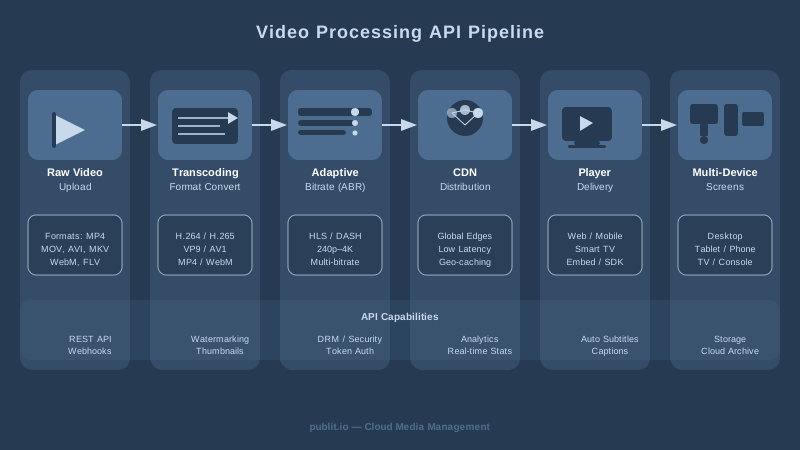
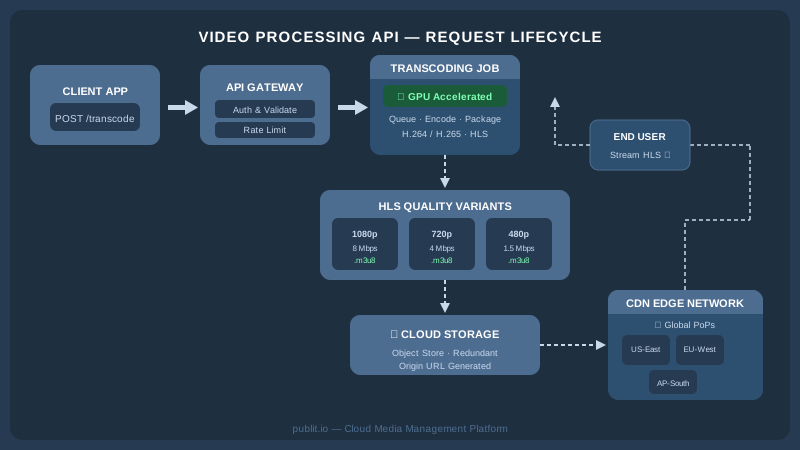
Understanding the mechanics helps you architect a cleaner integration. Here's a simplified but accurate picture of what happens when you use a video processing API end to end.
Step 1: Upload
You POST a video file (or provide a URL for remote fetch) to the API endpoint. The platform receives the file and stores it in a raw state, returning a unique asset identifier.
Step 2: Transcoding Job
You trigger a transcoding job specifying the output formats, resolutions, and any transformation parameters. On platforms with GPU acceleration, this job is queued and processed rapidly. You can poll for status or receive a webhook callback when encoding completes.
Step 3: Packaging for Streaming
If HLS delivery is enabled, the encoded outputs are automatically segmented and a master playlist (.m3u8) is generated referencing all quality variants. This playlist URL is what you embed in your player.
Step 4: CDN Distribution
The processed files are pushed to or lazily cached by the CDN. When a viewer requests playback, their request is routed to the nearest edge node, which serves the segments directly.
Step 5: Playback and Analytics
Your video player loads the HLS playlist and begins adaptive playback. A robust platform will also give you playback analytics — views, engagement rates, geographic distribution — so you can understand how your content performs. Publitio provides this through its analytics dashboard.
Scaling Video Processing: What Changes at High Volume
A single API call to transcode one video is easy. Handling 10,000 uploads per day with consistent turnaround times is an entirely different engineering challenge. Here's what separates scalable video processing APIs from those that buckle under load.
Parallel Processing and Queue Management
At scale, your encoding jobs can't wait in a single-threaded queue. Production platforms use distributed job queues with auto-scaling worker pools that spin up capacity on demand. This ensures that a sudden spike in uploads — say, after a product launch or a live event — doesn't cause processing delays that ripple into viewer experience.
Storage Architecture
High-volume video platforms generate enormous amounts of data. Source files, multiple encoded renditions, thumbnail variants, HLS segments — storage costs compound quickly. An API platform that handles storage efficiently, with lifecycle management and intelligent tiering, can save significant cost at scale. Publitio's video management solution is built to handle large libraries with organized storage and fast retrieval.
API Rate Limits and Throughput
Understand your provider's rate limits before you build against them. Some platforms throttle aggressively at volume; others offer enterprise tiers with uncapped throughput. If you're expecting high concurrent upload volume, verify that the API supports batch operations and parallel job submission. Publitio's developer-focused video API is designed with high-throughput use cases in mind.
Monitoring and Error Handling
At scale, some percentage of jobs will fail — due to corrupt files, unsupported codecs, or transient infrastructure issues. A mature API gives you detailed error codes, retry mechanisms, and webhook notifications for job state changes, so your system can handle failures gracefully rather than silently dropping content.
Use Cases for a Video Processing API
The applications for a well-integrated video processing API span nearly every industry that works with video content.
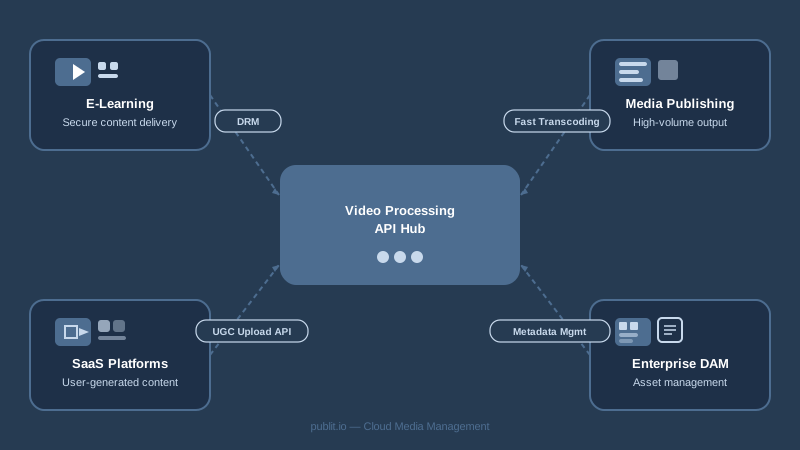
E-Learning and Online Course Platforms
Course platforms need to accept instructor video uploads in any format, transcode them consistently, protect content from unauthorized sharing, and deliver smooth playback to students globally. The full stack — encoding, DRM, HLS, CDN — is essential. Publitio's DRM features and HLS streaming make it a natural fit for this use case.
Media and Publishing Companies
News outlets and digital publishers need to process large volumes of video quickly, often with strict time requirements tied to editorial deadlines. GPU-accelerated transcoding and automated workflow triggers via webhook make this manageable without dedicated DevOps support.
SaaS Platforms with User-Generated Video
If your application allows users to upload video — feedback tools, portfolio platforms, communication tools — you need a backend that handles all the complexity invisibly. Users should upload and see their video ready to play in seconds, not minutes. A responsive transcoding API with fast job turnaround is the difference between a good product and a frustrating one.
Enterprise Digital Asset Management
Large organizations managing video libraries across departments need more than just encoding — they need metadata management, access controls, and organized storage. Publitio's media asset management solution and digital asset management platform extend video processing into a full enterprise DAM workflow.
WordPress Publishers
WordPress powers over 40% of the web, and many WordPress sites host video content that taxes shared hosting environments. Offloading media — including processed video — to a dedicated API platform improves site performance dramatically. The Publitio WordPress media offload plugin connects your WordPress media library directly to Publitio's processing and delivery infrastructure.
Choosing the Right Video Processing API for Your Stack
The market has no shortage of options, from open-source FFmpeg wrappers to major cloud provider media services. Evaluating them requires clarity about your actual needs. Here are the most important criteria to assess.
Developer Experience
How fast can an engineer go from API key to first successful transcoding job? Good documentation, SDKs in popular languages, and clear error messages are not luxuries — they directly affect how quickly you can ship. Publitio's developer documentation is comprehensive and structured for engineers who want to move fast.
Pricing Model
Video processing costs are driven by encoding minutes, storage volume, and bandwidth consumption. Make sure you understand all three dimensions of a platform's pricing before committing. Hidden egress fees and per-minute encoding rates can balloon costs unexpectedly at scale. Review Publitio's transparent pricing plans to understand exactly what you'll pay as your usage grows.
Feature Completeness
Consider whether the platform covers the full pipeline or just encoding. If you need HLS streaming, DRM, thumbnailing, watermarks, and analytics, a platform that provides all of these under one API is far simpler to manage than assembling multiple point solutions. Vertical integration reduces operational overhead and eliminates the category of bugs that emerge at integration boundaries between services.
Reliability and SLA
Video processing infrastructure should be treated like any other mission-critical service. Ask about uptime SLAs, regional redundancy, and what happens to in-flight jobs during an outage. For video-on-demand platforms or anything customer-facing, even a short processing outage can have outsized impact on user experience.
Getting Started with Publitio's Video Processing API
Publitio is built for developers and media teams who need a complete, API-first video infrastructure without the overhead of managing their own encoding pipeline. From GPU-accelerated transcoding and adaptive HLS streaming to CDN delivery and video-on-demand hosting, every capability is accessible through a clean, well-documented REST API.
You don't need to provision servers, configure encoding clusters, or negotiate separate CDN contracts. Upload a video, define your encoding profile, and Publitio handles the rest — returning playback-ready HLS URLs that work across every major device and browser.
The platform is equally capable as a full media asset management system for teams managing large libraries, and as a lightweight API integration for developers who just need reliable video processing in their application backend.
Ready to stop managing video infrastructure and start shipping products? Sign up at publit.io and get your first API key in minutes. Generous free tier included — no credit card required to start. Experience firsthand why thousands of developers and media teams trust Publitio to encode, transform, and stream their video at scale.