


Video Transcoding API: How to Convert and Stream Video at Scale
Whether you're building a video-on-demand platform, a corporate training portal, or a media-heavy SaaS product, a reliable video transcoding API is the backbone of any scalable video delivery strategy. Transcoding — the process of converting video files from one format, codec, or bitrate to another — ensures that your content reaches every viewer on every device, regardless of their connection speed or screen size. In this guide, we'll break down how video transcoding APIs work, why they matter, what to look for when choosing one, and how Publitio makes the entire workflow seamless from upload to stream.
What Is a Video Transcoding API?
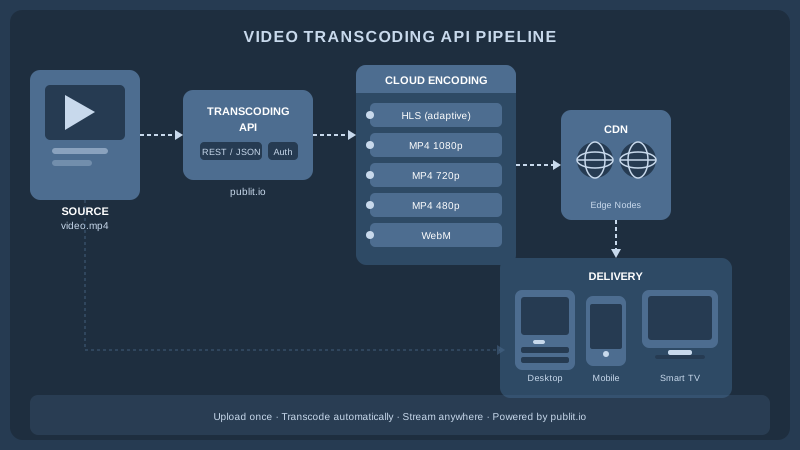
A video transcoding API is a programmatic interface that lets developers send raw video files to a cloud service and receive back one or more optimized output formats — all without managing their own encoding servers. Instead of provisioning GPU-equipped machines, installing FFmpeg, and writing custom pipeline logic, you make an HTTP request, pass your source file, specify your output parameters, and let the API handle the rest.
The outputs can vary widely depending on your use case:
- Multiple resolutions — 4K, 1080p, 720p, 480p, 360p for adaptive streaming
- Multiple codecs — H.264, H.265/HEVC, VP9, AV1 for browser and device compatibility
- Multiple containers — MP4, WebM, MOV, MKV
- HLS and DASH packages — segmented manifests for adaptive bitrate streaming
- Thumbnails and preview clips — auto-generated stills at custom timestamps
Modern video transcoding APIs also expose hooks for watermarking, DRM encryption, CDN publishing, and webhook callbacks on job completion — meaning the full post-production pipeline can be orchestrated through a single integration.
Why Scaling Video Delivery Requires More Than a Single MP4
It's tempting to upload a single high-quality MP4 and call it done. For a handful of viewers on fast broadband connections, that might work. But at scale, this approach quickly becomes untenable for three reasons: file size, device fragmentation, and network variability.
Adaptive Bitrate Streaming (ABR)
Adaptive bitrate streaming is the industry standard for delivering video reliably across varying network conditions. With ABR, a single piece of content is encoded at multiple quality levels and packaged into a manifest file (typically HLS or DASH). The player continuously monitors available bandwidth and switches to the appropriate quality tier in real time — buffering is reduced, startup time drops, and viewers on slower connections still get a watchable experience rather than a spinning wheel.
Generating these multi-bitrate ladder outputs manually is laborious. A video transcoding API automates the entire ladder, letting you define your quality tiers once and apply them to every video in your library. Publitio's HLS streaming feature handles this automatically, packaging your content into segmented HLS manifests ready for adaptive playback.
Device and Browser Compatibility
Different platforms have different codec and container requirements. Safari on iOS demands H.264 in an HLS wrapper. Chromium-based browsers can handle VP9 or AV1 in WebM for better compression efficiency. Smart TVs often require specific profile levels. Serving a single MP4 means many of your users are either forcing their device to decode an unsupported format or falling back to software decoding — both costly in terms of performance and battery life.
Storage and Bandwidth Costs
Sending a 4 GB raw camera file to every viewer when a 400 MB H.264 encode would be indistinguishable is wasteful and expensive. Transcoding compresses content to the smallest viable size for each output target, and CDN delivery ensures bytes travel the shortest possible path to the end user. Publitio's global CDN works in concert with the transcoding pipeline so your encoded outputs are cached at edge nodes closest to your audience.
Key Features to Look for in a Video Transcoding API
Not all transcoding APIs are created equal. When evaluating options for production use, pay attention to the following capabilities:
GPU-Accelerated Encoding
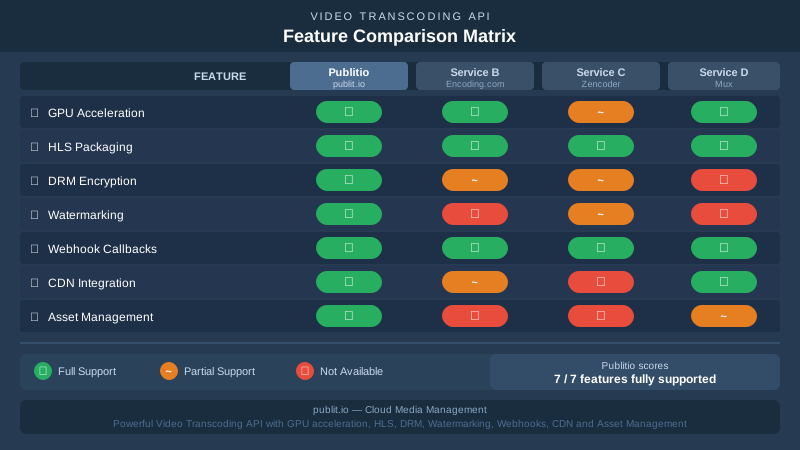
CPU-only transcoding is slow and costly at scale. GPU acceleration — using NVIDIA NVENC, AMD AMF, or similar hardware encoders — can cut encoding times by 5–10× compared to software encoding, which directly translates to lower cost-per-minute and faster time-to-publish. Publitio offers GPU video conversion to ensure your encoding jobs complete quickly even for long-form or high-resolution content.
Webhook and Polling Support
Transcoding is an asynchronous operation — a 60-minute 4K film might take 20–30 minutes to encode even on fast hardware. Your integration needs a reliable mechanism to know when a job is done. Look for APIs that support both webhook callbacks (push notifications to your endpoint when a job completes or fails) and status polling endpoints so you can build resilient workflows.
Watermarking and Branding
For commercial publishers, embedding a logo or dynamic watermark into the video stream protects content from unauthorized redistribution. A good transcoding API integrates watermarking directly into the encoding job — no need for a separate post-processing step. Publitio's watermarks feature lets you define image or text overlays with precise positioning and apply them across your entire library automatically.
DRM and Content Encryption
Premium content needs protection beyond watermarking. Digital Rights Management (DRM) — covering Widevine, FairPlay, and PlayReady — ensures only authenticated, licensed players can decrypt and render your video. Look for a transcoding API that integrates DRM key exchange so encryption is baked into the HLS/DASH packaging step. Publitio's Digital Rights Management solution handles encryption and key delivery alongside transcoding, giving you a unified content security workflow.
Metadata and Asset Management
At scale, raw encoding jobs aren't enough — you need to organize, tag, search, and retrieve your video assets efficiently. A transcoding API paired with a video management layer means your encoded outputs are automatically catalogued with metadata, linked to their source files, and accessible via a consistent asset URL. This matters enormously when you're managing tens of thousands of video assets across multiple projects or clients.
How a Video Transcoding API Fits into Your Architecture
Understanding where transcoding sits in your system design is critical to building a maintainable integration. Most architectures follow one of two patterns:
Upload-then-Transcode (Asynchronous Pipeline)
The most common pattern for production applications. Your user or content team uploads a source file — either directly to your backend or via a client-side signed upload — and your application immediately queues a transcoding job via API. The job runs asynchronously; a webhook callback notifies your system when outputs are ready, at which point you update your database with the delivery URLs and make the content live.
This pattern keeps your application responsive — users get immediate upload confirmation — and decouples the encoding workload from your own infrastructure. Publitio's video processing pipeline is designed around this asynchronous model, with job status endpoints and configurable webhooks.
Just-in-Time Transcoding (On-the-Fly)
For platforms with unpredictable content demand — think user-generated content where most uploads may never be viewed — transcoding every upload upfront wastes encoding credits. Just-in-time (JIT) transcoding defers encoding until the first play request, then caches the output for subsequent viewers. This trades a slightly higher first-play latency for significant cost savings on long-tail content.
Integrating with Your Existing Stack
A well-designed video transcoding API exposes a RESTful interface that slots into any tech stack — Node.js, Python, PHP, Ruby, Go. Publitio's developer documentation provides client libraries, endpoint references, and code samples so you can be up and running in hours rather than days. For teams already running WordPress, Publitio's WordPress media offloading plugin automatically reroutes media uploads through Publitio's encoding and CDN pipeline without touching your theme or plugin code.
Real-World Use Cases for a Video Transcoding API at Scale
Video-on-Demand Platforms
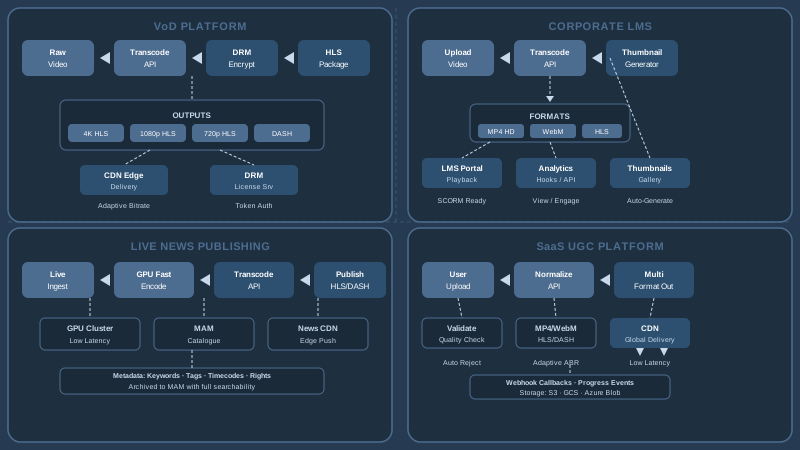
OTT and VoD platforms are the canonical use case. Every piece of content needs to be available at multiple quality levels, protected with DRM, branded with channel watermarks, and delivered over HLS or DASH via CDN. Publitio's video-on-demand feature is purpose-built for this workflow, combining transcoding, DRM, and CDN delivery into a single managed service.
Corporate Training and E-Learning
Internal training platforms often handle hours of recorded sessions, webinars, and course modules. Auto-generating multiple resolutions ensures employees on mobile data plans can still access content. Automatic thumbnail generation at key timestamps improves discoverability within course catalogs. And usage analytics help L&D teams understand which videos are actually being watched. Publitio's analytics dashboard provides per-video play counts, engagement rates, and geographic distribution data.
Media Publishing and Broadcasting
News organizations, sports broadcasters, and digital publishers ingest raw camera footage and need to publish online-optimized clips within minutes of an event. GPU-accelerated transcoding reduces turnaround from hours to minutes. Pairing this with a media asset management system ensures every clip is archived, tagged, and retrievable for future use — a critical requirement when your content library spans years of footage.
SaaS Platforms with User-Generated Video
Any SaaS product that lets users upload video — social platforms, collaboration tools, real estate listings, healthcare portals — needs to normalize those inputs into consistent, player-safe outputs. Users upload everything from iPhone 4K footage to ancient WMV files; a transcoding API normalizes all inputs into a predictable set of delivery formats. The Publitio video API supports a wide range of input formats and handles the normalization transparently.
Performance and Cost Considerations
Running video transcoding at scale has non-trivial cost implications. The main cost drivers are encoding minutes (how long source content is, multiplied by the number of output renditions), storage for encoded outputs, and egress bandwidth for CDN delivery.
To optimize spending:
- Define a lean encoding ladder. You rarely need more than 5–6 quality tiers. Start with 1080p, 720p, 480p, 360p and add 4K or 240p only where demand justifies it.
- Use efficient codecs. H.265 delivers comparable quality to H.264 at roughly half the bitrate, reducing both storage and bandwidth costs. AV1 goes further but requires broader decoder support.
- Leverage CDN caching aggressively. The most expensive byte to deliver is the one that misses the cache. Set long TTLs on encoded video segments and manifests.
- Delete source files after encoding — or archive them to cold storage — rather than paying hot-storage rates for files you'll only need if you re-encode.
- Monitor actual usage. Analytics data often reveals that 20% of your content accounts for 80% of views — that's where encoding quality investment is worth it.
Publitio's transparent pricing makes it straightforward to model costs against your expected encoding volume, storage, and bandwidth usage before committing.
Building a Future-Proof Video Infrastructure
The video landscape is not static. Codec standards evolve (AV1 is already mainstream on YouTube and Netflix), streaming protocols improve, and viewer expectations for quality and load speed keep rising. Building your video infrastructure on a managed video transcoding API rather than self-hosted encoding servers means you inherit improvements automatically — new codec support, faster GPU hardware, updated DRM integrations — without re-architecting your pipeline.
It also means your engineering team isn't on call at 2 AM debugging a failed FFmpeg process on a maxed-out encode server. You get SLA-backed reliability, horizontal scaling without capacity planning, and a vendor whose sole focus is making video delivery fast and reliable.
Pairing transcoding with broader digital asset management capabilities — versioning, access control, metadata schemas, team permissions — gives you the organizational scaffolding to manage not just individual videos but an entire content operation as it grows.
Getting Started with Publitio's Video Transcoding API
Publitio provides a complete cloud media platform built around a developer-first API. Upload a video, define your output profiles, and receive HLS-packaged, CDN-distributed, optionally DRM-encrypted outputs in minutes. Whether you're launching a new VoD product, modernizing a legacy media workflow, or adding video capabilities to an existing SaaS platform, Publitio gives you the encoding infrastructure, asset management layer, and global delivery network to ship fast and scale confidently.
The API is well-documented, the pricing is usage-based so you only pay for what you process, and the support team is staffed by engineers who understand video infrastructure deeply — not tier-one agents reading from scripts.
Ready to start transcoding at scale? Create your free account at publit.io, explore the full API reference in the developer docs, and have your first video transcoded, hosted, and streaming over HLS within the hour. No credit card required to get started — just sign up and start building.


