


Video Transcoding API for Streaming: How to Deliver Any Format at Scale
If you are building a video-heavy application, a streaming platform, or any product that serves video content to end users, you already know that raw video files are rarely ready for delivery straight out of the camera or editing suite. A reliable video transcoding API for streaming is the backbone that converts source files into the right formats, resolutions, and bitrates so that every viewer — on every device, over every network — gets smooth, high-quality playback. This guide breaks down what transcoding involves, why the API-first approach matters at scale, and how Publitio gives you the infrastructure to handle it all without building your own encoding pipeline from scratch.
What Is Video Transcoding and Why Does It Matter for Streaming?
Transcoding is the process of taking an existing encoded video file and re-encoding it into one or more different formats, codecs, resolutions, or bitrates. It is different from simple format conversion because it involves decoding the source material fully before re-encoding — a computationally intensive operation that must be done efficiently at scale.
For streaming specifically, transcoding serves several critical purposes:
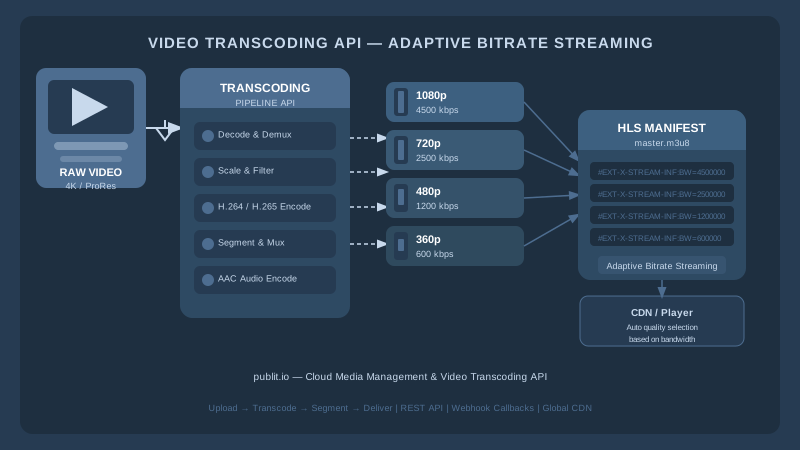
- Device compatibility: A 4K ProRes file from a professional camera cannot be played natively in a browser. It must be transcoded to H.264 or H.265 inside an MP4 or HLS container.
- Adaptive bitrate streaming (ABR): To serve viewers on both a 4G mobile connection and a gigabit home network, you need multiple renditions of the same video at different resolutions and bitrates. The player switches between them in real time.
- Bandwidth cost control: Serving an unnecessarily large file wastes CDN egress budget and degrades the user experience on slower connections.
- DRM and encryption: Many transcoding pipelines inject encryption during the encoding stage, ensuring content is protected at the segment level before it reaches the CDN.
Without an automated transcoding layer, every upload becomes a manual bottleneck. With a well-designed API, transcoding becomes a programmable, repeatable workflow that scales with your content library.
The Core Components of a Video Transcoding API for Streaming
Not all transcoding APIs are built the same. When evaluating solutions, you need to understand the layers that make up a production-grade pipeline.
Codec and Container Support
A robust video transcoding API for streaming must accept a wide range of input formats — MOV, MKV, AVI, MXF, MP4, WebM — and produce outputs optimized for web delivery. The most important output formats today are:
- H.264 (AVC) in MP4: The universal baseline codec supported by virtually every device and browser.
- H.265 (HEVC): Higher compression efficiency, roughly 40–50% smaller file sizes at equivalent quality, ideal for 4K content.
- VP9 and AV1: Open royalty-free codecs increasingly used for web delivery, particularly on Chrome and Firefox.
- HLS (HTTP Live Streaming): Apple's segmented streaming format that enables adaptive bitrate delivery and is supported natively on iOS, Android, and modern browsers via Media Source Extensions.
GPU-Accelerated Encoding
Transcoding is one of the most CPU-intensive workloads in media processing. For high-throughput pipelines, software-only encoding introduces unacceptable latency. GPU-accelerated encoding — using NVIDIA NVENC or AMD VCE — can reduce encoding time by an order of magnitude. Publitio's GPU video conversion feature leverages hardware acceleration to turn around transcoded files in a fraction of the time that software encoding would require, which is essential when users expect near-instant playback after upload.
Adaptive Bitrate Ladder Generation
Generating an ABR ladder means producing a set of renditions at predefined or dynamically calculated resolutions and bitrates, then packaging them with a manifest file that streaming players can interpret. For HLS, this is an M3U8 master playlist referencing individual variant playlists. Publitio's HLS streaming pipeline handles this packaging automatically, so you get a playback-ready URL without manually stitching manifests together.
Watermarking and Branding
Many platforms need to burn a logo or a dynamic watermark into transcoded output — both for branding and for forensic piracy tracking. This is easiest to accomplish at the transcoding stage rather than as a post-processing step. Publitio supports watermarks that can be applied during video processing, letting you protect and brand content in a single pipeline pass.
DRM and Encryption
For premium content, transcoding must be paired with content protection. HLS supports AES-128 segment encryption as a baseline, while multi-DRM workflows layer Widevine, PlayReady, and FairPlay on top of the same encoded segments. Publitio's digital rights management solution integrates with the transcoding workflow to deliver encrypted streams without requiring a separate DRM vendor integration.
Why Use an API-First Approach Instead of Building In-House?
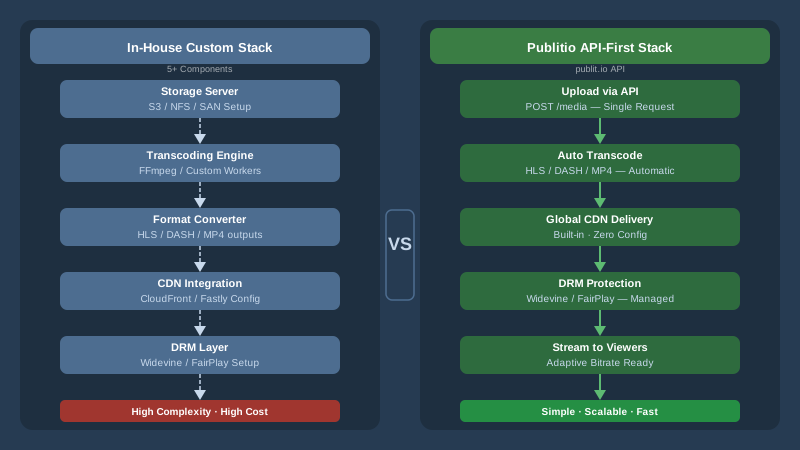
Some engineering teams consider standing up their own FFmpeg-based transcoding cluster. While this gives maximum flexibility, it comes with serious hidden costs:
- Infrastructure management: Encoding clusters require significant DevOps effort — auto-scaling, queue management, GPU driver updates, and monitoring.
- Format and codec updates: Keeping up with new codecs like AV1, new container variants, and evolving HLS spec changes is a continuous engineering investment.
- CDN integration: Transcoded files are useless without global delivery. Bolting a CDN onto a custom encoding cluster adds another layer of complexity.
- Storage and metadata: Managing the growing library of source files, renditions, and associated metadata requires a full digital asset management layer.
An API-first platform like Publitio collapses all of these concerns into a single integration. You upload via API, configure your transcoding parameters, and receive playback URLs — all without managing a single server. This is the promise of a well-designed video transcoding API for streaming: turning weeks of infrastructure work into hours of API integration.
You can explore the full API reference in the Publitio documentation to see exactly how upload, transformation, and delivery calls are structured.
How Publitio's Video Transcoding API Works End to End
Understanding the request-to-playback flow helps you design your integration correctly from the start.
Step 1: Ingest
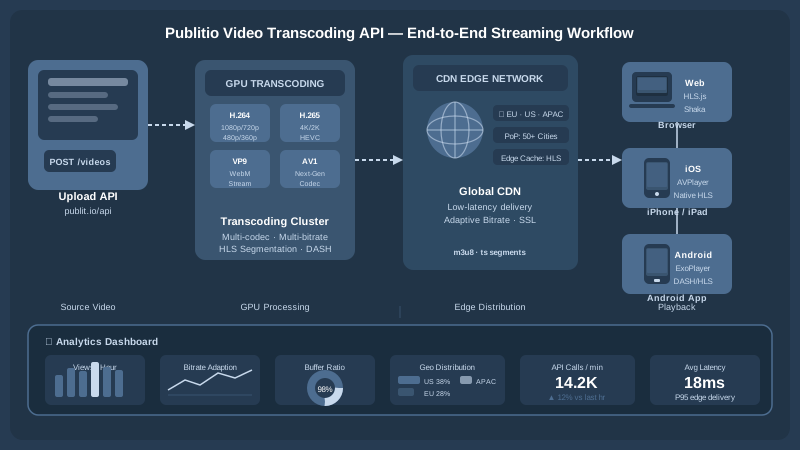
Files can be ingested into Publitio via direct upload from your server, a signed URL upload from the client browser, or by providing a remote URL for Publitio to pull from. The API responds with a file object including a unique identifier, metadata extracted from the source (codec, duration, resolution, frame rate), and the current processing status.
Step 2: Transcoding Job Configuration
You specify transcoding parameters either at upload time or by triggering a conversion job against an existing file. Parameters include output format, resolution, bitrate, frame rate, audio channels, and whether to generate an HLS package. Publitio's video processing engine queues the job and begins encoding using GPU-accelerated workers.
For HLS output, the API generates the full segment package — video segments, audio segments if applicable, and both the variant and master M3U8 manifests. You receive a single master manifest URL that you drop into any HLS-compatible player (Video.js, HLS.js, Shaka Player, or the native iOS/Android player).
Step 3: CDN Delivery
Transcoded files and HLS segments are automatically pushed to Publitio's CDN edge network, which spans multiple points of presence globally. This means the first viewer of a newly transcoded video already receives it from a nearby edge node rather than from origin. Publitio's CDN layer handles cache headers, range requests for partial playback, and origin shielding to protect the encoding infrastructure from direct traffic.
Step 4: Playback and Analytics
Once the CDN-hosted manifest URL is embedded in your player, playback begins. Publitio's analytics layer captures play events, bandwidth consumption, geographic distribution, and error rates, giving you the visibility you need to optimize your encoding ladder and CDN configuration over time.
Scaling Your Transcoding Pipeline: Practical Considerations
Choosing the Right Encoding Ladder for Your Audience
A naive encoding ladder transcodes every source file to the same set of resolutions regardless of original quality. A smarter approach — sometimes called per-title encoding — analyzes the complexity of each source file and generates a custom ladder that provides the best quality-per-bit ratio for that specific content. This reduces storage and CDN costs while improving perceived quality for viewers on low-bandwidth connections.
For most platforms launching their video infrastructure, a standard ladder of 1080p at 4–5 Mbps, 720p at 2.5 Mbps, 480p at 1.2 Mbps, and 360p at 600 Kbps provides a solid baseline. You can always add 4K tiers for platforms where viewers are on large screens with premium displays.
Managing a Large Video Library with DAM
As your content library grows, raw transcoding capability is not enough. You need to organize, tag, search, and version your assets — both source files and transcoded renditions. Publitio's video management solution provides the organizational layer, while the broader digital asset management platform handles mixed libraries that include video alongside images, audio, and documents.
Metadata consistency is especially important for transcoded libraries. When a source file is updated or replaced, you need clear relationships between the original and all derived renditions so that cache invalidation and playback URL management do not become a manual nightmare.
Video on Demand vs. Live Transcoding
This post focuses on VoD transcoding, but it is worth noting that live streaming introduces a different set of constraints. Live transcoding must occur in real time with strict latency budgets, requiring dedicated encoding capacity that cannot be shared with batch VoD jobs. Publitio's video on demand infrastructure is purpose-built for the VoD use case, delivering reliable turnaround times for uploaded content without competing with live workloads.
WordPress Publishers and Media Offloading
Not every team building a video-rich experience is working with a custom application. WordPress publishers managing large video libraries can bypass slow server uploads and storage bloat by using Publitio's WordPress media offloading plugin. Videos uploaded through the WordPress media library are automatically sent to Publitio for transcoding and CDN delivery, and the embed codes in posts are transparently updated to point to the optimized, transcoded versions.
Using the Free Video API to Prototype Fast
One of the most practical ways to evaluate a video transcoding API for streaming before committing is to build a working prototype against a real API rather than mocking the transcoding layer. Publitio offers a free video API tier that gives you access to core transcoding, HLS streaming, and CDN delivery functionality so you can validate your integration architecture with real workloads before selecting a paid plan.
This matters because transcoding APIs have subtle differences in how they handle edge cases: corrupt input files, extremely long-duration sources, unusual frame rates, or audio-only tracks embedded in video containers. You want to discover these quirks during development, not in production.
Evaluating Cost and Pricing at Scale
Transcoding and delivery costs compound quickly as your library grows. The main cost drivers are:
- Encoding minutes: The duration of source footage you transcode each month, often priced per minute of output or per GB of source material.
- Storage: Every rendition consumes storage. A single 60-minute source transcoded to five renditions may generate 8–15 GB of stored data.
- CDN egress: Every GB of video delivered to viewers is billed as egress. Popular content with high view counts drives egress costs significantly.
Publitio's pricing is structured to give you predictable costs at each growth stage, with plans that bundle storage, encoding, and CDN delivery so you are not surprised by separate line items from three different vendors.
Key Takeaways
- A production-grade video transcoding API for streaming must handle codec conversion, ABR ladder generation, HLS packaging, CDN delivery, and content protection in a unified pipeline.
- GPU-accelerated encoding dramatically reduces turnaround time for high-volume libraries.
- API-first platforms eliminate the DevOps overhead of running and scaling your own encoding infrastructure.
- Pairing transcoding with a full DAM system keeps your growing library organized and your source-rendition relationships intact.
- Starting with a free API tier lets you validate integration assumptions with real workloads before scaling up.
Building a reliable video streaming experience requires every layer — ingest, transcoding, packaging, encryption, delivery, and analytics — to work together seamlessly. Publitio is designed from the ground up to give developers and media teams a single API surface for all of it, so you can focus on your product rather than your encoding infrastructure. Sign up at publit.io today and start transcoding your first video in minutes — no infrastructure setup required, no encoding servers to manage, and a free tier available so you can explore the full platform before committing to a plan.


