


Video Upload API: How to Upload, Store, and Stream Videos Programmatically
If you're building a video-heavy application, a reliable video upload API is one of the most critical pieces of infrastructure you'll need. Whether you're creating an e-learning platform, a media portal, a SaaS product with video capabilities, or an enterprise content hub, manually managing video uploads, storage, and delivery quickly becomes unsustainable. The right API lets you automate the entire pipeline — from the moment a user selects a file to the moment that video streams smoothly on any device. In this guide, we'll walk through exactly how a video upload API works, what to look for when evaluating one, and how Publitio makes the entire process simple, scalable, and developer-friendly.
What Is a Video Upload API?
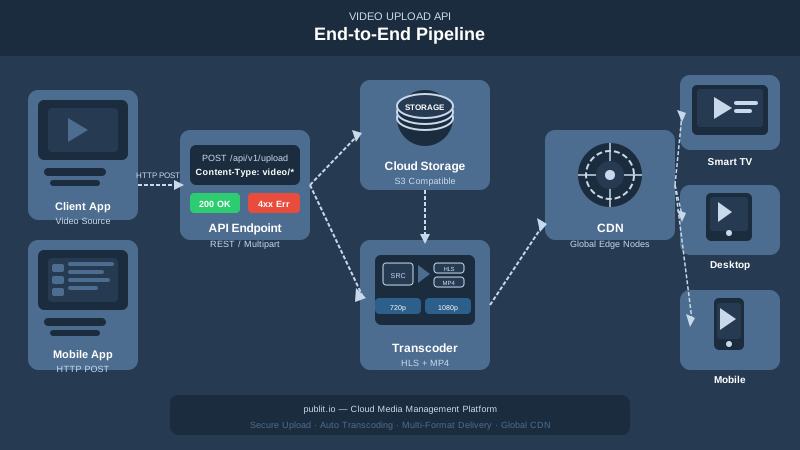
A video upload API is a set of programmatic endpoints that allow developers to send video files to a remote storage and processing service, typically over HTTP. Instead of building your own video infrastructure — servers, encoders, CDN configurations, streaming protocols — you delegate all of that to a purpose-built platform and interact with it through API calls.
At a basic level, a video upload API handles:
- Receiving video files via direct upload, URL ingestion, or multipart form data
- Storing the original asset in secure, redundant cloud storage
- Transcoding the video into web-optimized formats (MP4, WebM, HLS)
- Delivering the video through a CDN for fast, low-latency playback globally
- Returning metadata and playback URLs your application can use immediately
The best platforms go further, offering adaptive bitrate streaming, DRM protection, watermarking, analytics, and more — all accessible through the same API interface.
Why You Shouldn't Build Video Infrastructure From Scratch
Many teams underestimate the complexity of video infrastructure until they're deep in the weeds. A video file isn't just a blob of data you can store in an S3 bucket and call it a day. Here's what you're actually signing up for if you try to roll your own solution:
Transcoding Is Expensive and Complex
Raw video files from cameras and mobile devices are often in formats unsuitable for web streaming (MOV, MKV, high-bitrate MP4). Transcoding them into multiple resolutions and formats requires GPU-accelerated processing, careful quality tuning, and significant compute costs. Publitio handles this automatically with GPU-accelerated video conversion, dramatically reducing encoding times compared to CPU-based pipelines.
Adaptive Streaming Requires HLS Segmentation
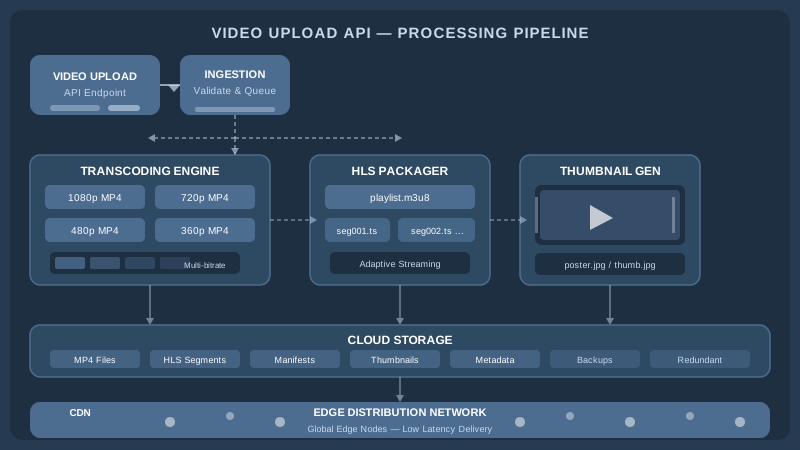
For professional-grade video delivery, you need HLS (HTTP Live Streaming) — a protocol that segments video into small chunks and adapts quality in real time based on the viewer's connection speed. Setting up HLS packaging, manifest files, and segment delivery is non-trivial. Publitio's HLS streaming feature handles all of this out of the box.
Global Delivery Demands a CDN
Serving video from a single origin server creates latency for users who are geographically distant. A proper CDN integration caches video segments at edge nodes worldwide, ensuring fast load times and uninterrupted playback regardless of where your users are located.
Security and Access Control Add Another Layer
If your video content is proprietary — courses, paid media, internal training — you need encryption, signed URLs, or full Digital Rights Management (DRM) to prevent unauthorized access and redistribution.
A dedicated video upload API solves all of these problems simultaneously, so your engineering team can focus on building product features rather than maintaining infrastructure.
How the Publitio Video Upload API Works
Publitio is an API-first media management platform designed for developers who need a complete video pipeline without the overhead of building one. Here's a practical breakdown of how to upload, store, and stream videos using the Publitio video upload API.
Step 1: Authenticate Your Requests
All API requests to Publitio use OAuth-style authentication with your API key and secret. You'll sign each request with a timestamp and hash to ensure secure, tamper-proof communication. Full authentication documentation is available in the Publitio developer docs.
Step 2: Upload Your Video File
Publitio supports multiple upload methods to fit different workflows:
- Direct file upload: POST a multipart form request with your video file attached. Ideal for server-side uploads from your backend.
- URL-based ingestion: Provide a public URL to a video file and Publitio will fetch, store, and process it automatically. Great for importing existing video libraries.
- Client-side upload: Use the Publitio JavaScript SDK to upload directly from the browser, bypassing your server entirely and reducing backend load.
A basic direct upload looks like this in concept: you send a POST request to the /files/create endpoint with your video file and any optional parameters such as title, description, tags, folder path, and privacy settings. The API responds immediately with a file object containing the asset ID, status, and initial metadata.
Step 3: Let Publitio Handle Processing
Once your video is uploaded, Publitio's video processing pipeline kicks in automatically. This includes:
- Transcoding to multiple quality levels (1080p, 720p, 480p, 360p)
- Generating HLS playlist files and segments
- Creating a video thumbnail and preview image
- Extracting metadata (duration, dimensions, codec, bitrate)
- Applying any transformations you've specified (watermarks, crops, filters)
You can poll the file status endpoint or use webhooks to be notified when processing is complete. The entire process is asynchronous, so your application remains responsive during encoding.
Step 4: Retrieve Playback URLs and Stream
Once processing is complete, the API returns a set of URLs for your video asset — an HLS manifest URL for adaptive streaming, direct MP4 links for download or fallback playback, and a thumbnail URL. You can embed these directly in your application using any HTML5 video player or a JavaScript player like Video.js or HLS.js.
For video-on-demand (VoD) delivery, Publitio's CDN ensures your HLS segments are cached globally, so the first viewer in Tokyo gets the same fast experience as a viewer in New York.
Key Features to Look for in a Video Upload API
Not all video APIs are created equal. When evaluating a platform for your project, here are the capabilities that separate a professional-grade solution from a basic file host.
Adaptive Bitrate Streaming
Your API should produce HLS or DASH streams that automatically adjust video quality based on the viewer's available bandwidth. This reduces buffering, improves watch time, and ensures your content is accessible on both high-speed broadband and mobile connections.
Programmatic Video Transformations
The best APIs allow you to manipulate video on the fly through URL parameters or API calls — resizing, trimming, adding overlays, or applying video and image watermarks to protect your content and reinforce branding. This eliminates the need for manual post-production for common use cases.
Secure Delivery and DRM
For premium content, you need more than just HTTPS. Look for support for signed URLs, token-based access control, and full DRM encryption (Widevine, FairPlay, PlayReady) to prevent unauthorized downloading or sharing of your video assets.
Analytics and Engagement Tracking
Understanding how your audience engages with your videos is essential for content strategy. The Publitio analytics dashboard provides data on plays, watch time, geographic distribution, and device breakdown — directly tied to your API-uploaded assets.
Scalable Storage and Organization
As your video library grows, you need a structured way to organize and retrieve assets. Publitio functions as a full video management solution, with folder hierarchies, tagging, search, and metadata fields that make it easy to manage thousands of video files programmatically or through the dashboard.
Developer-Friendly SDKs and Documentation
A great API is only as good as its documentation. Publitio provides SDKs for JavaScript, PHP, Python, and other popular languages, along with comprehensive API documentation covering every endpoint, parameter, and response format. The free video API tier also lets you test and prototype without any upfront commitment.
Common Use Cases for a Video Upload API
Understanding where a video upload API fits in real-world applications helps clarify whether it's the right tool for your project.
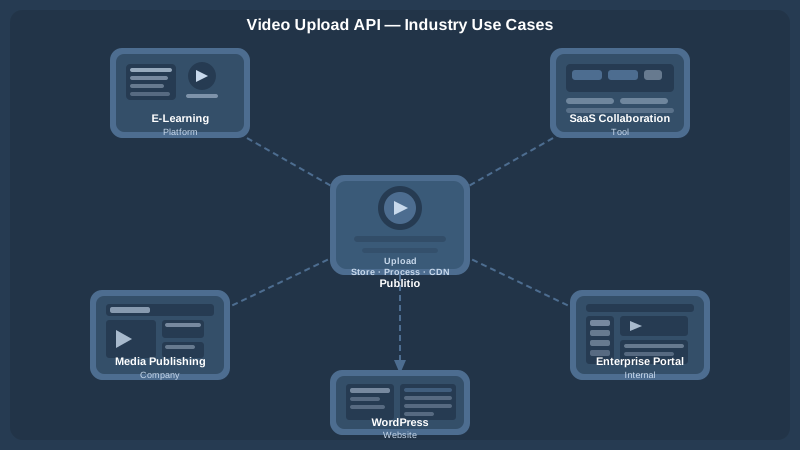
E-Learning and Online Course Platforms
Course creators upload lectures, tutorials, and walkthroughs. The API ingests these videos, encodes them for streaming, and delivers them securely to enrolled students — with DRM preventing content from being downloaded and redistributed.
SaaS Products with User-Generated Video
Collaboration tools, project management apps, and social platforms often need to support video uploads from users. A video upload API offloads all the infrastructure concerns, letting you focus on the product experience rather than the encoding pipeline.
Media Companies and Publishers
News organizations, sports networks, and entertainment publishers manage large libraries of video content. Publitio's media asset management capabilities — combined with fast upload APIs and CDN delivery — make it possible to publish, update, and retire content programmatically at scale.
Enterprise Internal Video Portals
HR teams, L&D departments, and internal communications teams need secure video hosting for training materials, town halls, and knowledge bases. Private video hosting with access controls and analytics gives enterprises visibility into how their internal content is consumed.
WordPress Sites with Heavy Media Needs
For WordPress-based publishers and marketers, Publitio offers a dedicated WordPress media offloading plugin that automatically routes uploaded videos to Publitio's cloud, keeping your server lightweight and your media delivery fast.
Getting Started with the Publitio Video Upload API
Getting your first video uploaded and streaming through Publitio takes minutes, not days. Here's the high-level path to go live:
- Create a free account at publit.io — no credit card required to start.
- Grab your API credentials from the dashboard (API key and secret).
- Install the SDK for your language of choice, or make raw HTTP requests directly.
- Upload your first video via a POST request to
/files/create. - Poll or webhook to confirm processing is complete.
- Embed the HLS URL in your player and hit play.
If you need more advanced configuration — custom encoding profiles, DRM setup, watermark templates, or analytics integrations — the developer documentation covers every option in detail. For teams evaluating storage and bandwidth costs, the Publitio pricing page breaks down plans transparently so you can project costs as you scale.
Publitio vs. Building Your Own Video Pipeline
To make the business case concrete, consider what you'd need to replicate Publitio's functionality in-house:
- Cloud storage (S3, GCS) — ongoing cost, requires management
- Transcoding service (AWS MediaConvert, FFmpeg cluster) — complex setup, GPU costs
- HLS packaging and manifest generation — custom engineering work
- CDN configuration and contracts (CloudFront, Fastly, Akamai) — pricing complexity
- DRM licensing and key management servers — significant legal and technical overhead
- Analytics pipeline (event tracking, data warehousing, dashboards) — months of work
- Ongoing maintenance, scaling, and incident response
By using Publitio's video upload API, you replace all of the above with a single integration and a predictable monthly cost. For most teams, the engineering time saved in the first month alone justifies the platform cost many times over.
Conclusion: Choose the Right Video Upload API for Your Project
A robust video upload API is the foundation of any application that takes video seriously. From automated transcoding and adaptive HLS streaming to DRM protection and global CDN delivery, the right platform handles every layer of the video stack so you can focus on building great user experiences. Publitio brings together all of these capabilities in a single, developer-first platform — with the flexibility to scale from prototype to production without changing your integration.
Ready to see how easy programmatic video upload and streaming can be? Sign up for a free Publitio account at publit.io and start uploading, storing, and streaming videos through the API in minutes. Explore the free tier, test your first upload, and discover why thousands of developers and businesses trust Publitio to power their video infrastructure.


