


What Is a MAM? Media Asset Management Explained
If you work with video, audio, or any kind of rich media at scale, you have almost certainly run into the chaos that comes from disorganised files, broken workflows, and teams searching endlessly for the right asset. Understanding what is a MAM — a Media Asset Management system — is the first step toward solving that problem. A MAM is a specialised software platform designed to store, organise, track, and distribute media assets such as video clips, audio files, graphics, and metadata, giving teams a single source of truth for all their rich media content. In this guide, we will break down exactly how MAM systems work, how they differ from related tools, and how platforms like Publitio's Media Asset Management solution can transform the way you manage media.
The Core Definition: What Is a MAM?
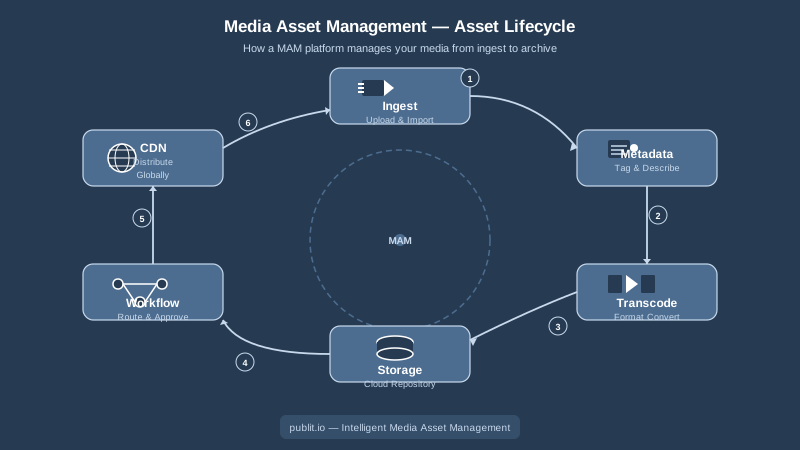
A Media Asset Management system is software built specifically around the lifecycle of rich media — primarily video and audio — from ingest and transcoding through editing, distribution, archiving, and eventually deletion or re-use. The word "asset" refers to any piece of media content that has business value: a raw camera file, a finished broadcast segment, a podcast episode, a product demo video, or an animated advertisement.
MAM platforms are distinguished from generic file storage by several key capabilities:
- Rich metadata management — tagging assets with descriptive, technical, and rights metadata so they can be searched and retrieved instantly.
- Format handling and transcoding — ingesting source files in many formats and converting them into the derivatives needed for web, mobile, broadcast, or archival use.
- Workflow automation — routing assets through approval, editing, or publishing steps without manual handoffs.
- Access control — ensuring that only authorised users or systems can view, download, or modify specific assets.
- Distribution — pushing finished content to delivery endpoints like CDNs, streaming platforms, or partner portals.
In short, a MAM is the operational backbone for any organisation that treats video and audio as core business assets.
MAM vs DAM: Understanding the Difference
One of the most common points of confusion in this space is the relationship between a MAM and a Digital Asset Management (DAM) system. Both manage assets, both use metadata, and many modern platforms offer features from both worlds. So what actually separates them?
What a DAM Focuses On
A Digital Asset Management system is typically broader in scope, covering all types of digital files: images, PDFs, presentations, brand guidelines, logos, and marketing collateral, as well as video and audio. DAMs excel at brand management, rights tracking for static assets, and enabling creative and marketing teams to find and reuse approved content quickly. If you need to manage thousands of product images and brand documents, a DAM is your primary tool. Publitio offers a comprehensive Digital Asset Management solution that handles exactly this kind of broad file library alongside richer media types.
What a MAM Focuses On
A MAM, by contrast, goes deep into the specific technical demands of video and audio. It understands frame rates, codecs, bitrates, audio channels, timecodes, and broadcast specifications in a way that general DAMs typically do not. MAMs also tend to be more tightly integrated with production tools — video editing software, playout servers, transcoding engines, and streaming infrastructure. Where a DAM might store a finished MP4, a MAM might manage every version of that file from the raw 4K camera original through multiple proxy formats, the edited master, the broadcast-ready mezzanine, and the web-optimised delivery copies, all with frame-accurate metadata linking them together.
When You Need Both
Many organisations need both capabilities, and modern cloud platforms have responded by converging the two. A media company might use a MAM for its production pipeline and a DAM for its marketing team, or it might use a single unified platform that handles all asset types. The important thing is matching the tool to the workflow rather than the label.
Key Components of a Media Asset Management System
To fully answer the question of what is a MAM, it helps to look at the functional building blocks that make up a mature platform.
Ingest and Transcoding
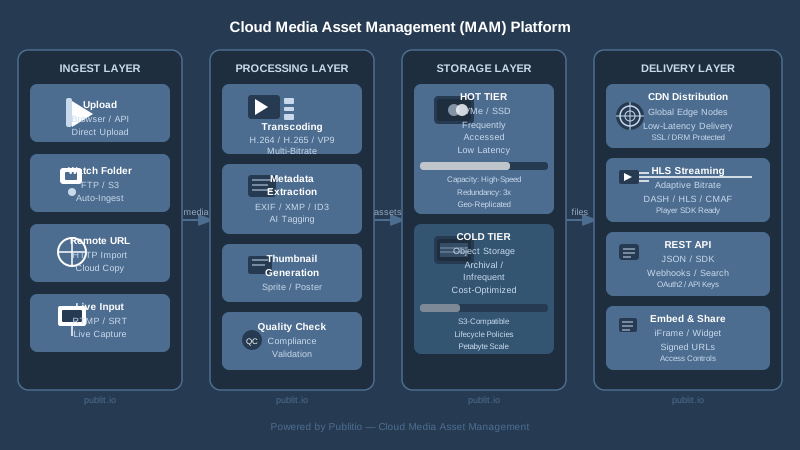
Every MAM starts with getting content in. Ingest can be manual (drag-and-drop upload), automated (watch folders, API push), or triggered by connected cameras or editing systems. Once a file arrives, the MAM typically triggers transcoding — converting the source file into the formats and resolutions needed downstream. Modern MAM platforms often use GPU-accelerated transcoding to handle high-volume or high-resolution content quickly. Publitio, for example, leverages GPU video conversion to dramatically reduce processing times for large video libraries.
Metadata and Search
Metadata is what transforms a folder full of files into a searchable, manageable library. A MAM captures both technical metadata (codec, resolution, duration, frame rate, file size) automatically on ingest, and allows teams to add descriptive metadata (title, description, tags, subject, talent featured, location, campaign) manually or through AI-assisted tagging. Strong metadata schemas are what allow a team of fifty people to find a specific two-minute interview clip across a library of ten thousand hours of footage in under thirty seconds.
Storage and Version Control
A MAM manages not just files but versions — the original, the edit, the colour-graded version, the subtitled version for each language market. Version control ensures that teams always know which file is the approved master and prevents the classic problem of someone distributing an outdated or unapproved cut. Storage is typically tiered, with hot storage for actively used assets and cold or archive storage for older content that is retained for rights purposes but rarely accessed.
Workflow and Collaboration
MAMs automate the handoffs between stages of production. A clip can move automatically from "ingested" to "under review" to "approved for distribution" based on user actions, triggering notifications or downstream processing at each step. This dramatically reduces the email chains, spreadsheet trackers, and manual chasing that plague unmanaged media workflows.
Distribution and Streaming
Once content is ready, the MAM handles getting it to audiences. For video-centric organisations, this means integration with video hosting and streaming infrastructure. Publitio's platform connects MAM capabilities directly to HLS streaming, ensuring that managed video assets can be delivered with adaptive bitrate streaming for reliable playback across devices and network conditions. For broader content delivery, CDN integration ensures low-latency global delivery.
Access Control and Rights Management
A MAM enforces who can see, download, edit, or share each asset. Role-based permissions protect sensitive or embargoed content, while rights metadata flags assets whose licences have expired or are restricted to specific territories. For video content that requires additional protection, Digital Rights Management (DRM) capabilities can encrypt streams so that content cannot be copied or redistributed outside authorised channels.
Who Uses a MAM and Why?
Understanding what is a MAM also means understanding the industries and teams that depend on it most. While any organisation with a significant video library can benefit, MAMs are particularly critical in the following contexts.
Broadcasters and Media Companies
Traditional and digital broadcasters manage enormous catalogues of programme content, news footage, sports clips, and archival material. A MAM lets them ingest footage from multiple sources, manage complex rights windows, prepare multiple delivery formats for different broadcast standards, and archive everything with the metadata needed to retrieve it years later.
Streaming Platforms and VoD Services
Video-on-demand platforms need to manage thousands of titles across multiple formats, resolutions, and language variants. A MAM integrated with video-on-demand delivery infrastructure allows them to automate the transcoding and publishing pipeline so that new content can go from upload to live audience with minimal manual intervention.
Corporate and Enterprise Video Teams
Enterprise organisations produce internal training videos, executive communications, marketing content, product demonstrations, and event recordings. Without a MAM, this content ends up scattered across shared drives, email attachments, and personal folders. A centralised MAM gives the entire organisation a single place to find approved content and ensures that outdated videos are retired and replaced.
Sports Organisations
Sports rights holders, clubs, and leagues generate massive volumes of footage: live match recordings, highlights, training sessions, behind-the-scenes content, and historical archives. A MAM with timecode-accurate logging allows them to clip, repurpose, and distribute highlights at speed, which is essential in a 24-hour social media news cycle.
Developers and API-First Teams
Modern MAMs are not just GUI tools for operators; they are API-first platforms that developers integrate directly into applications, CMS platforms, and custom workflows. Publitio's Video API gives developers programmatic access to upload, transcode, manage, and deliver video assets, making it straightforward to embed MAM capabilities into any application without building storage and processing infrastructure from scratch. Full API documentation is available at Publitio Docs.
Cloud MAM vs On-Premise MAM
Historically, MAM systems were large, expensive, on-premise installations — custom hardware, proprietary software, and specialist integrators required. That model still exists for certain broadcast environments, but the majority of new MAM deployments today are cloud-based, and for good reason.
Advantages of Cloud MAM
- Scalability — storage and processing capacity can expand instantly without hardware procurement.
- Accessibility — remote teams around the world can access the same library with nothing more than a browser or API credentials.
- Lower upfront cost — subscription pricing replaces large capital expenditure, and maintenance is handled by the platform provider.
- Faster innovation — cloud platforms can ship new features — AI tagging, new codec support, additional streaming protocols — without on-site software upgrades.
- Reliability — reputable cloud providers offer SLAs with high uptime guarantees and built-in redundancy.
For organisations already using WordPress to publish content, the transition to cloud media management can be even more seamless. Publitio's WordPress media offloading plugin automatically stores media uploads in the cloud rather than on the web server, reducing hosting costs and improving site performance while keeping content accessible through the same MAM infrastructure.
What Is a MAM in Practice? A Typical Workflow Example
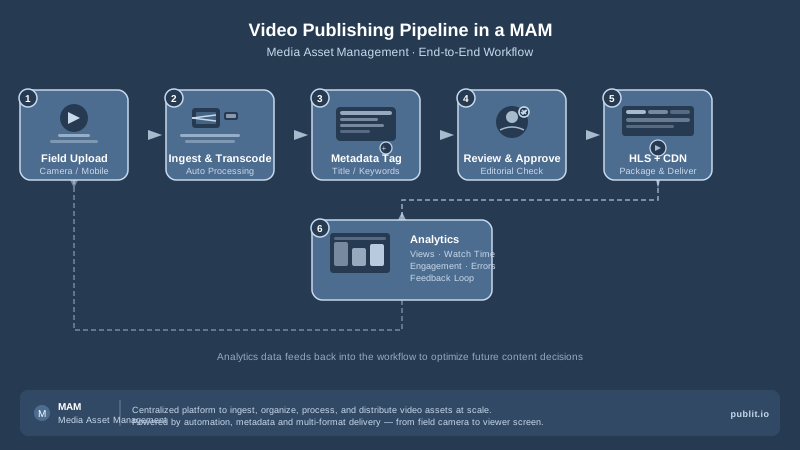
To make the concept concrete, here is how a typical MAM workflow might look for a digital media publisher.
A field journalist uploads a raw 4K interview recording via a mobile upload app. The MAM ingests the file, automatically extracts technical metadata, and triggers GPU-accelerated transcoding to create a high-resolution edit proxy and several web-delivery versions. The journalist adds descriptive metadata — interviewee name, topic, location, date — and submits the clip for editorial review. The editor receives a notification, previews the proxy, makes notes, and approves the clip. The MAM automatically packages the approved version for HLS adaptive streaming, applies a watermark for internal review copies, and publishes the final cut to the audience-facing video player via CDN. Throughout the process, analytics track views, engagement, and delivery performance, feeding data back into the MAM so the team understands which content is performing well.
Every step in that workflow is automated, audited, and searchable. Nothing lives in someone's Dropbox folder or gets lost in a reply-all email chain.
Choosing the Right MAM for Your Needs
With a clearer picture of what is a MAM and how it works, the question becomes: what should you look for when evaluating platforms?
Scalability and Storage
Ensure the platform can grow with your library. Look for flexible storage tiers, transparent pricing, and the ability to handle peak ingest volumes without performance degradation. Publitio's pricing page outlines scalable plans suited to different library sizes and usage levels.
Video Processing Capabilities
Evaluate the transcoding engine. Does it support the codecs and container formats you work with? Does it handle 4K and HDR? Is processing fast enough for your publishing cadence? Publitio's video processing capabilities cover a wide range of formats and resolutions with automated pipeline configuration.
Integration and API Quality
A MAM should fit into your existing stack, not force you to rebuild around it. Look for well-documented APIs, webhooks, and pre-built integrations with the tools your team already uses — editing software, CMS platforms, analytics tools, and distribution channels.
Security and Rights Management
Especially if your content has commercial value, verify that the platform supports robust access controls, encryption at rest and in transit, token-based URL signing, and optional DRM for high-value streams.
Audio and Image Management
Consider whether you also need to manage supporting asset types. Publitio covers not just video but also audio management and image management, making it a genuinely unified media platform rather than a single-format solution.
The Future of Media Asset Management
MAM technology continues to evolve rapidly. AI-driven auto-tagging can analyse video content and generate metadata automatically — identifying faces, objects, speech, and even sentiment without human intervention. Cloud-native architectures are enabling real-time collaborative editing directly within the MAM. And the convergence of MAM and DAM functionality means that organisations are increasingly looking for a single platform that handles everything from a raw camera file to a finished social media image, all with shared metadata, consistent permissions, and one billing relationship.
The organisations that invest in robust media asset management today are the ones that will be able to scale their content operations tomorrow — publishing faster, repurposing more efficiently, and protecting their media assets more effectively than competitors still relying on folders and spreadsheets.
Get Started with Publitio
Whether you are a broadcaster managing thousands of hours of archive footage, a developer building a streaming application, or a marketing team drowning in video files, Publitio gives you a powerful, API-first media asset management platform built for the modern cloud. From GPU-accelerated transcoding and HLS streaming to DRM protection, CDN delivery, and a comprehensive file management API, everything you need to run a professional media operation is available in one place. Sign up at publit.io today and take the first step toward a smarter, faster, and more organised media workflow — your future self will thank you.


