

WP Offload Media: Best Plugins to Offload WordPress Media in 2026
If your WordPress site is growing fast, you've probably noticed that media files — images, videos, PDFs, and other assets — can quickly become a performance bottleneck. That's where WP offload media solutions come in. By moving your media library off your web server and onto a dedicated cloud storage or CDN provider, you reduce server load, improve page speed, and gain far greater control over how your files are delivered to end users. In this guide, we'll cover the best plugins and platforms available in 2025 to help you offload WordPress media efficiently — including why Publitio is quickly becoming the go-to choice for developers and growing businesses alike.
Why You Should Offload WordPress Media
WordPress stores all uploaded media in the wp-content/uploads directory by default. While this works for small sites, it creates serious problems at scale:
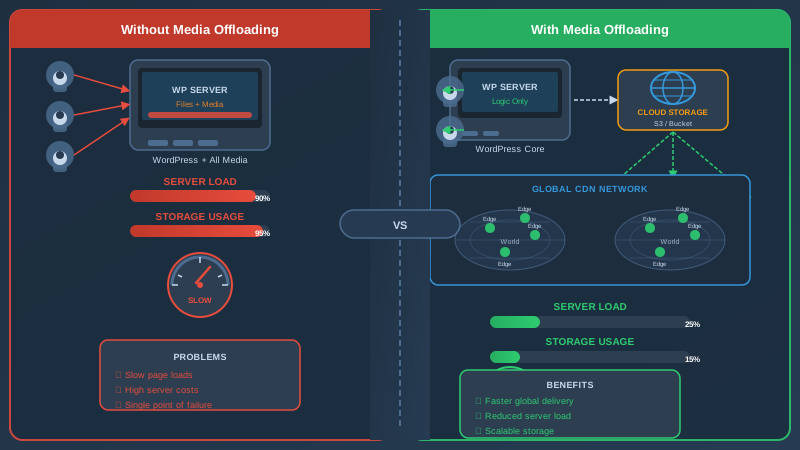
- Slow load times: Serving large files directly from your web server consumes bandwidth and processing power, hurting Time to First Byte (TTFB) and Core Web Vitals scores.
- Hosting costs: Most managed WordPress hosts charge extra for storage overages or throttle performance once disk usage climbs.
- No CDN delivery: Without a content delivery network, users far from your server experience noticeably slower load times.
- Backup complexity: Huge media libraries make backups slower, larger, and more expensive.
- Limited media management: WordPress's native media library has almost no asset organization, transformation, or DRM capabilities.
Offloading media to a cloud platform solves all of these issues at once. Your server stays lean, your files are served over a global CDN, and you unlock advanced capabilities like on-the-fly image resizing, video streaming, and access control.
What to Look for in a WP Offload Media Plugin
Not all offload plugins are created equal. Before choosing a solution, consider these key criteria:
Cloud Storage and CDN Integration
The plugin should connect to a reliable cloud storage backend and ideally deliver assets through a CDN for global low-latency delivery. Some plugins only integrate with a single provider (e.g., Amazon S3), while others support multiple backends or come with their own built-in CDN.
Video Hosting and Streaming Support
If your site includes video content, basic file offloading is not enough. You need a platform that supports video hosting and adaptive bitrate streaming (HLS) so videos load fast and play smoothly on any device. Bonus points for built-in video-on-demand (VoD) and DRM protection.
Image Optimization and Transformation
Look for platforms that can resize, compress, convert, or watermark images dynamically via URL parameters. This eliminates the need for additional image optimization plugins and reduces total page weight significantly.
Developer-Friendly API
For custom workflows, an API-first platform makes integration seamless. Whether you're building headless WordPress setups, custom upload flows, or automated pipelines, a robust REST API is essential.
Access Control and DRM
For premium content sites, the ability to restrict access to media files — via token-based URLs, signed links, or full DRM encryption — is critical. Without this, your paid content can be easily hotlinked or downloaded.
The Best WP Offload Media Plugins in 2025
1. Publitio — Best All-in-One WP Offload Media Solution
Publitio is a cloud-based media management platform that combines digital asset management, video hosting, CDN delivery, and a powerful API into a single solution. Its WordPress plugin offloads your entire media library automatically, replacing local file URLs with CDN-delivered cloud URLs — with zero manual effort required.
What sets Publitio apart from simple S3-based offload plugins is the depth of features you get out of the box:
- Automatic media offload: Install the plugin, connect your Publitio account, and every new upload is automatically sent to the cloud. Existing media can be bulk migrated in minutes.
- Global CDN delivery: All files are served from Publitio's CDN network, dramatically reducing load times for international audiences.
- On-the-fly image transformations: Resize, crop, convert to WebP, or apply watermarks by simply modifying the image URL. No Photoshop, no extra plugins.
- HLS video streaming: Videos are automatically transcoded and delivered via adaptive HLS streaming, ensuring smooth playback on any connection speed or device.
- DRM and video encryption: Protect premium video content with AES encryption and DRM, preventing unauthorized downloads or hotlinking. Learn more on the DRM solutions page.
- Digital Asset Management: Organize all your media with tags, folders, collections, and custom metadata through a clean DAM interface.
- API-first architecture: Full-featured REST API for developers who want to build custom integrations, automate uploads, or integrate media delivery into their own applications.
Publitio is ideal for content-heavy WordPress sites, media companies, e-learning platforms, and any team that needs more than simple file storage. Check the full features list or review pricing plans to find the right tier for your needs.
2. WP Offload Media Lite (Delicious Brains)
WP Offload Media Lite is one of the most popular free plugins in the WordPress repository for offloading files to Amazon S3, DigitalOcean Spaces, or Google Cloud Storage. It's a solid foundational tool that automatically copies uploaded files to cloud storage and rewrites URLs to serve assets directly from the bucket.
Pros: Free tier available, well-maintained, large community, easy to configure for S3.
Cons: No built-in CDN (you'll need to configure CloudFront separately), no video transcoding, no DRM, limited asset management features. The paid version adds more functionality but can become costly as your media library grows.
Best for: Developers who are already deeply invested in the AWS ecosystem and need a reliable S3 offload with minimal overhead.
3. Cloudinary
Cloudinary is a well-known media management platform with a WordPress plugin that offloads images and videos to Cloudinary's infrastructure. It offers powerful image and video transformation capabilities, making it a strong option for sites with heavy visual content.
Pros: Excellent image transformation features, video support, good documentation, large enterprise customer base.
Cons: Pricing can escalate quickly as bandwidth and transformation credits are consumed. The free tier is quite limited for production use, and the platform is significantly more expensive than alternatives like Publitio at equivalent usage levels. DRM support is only available on enterprise plans.
Best for: Larger organizations with a significant budget that need enterprise-grade image transformation at scale.
4. Bunny.net CDN Offload
Bunny.net offers a WordPress plugin that pushes media to Bunny's CDN storage zones, providing fast global delivery at a low per-GB cost. It's primarily a CDN-focused solution rather than a full media management platform.
Pros: Very affordable bandwidth pricing, fast CDN, simple setup.
Cons: No native image transformations, no video transcoding or streaming, no DAM features, minimal asset organization. You'll need to combine it with other plugins for any advanced media management.
Best for: Budget-conscious site owners who need basic CDN offloading without advanced media management requirements.
5. ShortPixel Adaptive Images
ShortPixel focuses specifically on image optimization and delivery. Its WordPress plugin can serve optimized, correctly-sized images from ShortPixel's CDN, compressing and converting them to next-gen formats like WebP and AVIF automatically.
Pros: Excellent compression, supports WebP/AVIF, easy to set up, reasonable pricing for image-heavy sites.
Cons: Image-only solution — no video hosting, no file management, no DAM or API for other media types. For comprehensive media offloading, you'll still need additional plugins.
Best for: Blogs and ecommerce sites that primarily need image optimization rather than full media library offloading.
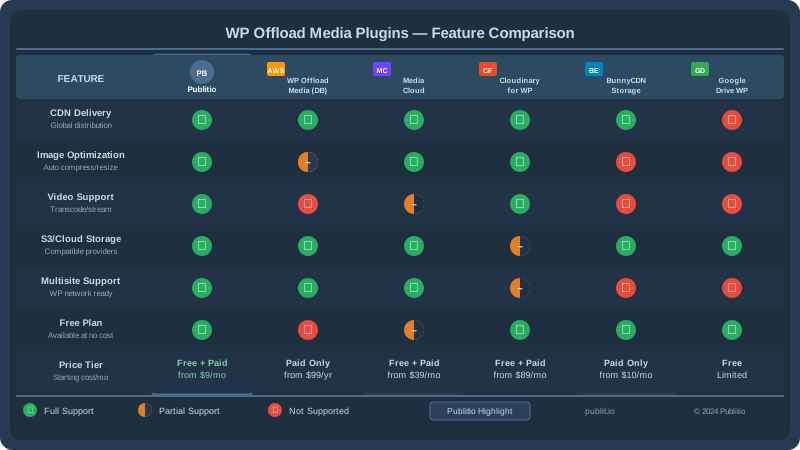
Comparing WP Offload Media Solutions: Feature Matrix
| Feature | Publitio | WP Offload Media Lite | Cloudinary | Bunny.net | ShortPixel |
|---|---|---|---|---|---|
| Automatic media offload | ✅ | ✅ | ✅ | ✅ | ⚠️ Images only |
| CDN delivery | ✅ Built-in | ⚠️ Via CloudFront | ✅ | ✅ | ✅ |
| Image transformations | ✅ | ❌ | ✅ | ❌ | ✅ |
| Video hosting & HLS streaming | ✅ | ❌ | ✅ | ❌ | ❌ |
| DRM / Video encryption | ✅ | ❌ | ⚠️ Enterprise only | ❌ | ❌ |
| Digital Asset Management | ✅ | ❌ | ⚠️ Limited | ❌ | ❌ |
| REST API | ✅ Full API | ❌ | ✅ | ⚠️ Basic | ❌ |
| Pricing model | Flexible plans | Free + Paid | Credit-based | Pay-per-GB | Credit-based |
How to Offload WordPress Media with Publitio
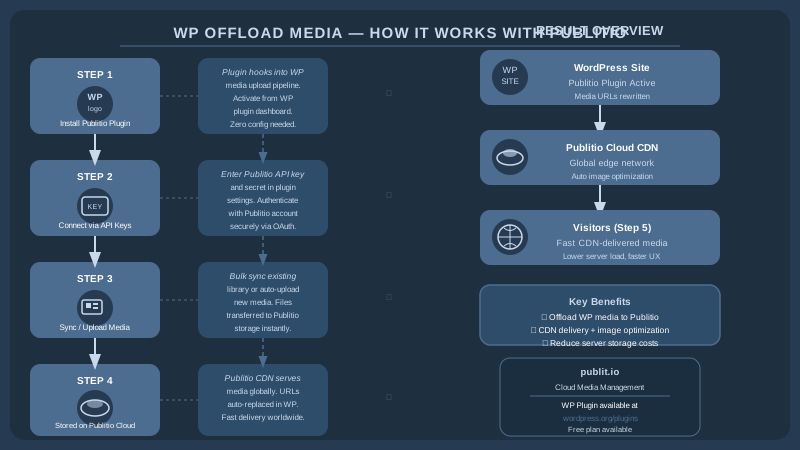
Getting started with Publitio's WP offload media plugin takes only a few minutes. Here's how the process works:
Step 1: Create a Publitio Account
Sign up at publit.io and choose a plan that fits your storage and bandwidth needs. A free trial is available to let you test all features before committing.
Step 2: Install the WordPress Plugin
Search for "Publitio Offloading" in the WordPress plugin repository, install and activate it. Alternatively, download it directly from the documentation hub.
Step 3: Connect Your API Credentials
In the plugin settings, enter your Publitio API key and secret. These are available in your Publitio dashboard. Once connected, the plugin will verify the credentials automatically.
Step 4: Migrate Existing Media
Use the built-in bulk migration tool to move your existing WordPress media library to Publitio. The plugin rewrites all media URLs in your database so your posts and pages continue to display correctly — with no broken images or links.
Step 5: Configure Delivery Options
Choose your CDN delivery settings, enable automatic image format conversion (WebP), configure video player options, and set up access control rules if needed. Refer to the developer documentation for advanced configuration options.
Who Needs a WP Offload Media Solution?
Practically any WordPress site beyond a simple personal blog benefits from offloading media. But certain use cases make it especially valuable:
- News and media publishers uploading dozens of images and videos daily
- E-learning platforms hosting course videos and downloadable resources that need secure delivery
- E-commerce stores with large product image catalogs requiring fast load times and dynamic resizing
- Membership sites delivering premium content that must be protected against hotlinking and unauthorized sharing
- Agencies managing multiple WordPress sites who want a single media platform for all clients
- Developers building headless WordPress or hybrid setups who need an API-first media layer
For video-heavy platforms in particular, Publitio's video hosting infrastructure and HLS streaming capabilities go far beyond what any simple S3-offload plugin can offer.
Final Thoughts on Choosing the Right WP Offload Media Plugin
The right WP offload media plugin for your site depends entirely on your content type, traffic volume, and growth ambitions. If you're running a simple blog with mostly images, a lightweight CDN offload tool may be all you need. But if you're managing video content, building a content-rich platform, or need serious digital asset management alongside your WordPress site, you need a solution that grows with you.
Publitio is built precisely for that scenario — combining media offloading, CDN delivery, video hosting, DRM, and a full digital asset management system into a single platform with transparent pricing. It's the kind of infrastructure that previously required stitching together five different services, now available in one.
Ready to take your WordPress media management to the next level? Sign up at publit.io today and start offloading your WordPress media in minutes. Explore all platform features, review pricing options, or dive straight into the documentation to see just how easy it is to get started. Your server — and your visitors — will thank you.


