

Watermark Image API: How to Protect and Brand Your Media at Scale
Whether you're a media company distributing licensed photography, an e-commerce platform showcasing product images, or a SaaS developer building a content-heavy application, protecting your visual assets is non-negotiable. A watermark image API gives you the programmatic power to overlay branding, ownership marks, or copyright notices onto images automatically — without touching a single file manually. In this guide, we'll explore why watermarking at scale matters, how a robust API approach works, and how Publitio's platform makes the entire process seamless for developers and media teams alike.
Why Watermarking Images Manually Doesn't Scale
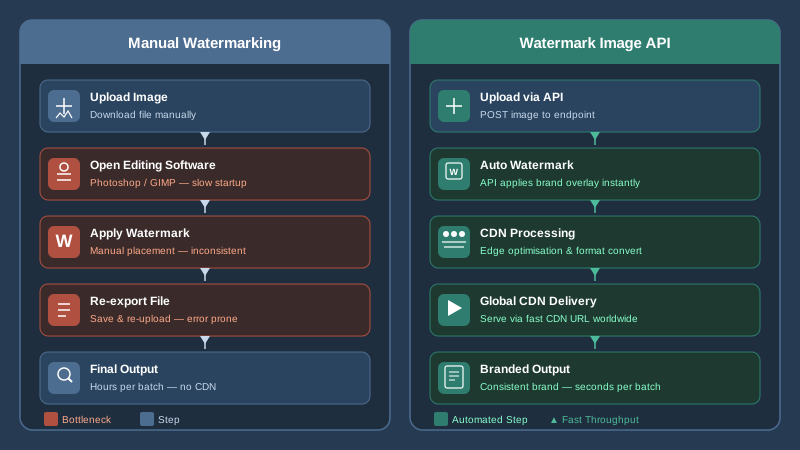
Think about a marketplace that onboards hundreds of new product images every day, or a stock photography platform distributing thousands of licensed assets per week. Manually applying watermarks in Photoshop or any desktop tool quickly becomes an operational bottleneck. Teams get overwhelmed, branding becomes inconsistent, and the risk of accidentally distributing unprotected assets skyrockets.
Manual workflows also introduce version-control headaches. Which version of the logo was used? At what opacity? Centered or offset? These questions compound over time and erode the consistency that serious brands depend on. The answer isn't better-trained staff — it's automation through a watermark image API that enforces your rules programmatically, every single time.
Beyond operational efficiency, there's a rights-management dimension. Images without watermarks are trivially easy to screenshot, download, and redistribute without attribution. A visible or semi-transparent watermark creates a meaningful deterrent and provides a paper trail of ownership — especially critical for news agencies, creative agencies, and independent photographers licensing their work online.
What a Watermark Image API Actually Does
At its core, a watermark image API accepts an image input — either a URL or a direct upload — applies one or more overlay layers (logos, text, or semi-transparent images), and returns the composited result. The best APIs don't just slap a logo on a corner; they give you fine-grained control over every dimension of that overlay.
Key Parameters You Should Expect
- Position: Absolute pixel coordinates or relative anchors (top-left, center, bottom-right, etc.)
- Opacity: From 0 to 100, allowing ghost watermarks or fully opaque branding marks
- Scale: Watermark size as a percentage of the base image or in fixed pixels
- Offset: Fine-tuning distance from edges to avoid clipping or crowding
- Rotation: Diagonal watermarks are commonly used to make removal harder
- Repetition / Tiling: Filling the entire image canvas with repeated watermark instances
- Text watermarks: Dynamic insertion of text such as usernames, timestamps, or license IDs
Publitio's watermark feature delivers exactly this level of control. Watermarks are managed as named, reusable assets within your account. You define them once — uploading your logo, setting defaults for opacity and position — and then reference them by name in any API call or URL transformation. This reusability is a major efficiency win for teams managing multiple brands or campaigns simultaneously.
URL-Based vs. Request-Body-Based Watermarking
There are two common patterns for how watermark APIs are invoked. The first is URL-based transformation, where you append query parameters directly to an image URL to trigger on-the-fly processing. This approach integrates naturally into content delivery pipelines because the CDN can cache the transformed output. The second is a request-body approach where you POST an API call with a JSON payload describing the transformation, and receive a new URL or binary in response.
Publitio supports both paradigms. Developers can use URL parameters for lightweight, cacheable transformations served directly through the global CDN, while server-side applications can call the REST API when more complex or conditional logic is required. The result in both cases is a fully processed image stored and distributed from Publitio's infrastructure.
How the Publitio Watermark Image API Works in Practice
Getting started with watermarking on Publitio follows a clear, developer-friendly path. Here's how a typical integration flows:
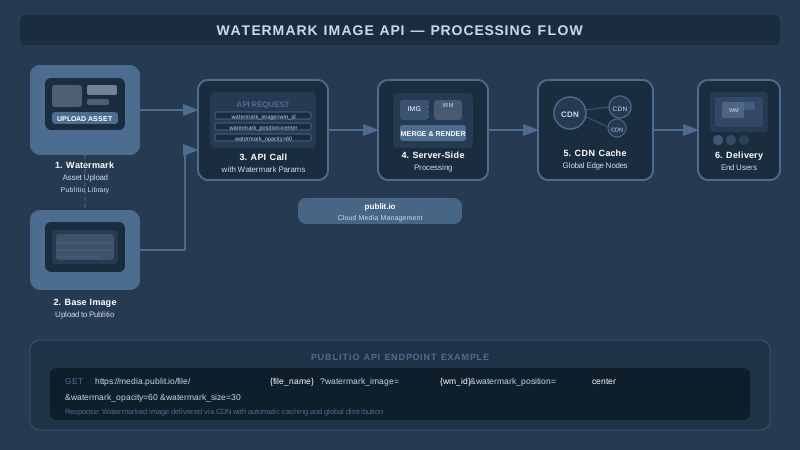
Step 1 — Upload Your Watermark Asset
First, you upload your watermark image (typically a transparent PNG of your logo or copyright badge) to your Publitio media library. This creates a reusable watermark object with a unique identifier. You configure defaults like opacity, position, and scale at this stage, though all of these can be overridden per-request.
Step 2 — Upload or Reference the Base Image
Next, you upload the image you want to protect, or reference an existing asset already in your image management library. Publitio supports JPEG, PNG, GIF, WebP, and many other formats.
Step 3 — Apply the Watermark via API or URL
With both assets in place, applying the watermark is a single API call or a URL parameter addition. A simplified example using URL-based transformation looks like this:
https://media.publit.io/file/your-image.jpg?wm=your-watermark-id&wm_position=bottom-right&wm_opacity=60The image is processed on the fly, the watermarked version is cached at the CDN edge, and subsequent requests for the same URL combination are served instantly from the nearest point of presence — giving you both protection and performance.
Step 4 — Deliver at Scale
Because watermarked images are served through Publitio's CDN infrastructure, there's no origin-server bottleneck regardless of traffic spikes. A product launch driving thousands of simultaneous image requests? No problem. Every user gets the branded, protected asset — fast.
Use Cases Where a Watermark Image API Delivers Real Business Value
Stock Photography and Media Licensing Platforms
Platforms selling or licensing imagery need to show high-quality previews without giving away the full asset for free. A watermark image API lets you serve watermarked previews automatically and switch to clean delivery only after a verified purchase — all through API logic and access controls.
E-Commerce and Product Catalogues
Retailers with thousands of SKUs can automatically brand every product image with their logo as it enters the catalog pipeline. No manual QA step, no inconsistent positioning — just a clean, branded gallery across every product page, every channel.
News Agencies and Photojournalism
News organizations distributing images to wire services or editorial clients need clear attribution visible in every asset. Dynamic text watermarks can embed photographer credit, agency name, and even usage restrictions directly into the visual — programmatically, at ingestion time.
User-Generated Content Platforms
Platforms where users upload their own photos — travel sites, community galleries, social apps — often want to brand all content with a platform watermark before featuring it publicly. API-driven watermarking ensures every piece of UGC is on-brand before it goes live, without requiring manual review of each image.
Educational and Subscription Platforms
Online learning platforms and subscription media services can use semi-transparent watermarks to personalize previews with the subscriber's username or account ID. This forensic watermarking approach discourages screen-capture piracy since the captured image can be traced back to the original account.
Watermark Image API and Digital Rights Management: A Powerful Combination
Watermarking is one layer of a broader content-protection strategy. For serious media operations, it works best alongside stronger digital rights management controls. While a visible watermark deters casual misuse and reinforces brand ownership, DRM-level protections — such as access-controlled delivery, signed URLs, and encrypted streaming — prevent unauthorized access at the infrastructure level.
Publitio supports both dimensions. You can apply a watermark to an image and simultaneously restrict its delivery via signed, time-limited URLs. This means even if someone attempts to hotlink or scrape your images, they'll receive either a blank response or an access-denied error — not the asset. Combined, watermarking plus delivery controls form a layered defense that suits commercial media operations of any size.
For video assets, the same philosophy extends to Publitio's HLS streaming with encryption capabilities, ensuring your video content receives the same level of protection as your images.
Integrating the Watermark Image API with Your Existing Stack
REST API and SDK Support
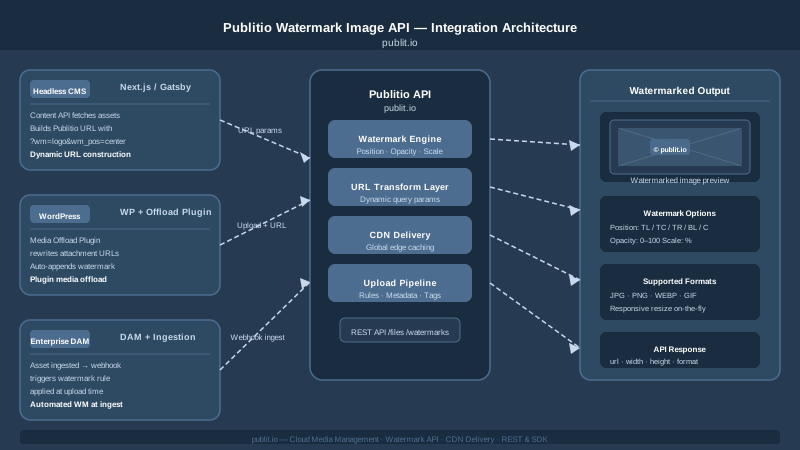
Publitio offers a fully documented REST API that any back-end language can consume — Python, Node.js, PHP, Ruby, Go, and beyond. The API documentation covers authentication, watermark management endpoints, image transformation parameters, and response formats in detail. Getting a proof-of-concept working typically takes less than an afternoon.
WordPress Integration
For teams running WordPress, Publitio's WordPress media offloading plugin brings API-driven media management — including watermarking — directly into the familiar WordPress dashboard. Images uploaded to the Media Library can be automatically offloaded to Publitio's CDN and served with watermarks applied, all without touching a line of code.
Headless and Jamstack Architectures
In headless CMS or Jamstack setups, image URLs are often constructed dynamically at build time or runtime. Publitio's URL-based transformation model fits naturally here — you construct the watermarked image URL as part of your data layer, and the CDN handles the rest. No additional build steps, no storing duplicate watermarked copies.
DAM Pipeline Integration
For enterprise teams managing large asset libraries, watermarking can be embedded into the digital asset management ingestion pipeline. When new assets are uploaded — whether via API, SFTP, or direct upload — a watermark transformation rule can be applied automatically, ensuring the protected version is always the one distributed to downstream systems.
Performance Considerations: Watermarking Without Slowing Down Your Site
A common concern when adding image processing to a delivery pipeline is latency. If every image request triggers a real-time compositing operation on your origin server, page load times suffer — and that hurts both user experience and SEO rankings.
Publitio's architecture handles this elegantly. Watermark processing happens once per unique transformation combination, and the result is cached at CDN edge nodes globally. Subsequent requests hit the cache, not the processing layer. This means the performance cost of watermarking is essentially a one-time operation per unique image-and-watermark combination — after which delivery is as fast as any standard static asset.
Additionally, Publitio applies intelligent image optimization alongside watermarking — outputting images in the optimal format and compression level for the requesting device. So your watermarked images aren't just protected; they're also fast and bandwidth-efficient. This integrates naturally with the broader media asset management workflow that Publitio provides across file types.
Choosing the Right Watermark Image API for Your Needs
Not all watermarking APIs are created equal. When evaluating options, look for these critical capabilities:
- Reusable watermark objects: Define once, apply everywhere — not a per-request upload every time
- CDN-backed delivery: Processing at origin with CDN caching, not reprocessing on every request
- Multiple overlay types: Image watermarks AND text watermarks, with dynamic content support
- Fine-grained positioning: Pixel-level control, percentage-based scaling, and multiple anchor points
- Format flexibility: Handles JPEG, PNG, WebP, GIF without separate configurations
- Integration breadth: REST API, CMS plugins, SDK libraries — not just a web UI
- Transparent pricing: Predictable costs as volume scales, without surprise overage fees
Publitio checks every one of these boxes, with transparent, usage-based pricing that grows with your needs rather than punishing you for success.
Beyond Images: A Full-Stack Media Platform
While the watermark image API is a powerful standalone capability, Publitio is designed as a complete media infrastructure platform. The same account that handles your image watermarking also manages your video processing, audio assets, file delivery, and analytics. Teams that start with image management often expand to use Publitio's video-on-demand capabilities as their content strategy grows — all under one API, one dashboard, and one billing relationship.
This consolidation matters operationally. Instead of stitching together multiple specialist vendors — one for images, one for video, one for CDN, one for DRM — your team works with a single, cohesive platform. Fewer integrations to maintain, fewer contracts to negotiate, fewer places where something can go wrong.
Start Protecting and Branding Your Images Today
If you're still watermarking images manually, or if you're evaluating API options for a new project, there's no better time to see what a purpose-built watermark image API can do for your workflow. Publitio offers a free tier that lets you explore the full watermarking feature set — no credit card required — so you can test the API, experiment with positioning and opacity settings, and validate the integration with your stack before committing to a paid plan.
Ready to automate image protection at scale? Sign up at publit.io and start watermarking your first images in minutes. Your brand and your assets deserve better than manual, inconsistent, error-prone processes — and with Publitio, the upgrade is just an API call away.